


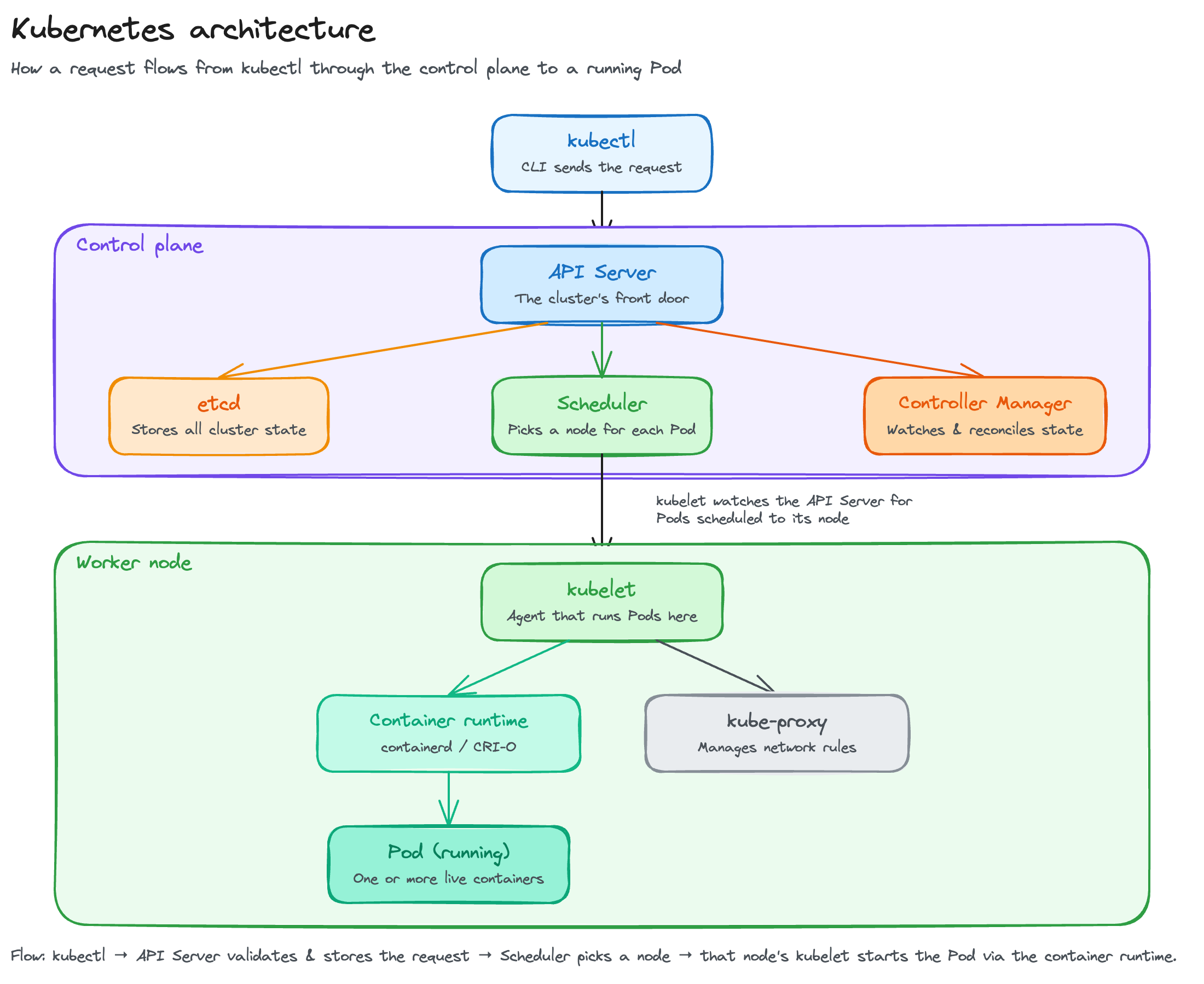
Kubernetes architecture splits a cluster into two layers: a control plane that makes decisions for the whole cluster, and worker nodes that actually run your containers.
If you've used Kubernetes, you already know it's a container orchestration platform, it deploys your applications, scales them, and replaces them automatically when something fails. What's less obvious is which components make those decisions and how they actually talk to each other.
This guide breaks down both layers, component by component, then traces exactly what happens inside the cluster when you deploy something.
Overview of Kubernetes as a container orchestration platform
Defining Kubernetes architecture
Kubernetes is a distributed system for running containerized applications, built around a declarative model.
You describe the state you want, for example, let's say you want three replicas of this container and this much memory. Then Kubernetes continuously works to make the cluster match that description, deploying, scaling, and healing without you issuing individual commands.
Architecturally, that splits into a control plane that makes decisions and a data plane, the worker nodes, that runs the actual workloads. Everything is designed around four goals: scalability, high availability, fault tolerance, and extensibility.
Structural layers and cluster design
A cluster is the foundational unit, one or more control-plane nodes managing one or more worker nodes, all coordinated through the API server rather than any component talking to another directly.
That API-first design is why scaling out is simple. When a new worker node registers itself with the API server, the scheduler sees the extra capacity, and Pods can start landing there, without reconfiguring the API server, etcd, or anything else in the control plane.
Control plane architecture and core components
Control plane overview
The control plane holds the cluster's state, decides where workloads run, and continuously reconciles reality against that state. For high availability, production clusters run multiple control-plane nodes, each with its own copy of the API server, scheduler, and controller manager, so no single node's failure takes the cluster down. Everything routes through one exposed interface, the API server's REST API.
API server (kube-apiserver)
The API server is the only control-plane component that talks directly to etcd, and every other component, kubectl, the scheduler, the kubelet on every node, reaches the cluster's state exclusively through it. Every request runs through the same lifecycle:
- Authentication confirms who's making the request
- Authorization checks whether they're allowed to do it
- Admission control runs policy checks and can mutate or reject the request
- Validation confirms the object itself is well-formed before it's persisted
The API server itself is stateless, since all cluster state lives in etcd, which is what lets it scale horizontally. Production clusters run several instances behind a load balancer for both HA and request volume.
etcd: The distributed key-value store
etcd is where the API server persists everything, every Pod spec, every Service, every Secret, as key-value pairs, making it the cluster's single source of truth. It stays consistent across multiple nodes using the Raft consensus algorithm, which requires an odd number of members (3, 5, or 7) so the cluster can always agree on a majority.
Losing etcd without a backup means losing the cluster's entire state, which is why backup and restore procedures matter as much as etcd's uptime.
Scheduler (kube-scheduler)
The scheduler watches the API server for Pods that don't have a node assigned yet, then picks one for each, in two phases:
- Filtering removes any node that can't run the Pod at all, insufficient CPU or memory, a taint the Pod doesn't tolerate, a node selector that doesn't match
- Scoring ranks the nodes that pass filtering and picks the best fit, based on factors like resource balance, node affinity, and pod affinity or anti-affinity rules
The scheduling framework makes this pluggable, so custom schedulers can slot in at any phase, and in HA clusters, only one scheduler instance is active at a time through leader election.
Controller manager (kube-controller-manager)
The controller manager runs Kubernetes' core behavior. A set of controllers, each running its own reconciliation loop, watches one type of object, compares its actual state to its desired state, and acts on any difference.
A Deployment controller notices you want 3 replicas and only 2 exist, so it creates one. A Node controller notices a node stopped reporting and marks it unhealthy. That observe-compare-act cycle, repeated continuously across dozens of controllers (Node, ReplicaSet, Deployment, Endpoints, ServiceAccount, and more), is the mechanism behind everything Kubernetes calls "self-healing."
Cloud-provider-specific loops, provisioning a load balancer, attaching a disk, run in a separate component, the cloud-controller-manager, so the core controller manager stays cloud-agnostic.
Worker node architecture and components
Worker node overview
Worker nodes are where your containers actually run, these are physical machines or VMs that register themselves with the control plane and report their capacity. The control plane tracks each node's allocatable resources, CPU, memory, available Pod slots, and factors that into every scheduling decision. Node conditions (Ready, MemoryPressure, DiskPressure) feed back to the control plane continuously, which is what lets the scheduler and controllers react when a node degrades.
Kubelet
The kubelet is the agent running on every worker node, and it's the component actually responsible for making a Pod real. It receives PodSpecs (Pod specifications, the YAML or JSON that defines a Pod's containers, images, and resource requirements) from the API server, starts the containers a runtime needs to run, and continuously checks them against liveness and readiness probes, restarting anything that fails. It also reports node-level resource usage back to the control plane. A few Pods, usually control-plane components on smaller clusters, run as static Pods, defined directly on the node rather than through the API server.
Container runtime and the Container Runtime Interface (CRI)
The kubelet doesn't run containers itself, it delegates to a container runtime through the Container Runtime Interface (CRI), a plugin API that decouples the kubelet from any specific runtime implementation. containerd and CRI-O are the two runtimes in common use today.
Kube-proxy and node networking
Kube-proxy runs on every node and maintains the network rules that route traffic addressed to a Service to one of its backing Pods, by watching the API server for Service and EndpointSlice changes and updating those rules continuously.
A 2026 currency note: nftables mode went stable in Kubernetes v1.33 and fixes long-standing performance problems the older iptables mode has at scale, though iptables remains the upstream default for now. IPVS mode, by contrast, was deprecated in v1.35 and shouldn't be used for new clusters. Some CNIs, Cilium in particular, go a step further and replace kube-proxy entirely with eBPF, handling the same routing job without iptables or nftables rules at all.
Pods as the atomic unit of the data plane
A Pod is the smallest deployable unit in Kubernetes, one or more containers that share a network namespace, an IP address, and optionally storage volumes. Init containers run and complete before the main containers start, handling setup work.
A 2026 currency note: native sidecar containers went stable in v1.33. A native sidecar is just an init container with restartPolicy: Always, which sounds like a small detail but fixes a real problem, the older pattern (a sidecar declared as a plain container) had no guaranteed startup order and never terminated cleanly in Jobs. A Pod moves through defined lifecycle phases, Pending, Running, Succeeded, Failed, Unknown, and higher-level objects like ReplicaSets and Deployments manage Pods rather than replacing this lifecycle.
Advanced architectural concepts and extensibility
ReplicaSets and Deployments as orchestration abstractions
A ReplicaSet's reconciliation loop keeps a set number of identical Pods running. A Deployment sits a layer above it, managing ReplicaSets on your behalf so you can describe a rolling update or a rollback declaratively instead of managing ReplicaSets by hand.
Networking architecture
Every Pod gets its own IP, and every Pod can reach every other Pod without network address translation, a flat model that CNI plugins are responsible for actually implementing. CoreDNS handles service discovery, Services (ClusterIP, NodePort, LoadBalancer) provide stable addressing in front of Pods that come and go, and NetworkPolicies control which Pods can talk to which.
A 2026 currency note: Ingress has a real successor now. The Gateway API is the upstream-recommended path forward, and the Ingress-NGINX project itself was retired and archived in March 2026. The Ingress API isn't gone. Existing Ingress objects still work, and it's feature-frozen rather than deleted, but new development is happening on Gateway API, which separates infrastructure configuration from application routing more cleanly than Ingress ever did.
Storage architecture
PersistentVolumes and PersistentVolumeClaims decouple a Pod's storage request from the actual disk backing it, provisioned dynamically through StorageClasses and the Container Storage Interface (CSI), the storage equivalent of CRI. The kubelet handles mounting a volume onto the node once the CSI driver has provisioned it. StatefulSets depend on this stable, persistent storage specifically, since a stateful workload needs the same volume to follow the same Pod identity across restarts.
High availability and scalability in Kubernetes architecture
Production clusters run multiple control-plane nodes, with redundant API servers behind a load balancer and leader election so exactly one scheduler and one controller manager are active at a time.
etcd needs an odd-numbered quorum, 3 or 5 members, to tolerate node loss without losing consensus. On the workload side, the Horizontal Pod Autoscaler and Cluster Autoscaler handle scaling Pods and nodes respectively as demand changes.
Running all of that yourself, the multi-master setup, etcd backups, leader election, control-plane upgrades, is a real operational commitment. Managed Kubernetes platforms take it off your plate entirely. Rackspace Spot, for example, includes a fully managed, free control plane, so most teams running on it never touch this layer at all.
Add-ons and extensibility architecture
Cluster add-ons extend core Kubernetes without changing it. CoreDNS for DNS, metrics-server for resource metrics, and a monitoring stack are close to universal. Beyond add-ons, Kubernetes exposes real extension points:
- CustomResourceDefinitions (CRDs) let you define your own object types
- Admission webhooks intercept requests before they're persisted
- The aggregation layer lets a custom API server extend the main one
The Operator pattern combines a CRD with a controller to encode operational knowledge, like how to back up a specific database, directly into the cluster.
Why choose Rackspace Spot for Kubernetes?
Rackspace Spot offers Kubernetes clusters for as little as $0.72 a month. Here's a breakdown of the features you get on the platform:
- Fully managed Kubernetes Cloudspaces with a built-in autoscaler, with Calico and Cilium available as CNI options
- Open-market auction pricing, with bids starting at $0.001/hr for a server, about $0.72/month, and prices set by real supply and demand, plus a free, fully managed control plane on every cluster
- Rackspace Spot's DBaaS product for teams that need managed PostgreSQL running alongside their cluster
- Terraform provider support, alongside the spotctl CLI, for managing cloudspaces as code across dev, staging, and production
- Persistent Volumes across SATA, SSD, and NVMe storage classes, starting at $0.02/GB-month
- Load balancers at a flat $10/month with no per-traffic charges
One limitation applies here: DBaaS currently supports only managed PostgreSQL, while AWS, GCP, and Azure each offer a broader range of database engines. Teams already standardized on PostgreSQL won't notice; a team running MySQL or a document store has to run that database outside the platform.
Get started with Rackspace Spot and deploy a cluster with the components covered in this guide.
Frequently asked questions
What is the architecture of Kubernetes?
Kubernetes architecture splits into a control plane, the API server, etcd, scheduler, and controller manager, that makes decisions, and worker nodes that actually run your containers. The two communicate exclusively through the API server, and the control plane continuously reconciles the cluster's actual state against the state you've declared.
What are the main components of Kubernetes architecture?
On the control plane: the API server, etcd, the scheduler, and the controller manager. On each worker node: the kubelet, a container runtime (containerd or CRI-O), and kube-proxy. Pods are the unit that actually runs on top of all of it.
What's the difference between the control plane and worker nodes?
The control plane decides, scheduling Pods, detecting failures, enforcing desired state. Worker nodes execute, actually running the containers the control plane has scheduled onto them. Every worker node also runs its own kubelet, which reports back to the control plane and carries out its instructions locally.
Is the master node the same as the control plane?
Yes. "Master node" is the older term, replaced in Kubernetes terminology by "control-plane node." Both describe the same set of components, the API server, etcd, scheduler, and controller manager, whether they're referred to by the old name or the current one.
What happens when you deploy a pod?
Running kubectl apply on a Deployment sends the request to the API server, which authenticates it, authorizes it, runs it through admission control, and writes it to etcd. The controller manager's Deployment controller notices the new desired state and creates a ReplicaSet, which creates Pod objects. The scheduler assigns each unscheduled Pod to a node. The kubelet on that node picks it up, and the container runtime pulls the image and starts the containers through CRI.