


Standing up a Kubernetes cluster is the easy part. Keeping a fleet of them healthy, secure, cost-efficient, and current for the next two years is where most teams actually struggle.
Kubernetes management is that ongoing work, the Day-2 operations that start the moment a cluster goes live: deploying and scaling workloads, watching cluster health, enforcing security policy, and keeping cloud spend under control. Kubernetes itself orchestrates containers. Management is how a team actually operates that orchestration day after day, whether that's one cluster or a hundred.
This guide covers the four core tasks that make up Kubernetes management, the tools that handle each one, the multi-cluster reality teams are dealing with in 2026, and how to decide how much of it to run yourself.
What is Kubernetes management?
Kubernetes management is the practice of deploying, scaling, securing, and maintaining Kubernetes clusters after they're running, the day-to-day work of keeping app health, cloud spend, rollouts, and configuration under control across cloud and on-premises environments.
Kubernetes management is a different job than orchestration. Kubernetes itself schedules containers, restarts what crashes, and reconciles actual state against desired state automatically. Management is the layer of tooling and process a team builds on top of that. It decides what gets deployed, watches whether it's healthy, enforces who can touch what, and controls what it all costs. The Introduction to Kubernetes architecture guide covers how the orchestration layer itself works.
The scope ranges from a single cluster a small team runs by hand to a fleet of dozens spanning regions, clouds, and edge locations, all needing the same four things done consistently.
Most teams get Day-1 right. A cluster stands up, workloads deploy, and everything works in the demo. Six months later, a certificate expires unnoticed, a node pool runs hot because nobody set resource limits, or three clusters have quietly drifted into three different configurations. Kubernetes management exists specifically to catch problems like that before they become an outage.
The core tasks of Kubernetes management
Those four things are deployment and scaling, observability, security and governance, and resource optimization and cost. Every real Kubernetes management practice comes down to these, whether it's running on one cluster or a hundred.
- Deployment and scaling covers rolling out updates without breaking production and adjusting replica counts as load changes, using Deployments, the Horizontal and Vertical Pod Autoscalers, and controlled rollouts and rollbacks
- Observability covers tracking cluster health, metrics, logs, and network telemetry well enough to catch a problem before a user does, typically through Prometheus, Grafana, and OpenTelemetry
- Security and governance covers enforcing RBAC, network policies, and policy-as-code through tools like OPA/Gatekeeper, plus keeping certificates and credentials current across every cluster
- Resource optimization and cost covers setting requests and limits so workloads don't starve each other, then watching what all of it actually costs. The Kubernetes resource optimization guide covers the mechanics
None of these four are hard in isolation. What makes them hard is doing all four continuously, across every cluster a team runs, without any one of them slipping while attention is on the others. A team that nails deployment automation but skips resource limits still gets paged at 3 a.m. when one workload starves the rest of a node.
Kubernetes management tools by category
No single tool covers all four of those tasks well, which is why the Kubernetes tooling landscape splits into distinct categories rather than converging on one platform.
- Command line and terminal UIs:
kubectlis the baseline every workflow builds on, andk9sadds fast terminal navigation for troubleshooting a cluster without leaving the shell - Graphical UIs and Kubernetes IDEs: Lens (OpenLens) and Portainer give a visual view of cluster resources, and Kubevious adds configuration validation on top
- GitOps and continuous delivery: Argo CD, paired with Argo Rollouts for canary and blue-green deployments, and Flux CD both turn deployment into a declarative, version-controlled process that corrects drift automatically
- Observability: Prometheus, Grafana, and OpenTelemetry cover metrics, dashboards, and traces respectively
- Cost and FinOps: Kubecost and similar tools give spend visibility down to the namespace or workload, and surface where requests are set too high
The following table maps each category to what it actually solves:
The category to reach for depends on the specific gap:
- Centralized control across many clusters calls for a fleet manager
- Deployment consistency calls for Argo CD or Flux
- Waste and runaway spend calls for Kubecost
- Fragmented visibility calls for the Prometheus/Grafana/OpenTelemetry stack
The best stack is the smallest interoperable one, not the biggest. Every tool added is one more thing to upgrade, secure, and keep compatible with the rest.
Multi-cluster and fleet management
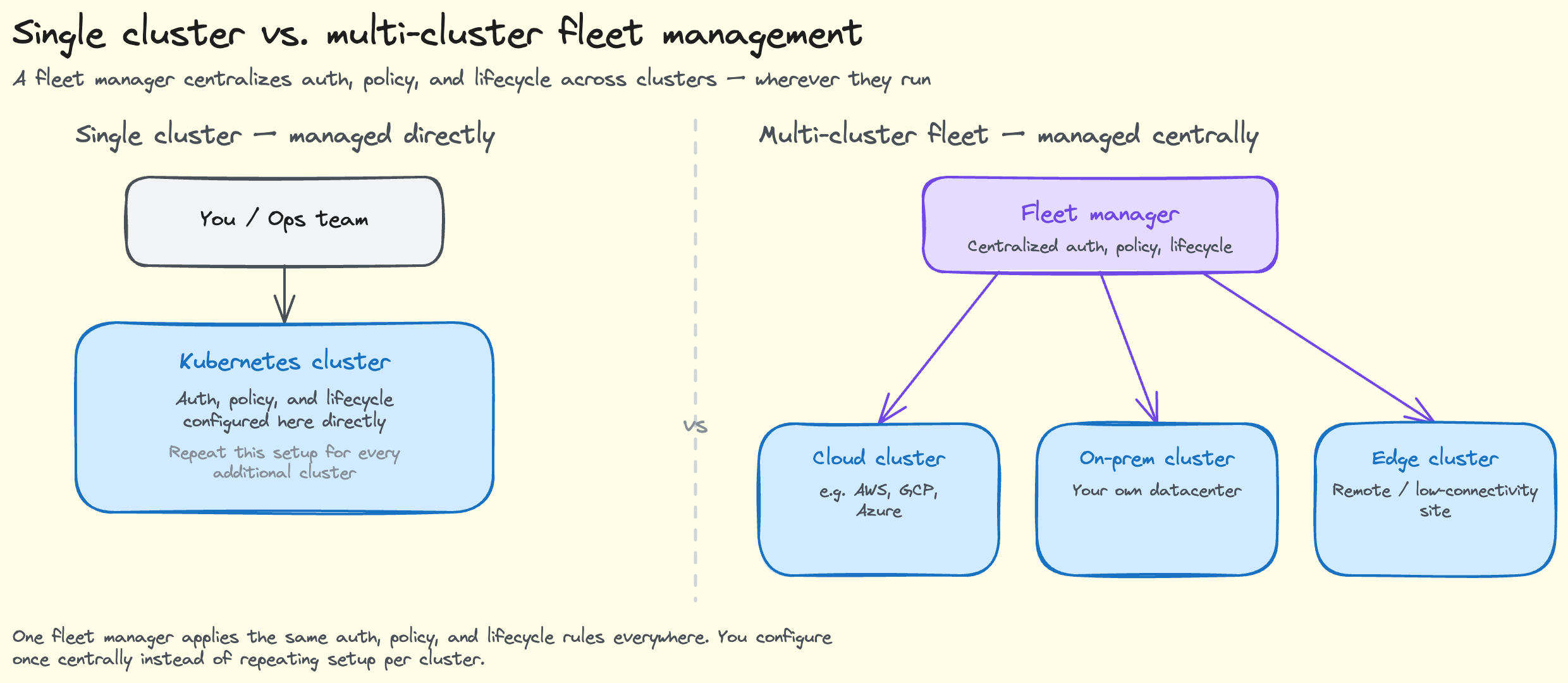
That fleet-manager category deserves its own look, since multi-cluster management is where the Kubernetes tooling conversation is loudest in 2026.
As teams run clusters across cloud, on-premises, and edge, centralized authentication, policy, lifecycle, and Day-2 consistency across all of them becomes the actual problem, not any single cluster's health. Running 10 clusters, each with their own RBAC rules, their own patch schedule, and their own drifted configuration, is 10 times the Day-2 burden from earlier in this guide, not one, unless something centralizes it.
Rancher is the open-source incumbent here, built for exactly this kind of centralized fleet control. But it's also driving a real wave of teams looking elsewhere. SUSE, which now owns Rancher, shifted Rancher Prime pricing to a CPU and vCPU-based model in 2025. Some enterprises have reported cost increases of 4 to 9 times what they paid under the old node-based licensing.
Combined with the operational overhead of running Rancher's own HA control plane, and the single point of failure risk if that control plane goes down, teams are actively evaluating alternatives.
The alternatives fall into two groups. Full platforms replace Rancher outright:
- Rafay leans on governance and policy blueprints
- Spectro Cloud focuses on declarative cluster profiles for edge and bare-metal
- Platform9 offers managed multi-cluster with no self-managed control plane to run
- VMware Tanzu and OpenShift cover the enterprise end
Lower-level lifecycle tools solve a narrower piece of the same problem:
- Karmada, a CNCF project, handles multi-cluster application propagation and failover
- Cluster API treats clusters themselves as managed, declarative resources
- Kamaji runs a cluster's control plane as ordinary pods instead of dedicated machines
Platform9, Rackspace Spot's sister company, is one of the more frequently cited managed alternatives specifically because it removes the self-managed control-plane burden that's driving teams away from Rancher in the first place. The Best Rancher Alternatives in 2026 guide covers the full landscape, Platform9 included, in more depth.
Managed vs. self-managed Kubernetes
How much of that self-managed burden a team keeps versus hands off is really the biggest management decision underneath everything else in this guide.
Self-managed clusters give a team maximum control over every layer, but that control comes with the full weight of Day-2 work landing on that team: version upgrades, a highly available control plane, security patching, and the infrastructure cost of running all of it. A team running self-managed Kubernetes owns every one of the four core tasks from earlier in this guide, on every cluster, indefinitely. Managed Kubernetes offloads most of that, specifically the control plane itself, the piece with the least differentiation and the most operational overhead.
EKS, GKE, and AKS each run the control plane for you, though at a real cost difference between them. EKS and GKE both charge roughly $73 a month per cluster for the control plane, while AKS includes it free. Managed platforms extend the same offload to multi-cluster fleets, not just single clusters.
Rackspace Spot is one option in this same managed category. Its control plane is free on every cluster like AKS's, and its node pricing runs on an open-market auction instead of a fixed rate, with bids starting at $0.001/hr, about $0.72/month. That combination addresses the cost-control task from earlier directly, since the infrastructure a fleet runs on is itself one of the levers.
Whichever path a team picks, managed or self-managed, some practices hold regardless of who's running the control plane.
Best practices for Kubernetes management
- Adopt GitOps. Keep infrastructure and app config declarative and version-controlled through Argo CD or Flux, for consistency, auditability, and an easy rollback when something breaks
- Automate security and governance. Policy-as-code through OPA/Gatekeeper, RBAC, and continuous compliance checks catch problems across every cluster instead of relying on someone remembering to check
- Automate backups and disaster recovery. A cluster or data loss without a tested recovery path turns into an outage instead of an incident
- Keep dev and prod in sync. Mirroring production in lower environments catches deployment surprises before they reach users
- Right-size and watch spend. Accurate requests and limits, paired with real cost visibility, prevent both resource starvation and runaway waste
- Standardize on the smallest interoperable stack. Every overlapping platform is one more thing to upgrade, secure, and keep compatible, and standard workflows hold up better during incidents and upgrades
Get started with Rackspace Spot and run a managed Kubernetes fleet without the self-managed control-plane burden.
Frequently asked questions
What is a Kubernetes management system?
A Kubernetes management system is the practice and tooling for deploying, scaling, securing, and maintaining Kubernetes clusters after they're running, the Day-2 work that follows initial setup. It covers everything from a single cluster to a large multi-cluster fleet, and spans deployment, observability, security, and cost control.
What are the core tasks of Kubernetes management?
Four tasks make up the discipline: deployment and scaling, observability, security and governance, and resource optimization and cost. Deployment and scaling covers rolling out updates and adjusting capacity; observability covers tracking health and metrics; security and governance covers RBAC and policy enforcement; and cost covers setting accurate resource limits and watching spend.
What are the best Kubernetes management tools?
It depends on the task. kubectl and k9s cover command-line operations, Lens and Portainer cover visual cluster management, Argo CD and Flux CD cover GitOps deployment, Prometheus and Grafana cover observability, and Kubecost covers cost visibility. Most teams run one tool from several of these categories rather than one tool for everything.
What's the difference between a management tool and a managed Kubernetes service?
A management tool helps a team operate clusters that it already runs, handling deployment, observability, or policy on infrastructure the team still owns. A managed Kubernetes service, like EKS, GKE, AKS, or Rackspace Spot, runs the control plane itself, removing that layer of operational work entirely.
What is the best multi-cluster management tool?
Rancher is the most common answer and the open-source incumbent, but its 2025 shift to CPU and vCPU-based pricing under SUSE has pushed teams toward alternatives like Rafay, Spectro Cloud, and Platform9, each solving the same centralized fleet problem without Rancher's licensing or HA overhead.
Why are people moving away from Kubernetes?
Day-2 operational complexity, the real burden of upgrades, security patching, and multi-cluster consistency, is what's actually driving the sentiment. That complexity pushes teams toward managed Kubernetes and platform engineering, not away from the technology itself.
Can I learn Kubernetes in 2 days?
You can learn the core concepts, Pods, Deployments, Services, and basic kubectl commands, in a couple of focused days. Operating it well in production, the Day-2 work this guide covers, takes considerably longer and comes mostly from hands-on experience running real clusters through real incidents, not from a weekend of tutorials.