


We've all been there. It's Friday afternoon, a deployment goes sideways, your on-call phone starts buzzing, and suddenly the weekend you had planned is gone. Bad deployments don't just hurt user experience , they erode team confidence, slow down velocity, and create the kind of stress that makes engineers burn out.
The good news? Choosing the right deployment strategy makes a massive difference. A deployment strategy is the method your team uses to release new software versions into production environments , it governs how traffic shifts, how risk is managed, and what happens when things go wrong. In 2026, teams have more options than ever, thanks to cloud-native orchestration tools, GitOps workflows, and progressive delivery techniques that make releases genuinely boring and routine (in the best way).
In this guide, we'll walk through every major deployment strategy, compare their trade-offs side by side, cover the infrastructure and tooling that support them, and share the best practices that tie it all together.
Core Deployment Strategy Types and Descriptions
Recreate Deployment Strategy
The recreate deployment strategy is about as simple as it gets: shut down the current version entirely, then bring up the new one. There are no fancy traffic splits or parallel environments , just a clean swap.
This deployment method makes sense in specific situations: non-critical internal tools, development environments, or batch processing systems where a maintenance window is acceptable. It's also useful when the old and new versions are fundamentally incompatible and can't run side by side.
Recreate guarantees downtime during the switchover. Every user hitting your service while the old version is offline and the new one spins up gets an error. Roll back, and you're redeploying the previous version, stretching that downtime even longer.
For any user-facing production environment where availability matters, recreate is the wrong choice. The moment your SLA includes uptime requirements, you should reach for something more resilient.

Rolling Update Strategy
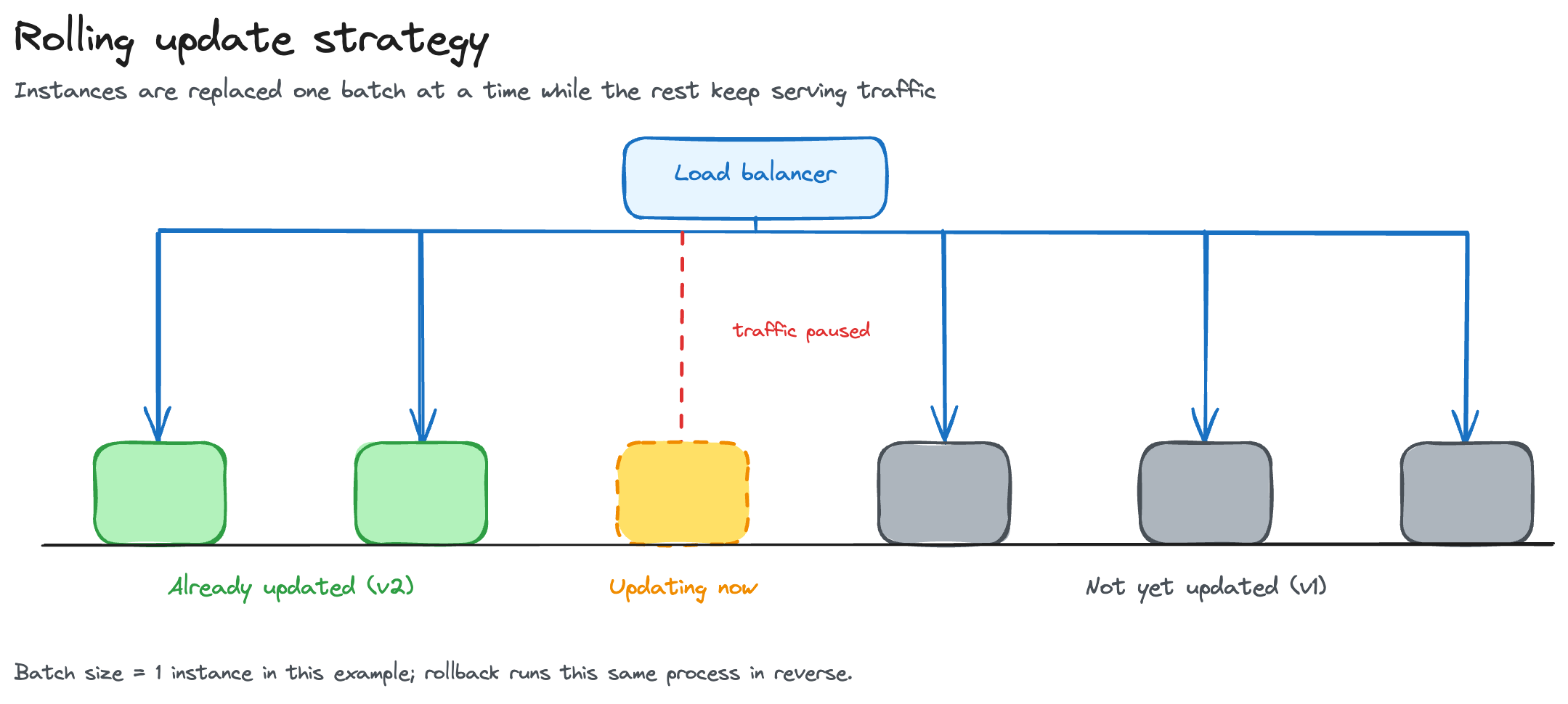
Rolling updates are the workhorse of application deployments. Instead of replacing everything at once, you replace instances of the old version incrementally, one batch at a time, while the rest of the service keeps running. Some instances always remain available throughout the rollout, which is what keeps downtime to a minimum, and the load balancer does the actual work: it routes traffic away from instances being updated and toward the healthy ones still running the current version.
Two settings control how a rollout actually behaves:
- Batch size: how many instances get updated at once. Smaller batches mean a slower rollout but lower risk; larger batches move faster but expose more traffic to the new version at a time.
- Rollout interval: how long to wait between batches, giving you time to catch problems before the next one goes out.
Most teams find a sweet spot based on their instance count and how much risk they're willing to carry at once.
Rollback is where rolling updates get tricky. Mid-deployment, you'll have a mix of old and new versions running simultaneously, and rolling back means re-running the update process in reverse, which takes time. Rolling updates are the default strategy in Kubernetes, a natural starting point for most teams, but that rollback complexity is a real limitation for high-stakes releases.
Blue-Green Deployment Strategy
Blue-green deployments take a different approach: maintain two identical production environments, call them "blue" and "green", and serve live traffic from only one at a time.
Here's how it works in practice:
- Blue is live and serving users.
- You deploy the new version to green and validate it fully.
- Once you're satisfied, you switch all traffic from blue to green, at the load balancer or DNS level.
- Blue stays warm and idle, ready to take traffic back if needed.
Both environments need to be identical, and that infrastructure mirroring is non-trivial. Infrastructure as code is the standard way to enforce that parity, keeping blue and green in sync and preventing configuration drift.
The payoff is real: zero downtime and instant rollback. If something goes wrong after the traffic switch, you route traffic back to blue in seconds, which is why blue-green is often the right call for mission-critical releases with no tolerance for errors.
The honest trade-off is cost. Running duplicate production environments means paying for twice the infrastructure during deployment windows, a cost budget-conscious teams need to weigh against the risk reduction it buys them.

Canary Deployment Strategy
Canary deployments are named after the old mining practice of bringing canaries into coal mines as early warning systems. The idea is similar: expose the new version to a small subset of users first, watch closely for problems, and only expand if everything looks healthy.
The canary phases typically look like this:
- Initial slice: route 1-5% of traffic to the new version.
- Gradual expansion: expand to 25%, then 50%, watching metrics at each stage.
- Full rollout: complete the rollout only after metrics confirm stability.
Traffic management is what makes canary deployments work. Teams use weighted routing, header-based routing, or user cohort segmentation to control exactly who sees the canary version, and service meshes like Istio, along with tools like Argo Rollouts, make this kind of fine-grained traffic splitting straightforward in Kubernetes environments.
Monitoring during canary deployments is non-negotiable. You're watching error rates, latency, saturation, and business KPIs closely to catch anomalies before they hit your full user base, and automated thresholds can trigger a rollback without anyone having to notice first.

Canary vs. blue-green vs. rolling update , a quick comparison:
In 2026, combining canary deployments with feature flags and progressive delivery platforms is considered the leading approach for reducing deployment risk in production.
Shadow Deployment Strategy
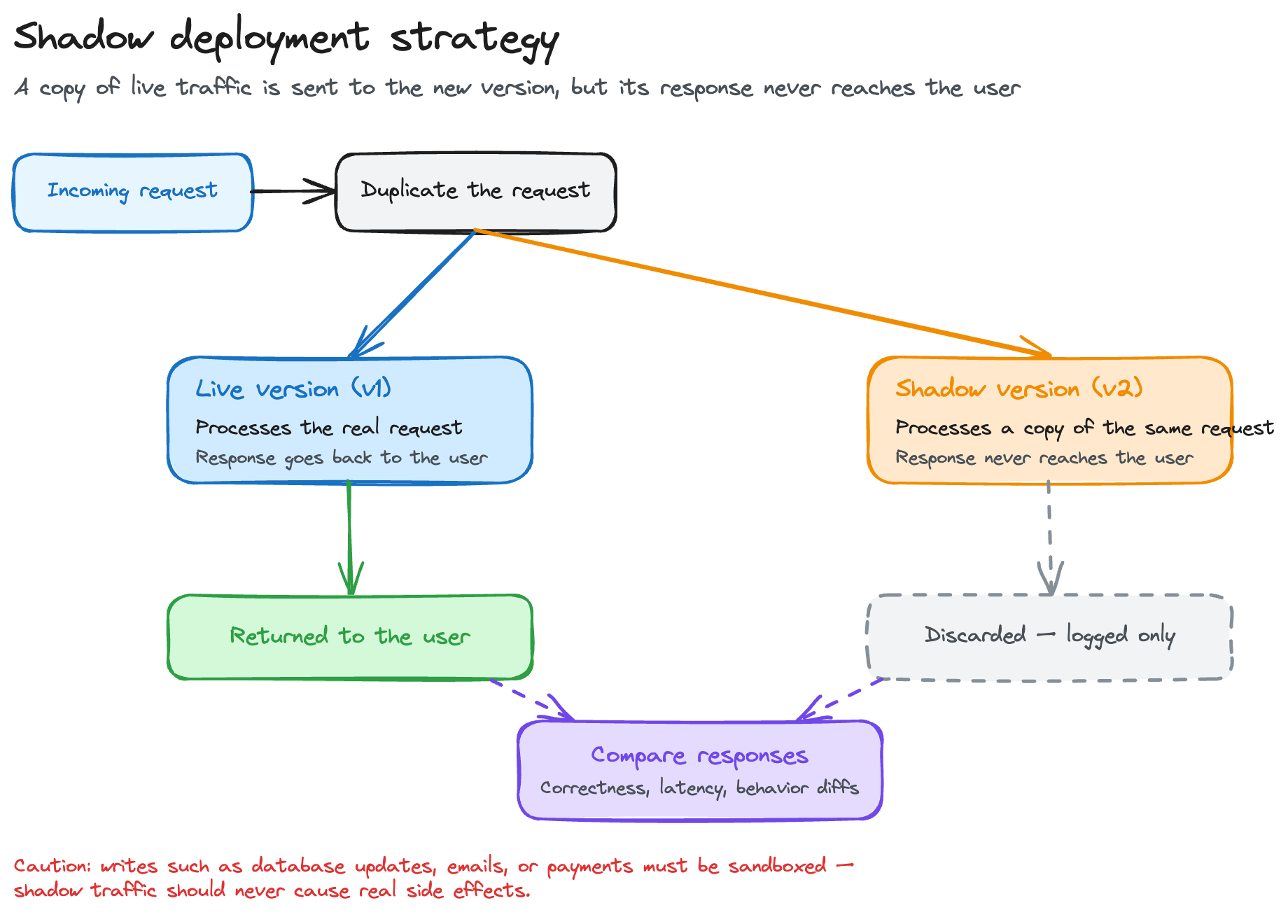
Shadow deployment takes risk reduction to the extreme. You route a copy of live production traffic to the new version, but its responses are never returned to real users, everyone still sees the stable version's output while you compare shadow responses against production ones for correctness, latency, and behavioral differences.
This method is ideal for high-risk scenarios: validating ML model updates, performance regression testing, or testing major architectural refactors under real-world load without any user impact. It's especially popular for ML model validation, where behavioral differences between model versions need to be compared before any real exposure.
The infrastructure requirements are significant. Traffic duplication happens at the load balancer or service mesh layer, and you need separate telemetry pipelines so shadow logs don't pollute your production observability stack. Critically, the shadow environment must be sandboxed from shared state: if the shadow version triggers writes to your database, sends emails, or charges payment methods, you have a serious problem.
A few limitations to be aware of:
- Shadow deployments effectively double your processing load
- They can't validate user-facing UX or interactive flows
- Write operations require careful sandboxing
Given the doubled load, most teams start with a 1-10% traffic sample rather than mirroring 100%, to keep cost and infrastructure impact manageable.
Feature Flags and Feature Toggles as a Deployment Strategy
Feature flags might be the most underrated tool in the modern deployment toolkit. The core idea is to decouple software deployment from feature release: you ship code to production with the feature flag turned off, and the feature itself gets enabled independently, without a redeployment.
Feature toggles act as runtime kill switches. If a new feature causes problems in production, you flip the flag off and the issue is resolved instantly, no rollback required. That's what makes this one of the most effective risk mitigation approaches available, it separates the risk of deployment from the risk of feature exposure.
Integrating feature flags into continuous delivery pipelines enables the same kind of progressive rollout canary deployments use, just at the feature level instead of the infrastructure level: enable the feature for 1% of users, then 5%, then 25%, expanding only as long as metrics stay healthy.
One real concern with feature toggles is flag debt. Long-lived flags accumulate over time, creating code complexity and maintenance burden, so it's worth setting expiration dates on release flags and cleaning them up promptly once the rollout completes.

Cloud Deployment Strategies
Cloud environments change the deployment calculus in meaningful ways. Elastic infrastructure means you can spin up additional capacity for a blue-green swap or a canary split without a long-term provisioning commitment, then scale it back down and only pay for what you used.
Cloud deployment strategies also benefit from managed orchestration tools. Kubernetes distributions like EKS, AKS, and GKE offer built-in support for rolling updates and integrate with tools like Argo CD and Flux for GitOps-driven deployments, and service meshes increasingly handle traffic management across multi-cluster and hybrid cloud setups too.
Multi-region and multi-availability-zone configurations add another layer of resilience. Spreading a canary rollout across availability zones, for example, lets you validate the new version's behavior under different load patterns before expanding further.
Cloud-native deployment decisions should also account for provider-specific tooling. Each major cloud provider offers deployment services with its own feature set, and managed control planes cut a lot of the orchestration complexity out entirely, so the right cloud deployment strategy isn't just about the deployment pattern itself, it's about choosing tools that fit your team's operational model.

Deployment Infrastructure, Pipelines, and Tooling
Deployment Pipelines and Automation
A well-structured deployment pipeline connects activities in an automated sequence: build → test → stage → production. Each stage gates the next, so only validated artifacts move forward.
Automation is the single biggest factor in reliable deployments. Manual steps are the leading source of failures, human error, forgotten steps, inconsistent environments, and automating the pipeline end to end removes all three.
Modern pipelines route different change types to the appropriate strategy automatically:
- A hotfix goes through a rolling update
- A major feature release triggers canary
- A critical infrastructure change uses blue-green
Rollback should be built into the pipeline, not tacked on. Automated triggers based on health checks and metric thresholds let it recover without anyone stepping in, and reusable pipeline-as-code templates keep that automation consistent across teams.

Configuration Management in Deployment
Inconsistent configuration is one of the top causes of deployment failures. Configuration management means treating configuration as a first-class artifact and keeping it consistent across environments.
The key principle: manage configuration separately from application code. Use externalized config files, environment variables, or dedicated config servers, not hardcoded values baked into the binary, so the same artifact can be promoted from staging to production while environment-specific settings get injected at runtime.
Staging and production configuration need careful separation. Secrets, endpoint URLs, scaling parameters, and feature flag defaults often differ between the two, and version-controlling configuration through infrastructure as code keeps every change traceable and reproducible.
Configuration drift is the other risk to guard against. In blue-green deployments especially, drift between blue and green is a subtle failure mode, a config value that never made it to green can cause unexpected behavior the moment traffic switches over.

Orchestration Tools and Load Balancing
Kubernetes is the dominant orchestration platform for executing deployment strategies at scale. It natively supports rolling updates and can be extended with tools like Argo Rollouts or Flagger to support canary deployments and blue-green patterns with automated promotion logic.
Load balancing is how traffic routing decisions get implemented during deployments. During a rolling update, the load balancer routes traffic away from instances being updated. During a canary deployment, it splits traffic according to weighted rules , sending 5% to the canary version and 95% to the stable version.
Service mesh integration with tools like Istio or Linkerd unlocks even finer-grained traffic management. Service meshes enable percentage-based traffic splitting, header-based routing, and circuit breaking , all of which are critical for advanced canary deployments in production environments.
Orchestration-driven automation of canary phases means the system can automatically promote a release when metrics meet defined thresholds, or roll it back when they don't. Selecting orchestration tools based on deployment strategy requirements is essential: a team running simple stateless microservices has different needs than a team managing stateful workloads across multiple regions.
Staging Environment and Pre-Production Validation
The staging environment exists to give you a place to fail safely. Before anything touches production, you validate deployment configurations, test application behavior, and run end-to-end scenarios in an environment that mirrors production as closely as possible.
Infrastructure as code is the best way to keep your staging and production environments in sync. When environments diverge, staging loses its value as a validation gate , you end up testing in conditions that don't reflect what production will actually encounter.
Running a testing deployment strategy in staging means deliberately simulating failure modes: what happens if a node goes down mid-rollout? Does the rollback procedure work as expected? These questions need to have tested answers before you're under pressure in a production incident.
Artifacts promoted from staging to production should follow a controlled, automated path in the deployment pipeline , not a manual copy-paste. The limitation to acknowledge honestly is that staging can never fully replicate production traffic patterns, data volumes, or third-party integration behavior. Staging catches configuration and functional issues well; it catches performance and scale issues imperfectly.
Release Management, Risk Mitigation, and Monitoring
Release Management and Deployment Timeline Planning
Release management is the organizational layer around the technical deployment process: planning, scheduling, and controlling how releases move through environments.
A deployment timeline balances business requirements (launch dates, marketing campaigns, regulatory deadlines) against technical constraints (dependency readiness, maintenance windows, team capacity). Building it collaboratively, with development, operations, and stakeholders all weighing in, is what prevents last-minute surprises.
Release gates and approval workflows create checkpoints that stop premature promotion: a QA sign-off, a green result from automated smoke tests, or a product manager's approval for a customer-facing change.
Dependency management gets especially complex in microservice architectures during phased rollouts. When service A depends on service B's new API, deployment order matters, which is why microservice deployment strategies need to account for backward compatibility and versioned interfaces to keep rollouts safe and independent.
Risk Mitigation Strategies in Deployment
The most common deployment risks are downtime, data inconsistency, performance degradation, and security regressions. Each deployment strategy carries a different risk profile, and matching strategy to risk is the core of good deployment planning.
Canary deployments and feature flags are the primary risk mitigation mechanisms in 2026 because they both limit blast radius , the number of users exposed to a potential problem at any given time. If a canary release is causing errors for 5% of users, that's bad but manageable. The same problem hitting 100% of users simultaneously is a crisis.

Rollback capabilities function as a safety net across all deployment strategy types. But here's the critical point: an untested rollback is essentially no rollback. If you haven't verified that your rollback procedure works, you can't count on it under pressure.
A practical risk assessment framework for choosing a deployment strategy:
- Low-risk, stateless change → Rolling update
- New feature with uncertain user impact → Canary + feature flag
- Zero-downtime requirement, mission-critical → Blue-green
- High-risk change needing production validation without user impact → Shadow deployment
Traffic management is the mechanism through which you reduce blast radius in practice , the more precisely you can control who sees the new version, the better you can limit the impact of problems.
Monitoring During and After Deployment
Monitoring isn't something you turn on after deployment , it's active throughout the entire rollout. The key metrics to watch during rolling updates, canary releases, and shadow deployments are error rate, request latency, saturation (CPU/memory), and business KPIs like conversion rate or transaction success.
Automated monitoring thresholds that trigger rollback are one of the most important features of a mature deployment pipeline. If your error rate exceeds a defined threshold during a canary rollout, the system should roll back automatically , not wait for an on-call engineer to notice at 2 AM.
Observability tooling integrated within CD workflows gives you real-time deployment health visibility. This means correlating monitoring data with specific canary phases , you need to know whether a metric spike started before or after a particular stage of the rollout to make good promotion decisions.
Post-deployment monitoring windows , typically 15 minutes to 24 hours depending on traffic volume , are the final confirmation that a release is stable before declaring success and closing the deployment record.
Rollback Capabilities Across Deployment Strategies
Rollback design looks very different depending on which deployment strategy you're using:
- Blue-green: Instant rollback via traffic routing reversal back to the previous environment. This is the fastest and cleanest rollback available.
- Canary: Fast rollback by routing all traffic away from the canary version. The complexity increases if the canary has already progressed through multiple canary phases.
- Rolling update: Slowest rollback , you're essentially running the deployment process in reverse, instance by instance.
- Feature flag, based: Instant rollback by flipping the flag off, without touching infrastructure at all.
Automating rollback triggers based on monitoring thresholds removes human latency from the equation. When error rates spike, automated systems can respond in seconds; a manual process takes minutes at best.
Testing rollback procedures in your staging environment as part of the regular deployment process is non-negotiable. If your rollback has never been tested, you don't actually have a rollback , you have a hope.
DevOps Best Practices and Continuous Delivery Integration
DevOps Methodology and Deployment Strategy Alignment
The DevOps methodology is fundamentally about shared ownership between development and operations. That shared ownership directly shapes which deployment strategies are feasible and how they get executed.
Teams with lower DevOps maturity often start with rolling updates , they're the default in Kubernetes and require the least operational sophistication. As teams mature, they adopt canary deployments and progressive delivery patterns that demand more sophisticated monitoring, traffic management, and pipeline automation.
Deployment management practices that support rapid, reliable software deployment include consistent tooling, automated testing gates, and clear ownership of the deployment process. When dev and ops share responsibility for production, deployments become a collaborative activity rather than a handoff , and that changes everything about how deployment practices evolve.
Organizational factors matter too. Team size, skill set, and regulatory requirements all influence deployment strategy adoption. A small startup can move fast with rolling updates and feature flags. A financial services firm with strict change management requirements needs a different approach, with formal release gates and audit trails built into the deployment pipeline.
Continuous Delivery and Deployment Strategy Integration
Continuous delivery is about making production deployments boring and routine. The goal is to ensure code is always in a deployable state, so releasing is a non-event rather than a high-stakes ceremony.
CD pipeline design patterns that natively support canary, rolling, and blue-green strategies allow teams to match deployment approach to change type automatically. A CD framework that automates deployment activities from commit to production , with appropriate gates and validations at each stage , dramatically reduces the cognitive load on engineering teams.
Measuring deployment frequency and lead time using DORA metrics tells you whether your CD practice is actually improving. Teams that deploy frequently and recover quickly from failures are demonstrably outperforming those that deploy infrequently and take hours to recover.
The balancing act in CD workflows is deployment speed versus stability. A software deployment strategy that optimizes purely for speed without investing in monitoring and rollback capabilities trades short-term velocity for long-term fragility.
Best Practices for Software Deployment Strategies
Let's bring it all together with the practices we've seen consistently work across teams and environments:
Choose strategy based on risk, not habit. Match your deployment strategy to the risk profile of each change. Not every deployment needs blue-green; not every change is safe for a simple rolling update.
Standardize deployment configurations across teams. Inconsistency creates incidents. Teams using the same pipeline templates, the same configuration management approach, and the same rollback procedures have far fewer surprises.
Treat feature flags, monitoring, and rollback capabilities as non-negotiable. These aren't advanced features , they're baseline requirements for responsible production deployments.
Document your deployment strategy descriptions and runbooks. When something goes wrong at 3 AM, your team needs clear, tested procedures , not tribal knowledge. Good documentation reduces mean time to recovery.
Iterate on deployment practices continuously. Run post-deployment retrospectives. What went wrong? What slowed you down? Software deployment strategies should evolve based on real operational experience.
Avoid these anti-patterns:
- Skipping the staging environment because "it takes too long"
- Manual deployments that bypass the pipeline
- Rollback procedures that have never been tested
- Feature flags that never get cleaned up
- Deploying late on Fridays (you know why)
Traffic Management Best Practices Across Strategies
Precise traffic routing rules are the foundation of effective canary and blue-green deployments. Vague or overly broad routing rules lead to uneven traffic distribution and make it impossible to draw valid conclusions from your monitoring data.
Use weighted traffic splitting to control canary phases with intention. Moving from 5% to 25% should be a deliberate decision based on data , not a time-based progression that ignores whether metrics are actually healthy.
Session persistence is a subtle but important concern during traffic management transitions. If a user's session is mid-flow when traffic shifts, routing them to a different version can cause confusing or broken experiences. Your load balancing configuration needs to account for session affinity appropriately.
Monitoring traffic routing behavior as a core component of deployment observability means treating your routing layer as a first-class telemetry source. Are requests being split at the percentages you configured? Are any routes experiencing disproportionate error rates? These signals are as important as application-level metrics.
Slash Infrastructure Costs Without Sacrificing Deployment Reliability
Understanding deployment strategies is one thing , having the infrastructure to execute them reliably and cost-effectively is another challenge entirely.
If your team is running Kubernetes-based deployments and you're feeling the weight of cloud infrastructure costs, Rackspace Spot is worth a serious look.
Rackspace Spot lets you slash cloud costs by leveraging spot instances, priced through an open-market auction that lets bids start as low as $0.001 per hour, with managed Kubernetes and a managed control plane that supports the automated, scalable deployment pipelines we've covered throughout this guide.
Features like the spotctl CLI and Terraform provider make it straightforward to integrate Rackspace Spot into your existing deployment workflows.
Whether you're running canary deployments, blue-green switchovers, or rolling updates at scale, Rackspace Spot gives you the infrastructure reliability your deployment pipelines depend on , at a fraction of the cost of on-demand compute.
Ready to reduce your cloud infrastructure costs while maintaining deployment confidence? Explore Rackspace Spot today and see how much your team could save.
Frequently asked questions
What is the deployment strategy?
A deployment strategy is the approach or method your team uses to release new software versions into a target environment. It governs how traffic shifts between old and new versions, how risk is managed during the transition, and what happens if the release needs to be reversed. Different strategies , rolling update, blue-green, canary, shadow, recreate , make different trade-offs between speed, safety, cost, and complexity.
Which is the best deployment strategy?
There's no single best deployment strategy , the right choice depends on your risk tolerance, downtime requirements, infrastructure budget, and team maturity. That said, a practical 2026 rule of thumb: use rolling updates for routine low-risk changes, canary deployments for new features with uncertain impact, and blue-green for mission-critical releases that require zero downtime and instant rollback. Combining canary deployments with feature flags is the most commonly recommended approach for high-risk production deployments.
What are the different types of deployment?
The main deployment types covered in this guide are:
- Recreate , full shutdown and restart, with guaranteed downtime
- Rolling update , incremental instance replacement, minimal downtime
- Blue-green , dual-environment traffic switching, zero downtime
- Canary , gradual traffic expansion with real-user validation
- Shadow , traffic duplication without user-facing impact
- Feature flag, based , runtime feature control decoupled from code deployment
What is a strategic deployment?
A strategic deployment is the deliberate, planned approach to releasing software that aligns the deployment method with both business goals and technical constraints. It means choosing not just how to deploy, but when, to whom, and with what safeguards , treating each release as a risk-managed event rather than a mechanical code push.