


Running one container with docker run takes one command. Running that same container reliably at 200 instances across 50 machines, scaling it, recovering it after a crash, routing traffic to the healthy copies, updating it without downtime, takes a lot more than a docker run.
Container orchestration automates deployment, scaling, networking, and recovery for containers running across many machines, so a team doesn't do any of it by hand.
This guide covers what orchestration actually is, how it differs from containerization and from Docker itself, how it works under the hood, and which tool to reach for depending on what you're running.
What Is Container Orchestration?
Container orchestration is the automated deployment, scaling, networking, and management of containers running across many machines in production, which turns a single container running on a laptop into thousands running reliably across a fleet of servers.
That automation is the entire point. A person clicking through deployments, watching for crashed containers, and manually rerouting traffic doesn't scale past a handful of machines, and doesn't recover from a failure at 3 a.m. as fast as a system built to do exactly that. An orchestrator handles placement, which machine runs which container, health, restarting what crashed, scaling, adding or removing instances as demand changes, and networking, routing traffic to whatever's currently healthy, continuously and automatically.
That automation pays off in four concrete ways:
- Deployments become predictable and repeatable instead of a manual runbook someone has to execute correctly every time
- A failed container or node stops meaning downtime, since the orchestrator reschedules the workload elsewhere before most users notice
- Hardware gets used more efficiently, since the scheduler packs containers onto available capacity instead of each one sitting on its own reserved machine
- None of it requires a person watching when it happens
Container orchestration is a specific, container-focused slice of the broader practice of cloud automation, the same reconcile-and-recover logic applied to provisioning, configuration, and infrastructure generally.
Containerization vs. Orchestration vs. Docker
These three terms get used almost interchangeably, and mixing them up is one of the most common points of confusion for anyone new to the space.
Containerization happens at build time, packaging an application and everything it needs, code, runtime, libraries, into a single portable image. Orchestration happens at run time, automating how many of those containers run together, where, and how they recover from failure.
Docker sits in between, a container runtime and platform for building and running individual containers, not an orchestrator. Docker can start a container; it doesn't decide which of 50 machines that container should run on, or restart it automatically if the machine it's on goes down. Orchestration is the layer that handles exactly that.
Docker and Kubernetes aren't competitors, despite how often they get compared. The real comparison is Docker Swarm, Docker's own orchestration mode, against Kubernetes, covered in depth in a dedicated Kubernetes vs. Docker comparison.
How Container Orchestration Works: Core Functions
Every orchestrator, regardless of which one, runs on the same underlying model, declarative desired state. You describe what you want, 3 replicas of this container, this much memory, and the orchestrator continuously compares that declaration against what's actually running, correcting the difference on its own.
That reconcile loop is what powers every core function:
- Scheduling places containers on the best-fit node based on available CPU, memory, and any constraints you've set
- Scaling adds or removes container instances as demand changes, driven by a Deployment's
replicasfield or an autoscaler watching real usage - Self-healing and high availability restarts or reschedules a container automatically when it crashes or its node fails, and reroutes traffic away from it in the meantime
- Load balancing and service discovery spread traffic across healthy instances and let services find each other by name through internal DNS instead of hard-coded IPs
- Rollouts and rollbacks replace containers with a new version gradually, with zero downtime, and can revert to the previous version with one command if something breaks
- Config, secrets, and health monitoring inject configuration and credentials into a container at deploy time and continuously check its health to feed the reconcile loop
A few Kubernetes examples make the shape of this concrete. A Pod is the smallest unit orchestration manages:
apiVersion: v1
kind: Pod
metadata:
  name: web
spec:
  containers:
  - name: web
    image: nginx:1.27
A Deployment manages a set of identical Pods and their replica count:
apiVersion: apps/v1
kind: Deployment
metadata:
  name: web
spec:
  replicas: 3
  selector:
    matchLabels:
      app: web
  template:
    metadata:
      labels:
        app: web
    spec:
      containers:
      - name: web
        image: nginx:1.27
A Service gives that Deployment a stable address other containers can reach it at:
apiVersion: v1
kind: Service
metadata:
  name: web
spec:
  selector:
    app: web
  ports:
  - port: 80
Rolling back a bad deploy is one command: kubectl rollout undo deployment/web.
Container Orchestration Architecture
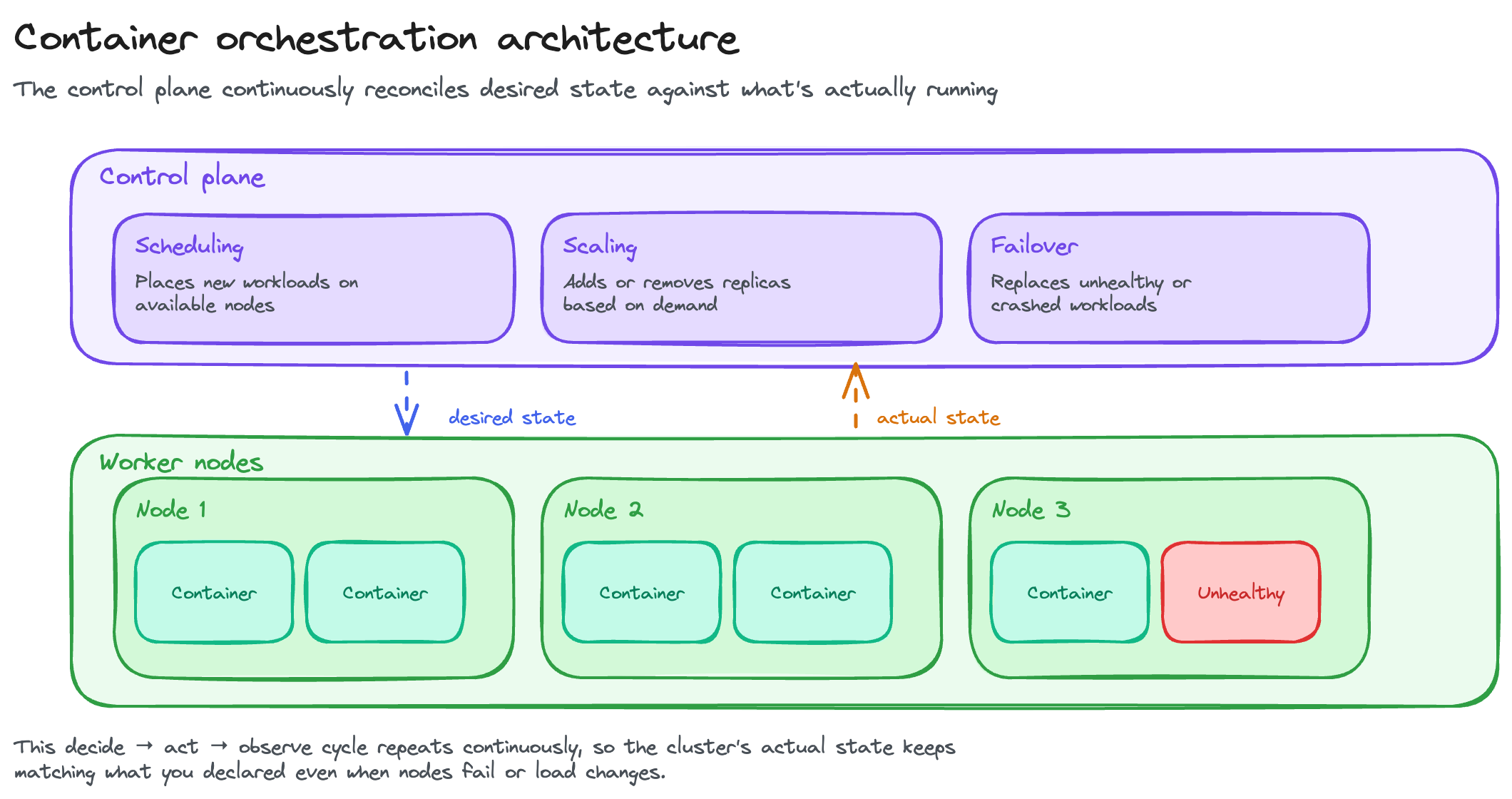
Every orchestrator, no matter the vendor, is shaped the same way, a control plane that makes decisions, sitting above a set of worker nodes that actually run the containers.
The control plane holds the cluster's desired state, decides where each container runs, and continuously reconciles the two. Worker nodes register with the control plane, report their available capacity, and run whatever gets scheduled onto them.
Kubernetes is the reference implementation of this shape. An API server acts as the single entry point, a scheduler assigns containers to nodes, and a set of controllers keeps actual state matching desired state. Together, they coordinate worker nodes that each run a container runtime and report back continuously. The Kubernetes Architecture guide covers each of those components individually.
Container Orchestration Tools and Platforms
Kubernetes dominates this landscape, but it isn't the only real option, and picking the wrong one for your situation adds operational cost for no benefit.
- Kubernetes is the industry standard. 82% of organizations now run it in production, per CNCF's 2026 survey. It's the most powerful and extensible option, and the one with the steepest learning curve. Best fit for complex, large-scale workloads
- Docker Swarm is simple and Docker-native, with minimal setup. Its development has slowed considerably compared to Kubernetes, and it's a reasonable choice only for teams deliberately staying small and Docker-native, not a default pick for anything new in 2026
- HashiCorp Nomad is a single lightweight binary that schedules containers, VMs, and standalone binaries side by side, the right pick for mixed workloads Kubernetes wasn't built to run
- Managed Kubernetes services remove most of the operational burden of running the control plane yourself. AWS EKS and Google GKE both charge about $73 a month per cluster for the control plane, while Azure AKS and Rackspace Spot both include it for free
- Management layers and distributions sit on top of an existing cluster rather than replacing it: Rancher and Portainer add multi-cluster management, OpenShift packages Kubernetes with enterprise security and CI/CD, and K3s strips Kubernetes down for lightweight and edge deployments
Use Cases and Choosing the Right Approach
Container orchestration shows up anywhere an app needs to run reliably at more than a handful of instances:
- Microservices at scale, where dozens or hundreds of small services each need their own deployment, scaling, and failure recovery
- CI/CD and GitOps pipelines, where every merge triggers a deploy that has to roll out safely and roll back cleanly if it doesn't
- Autoscaling for traffic that varies by the hour, adding capacity during peak load and releasing it when demand drops
- Multi-cloud and hybrid portability, where the same containerized workload needs to run on more than one cloud without a rewrite
- AI and ML inference at scale, an increasingly common driver as teams move model serving from a single GPU box to a fleet that scales with request volume
Choosing a tool comes down to three things, scale, team skills, and workload type:
- A single-host setup with a handful of containers doesn't need an orchestrator at all. Docker Compose covers it
- Most production teams land on managed Kubernetes, since it removes the control-plane burden without giving up Kubernetes' ecosystem
- Docker Swarm only makes sense for a team deliberately staying small and Docker-native
- Nomad fits a team running a real mix of containers, VMs, and legacy binaries side by side
Self-managing Kubernetes carries real operational cost, patching, upgrades, control-plane scaling, which is exactly why most teams choose a managed option instead. A spot-priced managed platform like Rackspace Spot keeps that convenience affordable rather than adding a second large line item on top of compute.
Best Practices
- Start as simple as your scale allows. Don't adopt Kubernetes for five containers; grow into orchestration as the operational need for it actually appears
- Right-size requests and limits, and enable autoscaling. Scheduling and scaling only work well when the numbers behind them are accurate
- Secure the platform. RBAC scoped tightly, no exposed dashboards, and scanned images cover the most common failure modes
- Build in observability. Health checks, metrics, and alerting are what let the reconcile loop actually catch problems instead of you finding out from a user
- Use declarative, version-controlled config. GitOps makes every rollout and rollback reproducible and auditable instead of a one-off manual change
Get started with Rackspace Spot and run a container orchestration workload on a real cluster.
Frequently Asked Questions
What is container orchestration?
Container orchestration is the automated deployment, scaling, networking, and management of containers running across many machines. It handles placement, health, scaling, and traffic routing continuously, so a team doesn't manage any of it by hand.
What's the difference between containerization and container orchestration?
Containerization happens at build time, packaging an application and its dependencies into a portable image. Orchestration happens at run time, automating how many of those containers run together, where, and how they recover from failure. One packages an app; the other runs it at scale.
What is the difference between Docker and container orchestration?
Docker is a container runtime, a tool for building and running individual containers. Orchestration is a separate layer that manages many containers across many machines, including which machine each one runs on and what happens when one fails. Docker builds the container; orchestration decides where it runs and keeps it running.
Is Kubernetes a container orchestrator?
Yes, and it's the most widely used one. Kubernetes automates deployment, scaling, networking, and self-healing for containers across a cluster of machines, and runs in production at 82% of organizations surveyed by CNCF in 2026.
What are the main container orchestration tools?
Kubernetes is the industry standard. Docker Swarm is Docker's simpler, Docker-native option, though its development has slowed. HashiCorp Nomad handles mixed containers, VMs, and legacy apps in one tool. Managed Kubernetes services (EKS, GKE, AKS, Rackspace Spot) run the control plane for you.
Do small teams need container orchestration?
Not always. A handful of containers on one host runs fine under Docker Compose without an orchestrator at all. Orchestration earns its complexity once a team is running enough containers, across enough machines, that manual management stops being realistic.
What's the difference between Kubernetes and Docker Swarm?
Kubernetes and Docker Swarm are the real head-to-head, unlike the Docker-vs-orchestration question above. Kubernetes is more powerful, more extensible, and dominant in production; Docker Swarm is simpler to set up but has slowed in both development and adoption. A dedicated Kubernetes vs. Docker Swarm comparison covers the full breakdown.