


"We need to cut our Kubernetes costs. EKS is getting expensive."
If you've said that, you already know the number: $0.10 per hour per cluster in control plane fees alone, bringing it to $74 a month before a single node is provisioned or a single pod runs. Three clusters across staging, production, and Disaster Recovery (DR) brings that to $2,664 a year in control plane fees, before you've configured IAM, VPC CNI, node groups, or the AWS Load Balancer Controller that EKS requires before anything runs.
Meanwhile, there are EKS alternatives like Rackspace Spot that offer a free Kubernetes control plane from the start.
The aws eks alternatives market has matured into three distinct camps:
- Tools that simplify operations while staying inside AWS (e.g. ECS, Fargate, AKS, GKE)
- Tools that extend Kubernetes beyond AWS to on-premises and hybrid environments (e.g. Platform9, OpenShift, Rancher)
- Tools that offer a cost-effective alternative to big cloud pricing (e.g. Rackspace Spot, kOps, DOKS)
Here is a quick look at the 10 AWS EKS alternatives covered in this guide:
- Rackspace Spot
- Platform9
- Google Kubernetes Engine (GKE)
- Azure Kubernetes Service (AKS)
- Amazon ECS
- AWS Fargate
- DigitalOcean Kubernetes (DOKS)
- OpenShift
- Rancher
- kOps
What is AWS EKS?
Amazon Elastic Kubernetes Service (EKS) is AWS's managed Kubernetes service, introduced in 2018 after AWS noticed a significant number of users were already running Kubernetes on AWS using Rancher or kOps on top of EC2 instances.
With EKS, AWS manages the control plane while you are responsible for the data plane, whether that's self-managed node groups where you handle provisioning, scaling, and patching yourself, or AWS-managed node groups where EKS handles the worker node lifecycle for you.
EKS is also distinct from two other AWS container services:
- Amazon ECS is AWS's proprietary container orchestration service. It uses task definitions instead of Kubernetes manifests, is not Kubernetes-compatible, and carries no control plane fee.
- AWS Fargate is a serverless compute layer, not an orchestrator. It works with both ECS and EKS. Choosing Fargate is a compute decision, not an orchestration decision.
Why teams look for EKS alternatives
- Control plane cost. $74/month per cluster. A staging, production, and DR setup costs $2,664 a year in control plane fees alone.
- Pre-deployment overhead. IRSA, VPC CNI, security groups, node groups, AWS Load Balancer Controller, and EBS CSI driver are all required before a single workload runs.
- Vendor lock-in. IRSA, ELB, CloudWatch, and EBS CSI tie your deployment to AWS-specific infrastructure. Migrating off means replacing the entire IAM and networking model, not just the control plane.
- Compounded learning curve. EKS requires Kubernetes expertise and AWS networking and identity expertise simultaneously.
What to look for in a managed Kubernetes solution
- Multi-cloud portability. Does the platform use standard Kubernetes APIs, or proprietary task definitions that lock you to a single provider?
- Cost transparency. Control plane fees, egress charges, node pricing, and add-on costs all add up. Verify the total at scale, not just the headline price.
- Operational overhead scope. Does the platform manage just the control plane, or also node lifecycle, upgrades, and add-ons?
For most teams leaving EKS, cost transparency and operational overhead scope are the two criteria that matter most.
The best AWS EKS alternatives
1. Rackspace Spot

Rackspace Spot is a cloud platform that provides fully managed Kubernetes infrastructure called Cloudspaces. It offers both on-demand and spot instances for your nodes, with spot instances priced via an open-market auction where bids start at $0.001/hr.
Rackspace Spot ranks as one of the top managed Kubernetes service providers and offers the best managed Kubernetes experience built for cost-optimized production workloads.
The 2026 Rackspace Spot report shows that 96.8% of Rackspace Spot users run their Kubernetes workloads entirely on spot instance nodes, even when on-demand is available. This includes stateful workloads, because interruption rates on the platform are 0.1%, giving users the confidence to commit fully to spot.
The history of AWS spot instances shows that AWS previously ran an open-market auction before dismantling it in 2017. Rackspace Spot revives this model with a true auction system, passing price savings directly to users and democratizing access to compute resources.
For Kubernetes workloads including microservices, batch jobs, distributed ML training, and CI/CD pipelines, Rackspace Spot's compute is significantly cheaper than AWS across both on-demand and spot pricing.
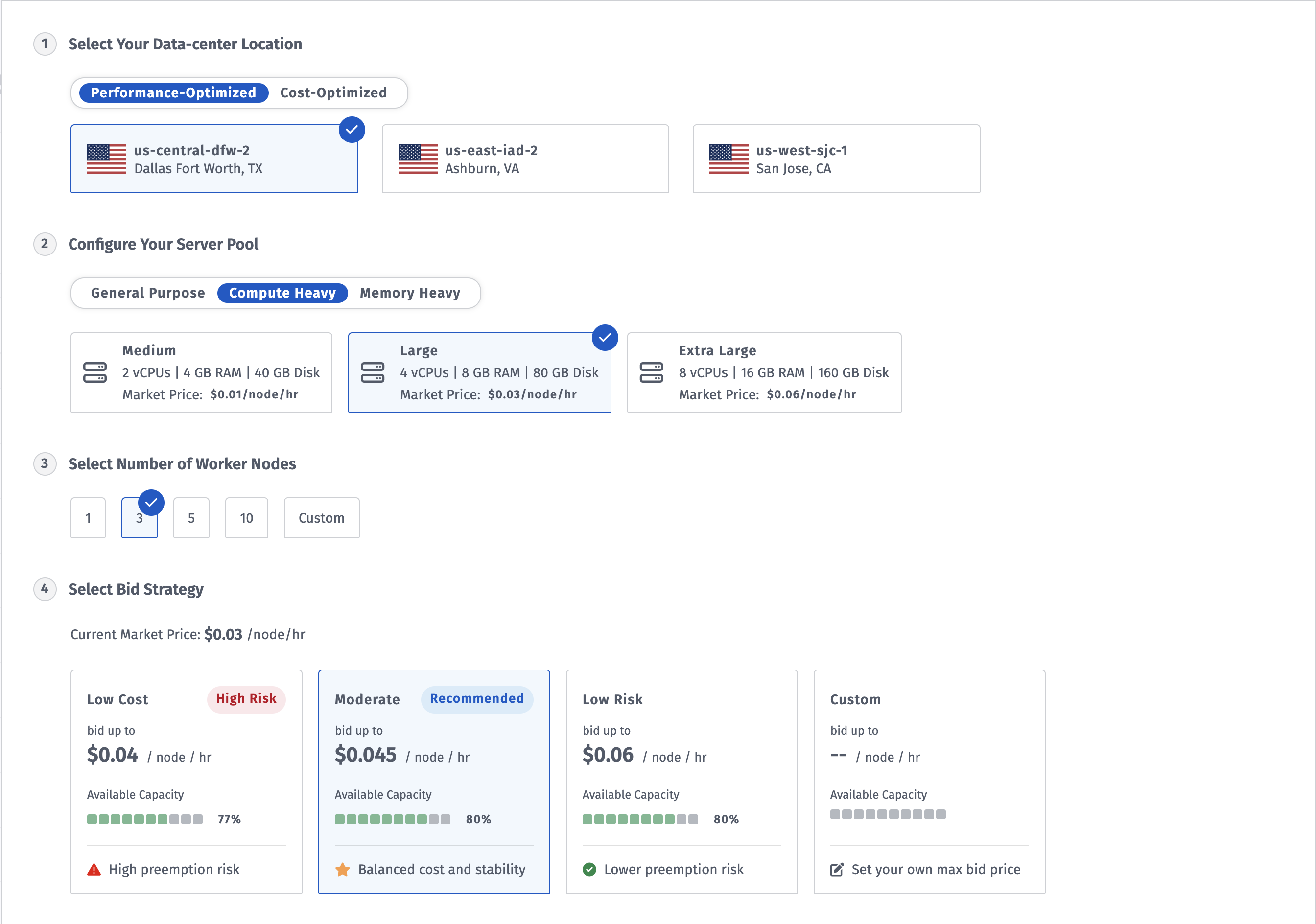
The Rackspace Spot cloudspace configuration screen showing data center selection, server pool configuration, worker node count, and bid strategy
Key features:
- Fully managed Kubernetes Cloudspaces with built-in Autoscaler, with Calico and Cilium available as CNI options.
- Open-market auction pricing for spot nodes with bids starting at $0.001/hr, reducing overall cluster costs.
- Free Kubernetes Control Plane The Kubernetes control plane is fully managed and included at no additional charge. By comparison, AWS can charge up to $72 monthly per cluster for control plane access alone.
- Database-as-a-Service (DBaaS) for PostgreSQL For teams evaluating AWS RDS alternatives, Rackspace Spot's DBaaS product delivers fully managed PostgreSQL.
- GitOps-ready infrastructure: Terraform provider support, alongside the spotctl CLI, enables infrastructure-as-code management across development, staging, and production environments.
- Persistent Volumes: Rackspace Spot offers persistent volumes across SATA (
sata,sata-large) and SSD (ssd,ssd-large,spot-ceph) storage classes, starting at $0.02/GB-month, with high-performance NVMe (ssdv2,ssdv2-performance) available on Gen-2 data centers at $0.06/GB-month. - Load balancers at a flat $10/month with no per-traffic charges.
Strengths:
- Lowest cost managed Kubernetes: transparent, market-driven pricing with full visibility into capacity and price thresholds before bidding.
- Free control plane: the Kubernetes control plane costs nothing on Rackspace Spot, giving teams immediate cost savings that compound as workloads and cluster count grow.
- No long-term contracts: teams pay for what they use, billed to the second, with no lock-in or commitment required.
- GitOps-first architecture: every cluster resource is fully configurable through Terraform.
- Node pre-emption alerts:Teams running spot nodes receive advance notifications when nodes face pre-emption.
Weaknesses:
- Rackspace Spot currently supports only managed PostgreSQL as its Database-as-a-Service offering, compared to the broader range of managed database services available from other cloud providers.
- Smaller regional footprint: fewer data center locations than AWS, which limits options for latency-sensitive or globally distributed deployments.
- Server variety is limited to Rackspace's cloud capacity pool: teams needing specific instance configurations may find fewer compute options than AWS provides.
Pricing
The Kubernetes control plane is included at no charge.
Spot node pricing follows an open-market auction model with bids starting at $0.001/hr, giving you full control over your Kubernetes cluster compute costs.
The table below compares AWS EKS and Rackspace Spot across on-demand and spot pricing, based on a standard 3-node cluster with 2 vCPU and 16 GB RAM per node:
At spot pricing, a standard 3-node cluster on Rackspace Spot costs $21.60/month versus $115.50/month on AWS EKS, a saving of over 80%.
Why choose Rackspace Spot: Teams running stateless, interruption-tolerant Kubernetes workloads (CI/CD pipelines, batch processing, distributed training runs, data transformation jobs) get genuine market-rate compute without the EKS control plane tax or AWS lock-in.
2. Platform9
Platform9 is a SaaS-managed Kubernetes platform from Rackspace's portfolio. It manages the full operational layer: cluster provisioning, upgrades, monitoring, and troubleshooting, across on-premises, private cloud, and multi-cloud environments where EKS cannot reach.
Key features:
- SaaS-managed Kubernetes across on-premises, private cloud, and multi-cloud.
- Built-in monitoring, alerting, and troubleshooting tools.
- Day 2 operations managed by Platform9: upgrades, patching, and cluster health.
Strengths:
- Manages Kubernetes across hybrid environments including bare-metal data centers where EKS cannot operate.
- Day 2 operations are fully absorbed, with no quarterly upgrade cycles consuming engineering time.
Weaknesses:
- Not a compute provider. You provision and pay for the underlying nodes.
- Teams needing full Kubernetes configuration control may find the SaaS model constraining.
Pricing
Freedom plan free up to 20 nodes. Growth plan from under $500/month for up to 50 nodes. Contact Platform9 to confirm current rates.
Best for Platform9: Enterprises managing Kubernetes across on-premises and cloud who want managed operations without migrating to a public cloud.
3. Google Kubernetes Engine (GKE)
GKE is Google's managed Kubernetes service. Autopilot mode manages nodes, scaling, and upgrades automatically. Standard mode gives you node-level control similar to EKS.
Key features:
- Autopilot mode for fully managed nodes, or Standard mode for manual node control.
- Native integration with Google Cloud services: Cloud Monitoring, Cloud Logging, Artifact Registry.
Strengths:
- Autopilot eliminates node management overhead entirely. No other major managed service abstracts it as completely.
- Built-in monitoring and logging via Cloud Monitoring and Cloud Logging require zero configuration, unlike EKS where setting up observability requires manual integration with CloudWatch or a third-party stack.
Weaknesses:
- Surrounding services compound costs fast.
- Steep advanced networking learning curve.
- Deep Google Cloud vendor lock-in risk.
- Per-cluster fees multiply at scale.
Pricing
$0.10 per cluster per hour for management, with one free cluster monthly through a $74.40 credit. Node compute is billed separately at Compute Engine rates, and costs rise quickly across multi-cluster deployments.
Best for GKE: Teams already on GCP, or teams that want Autopilot to eliminate node management overhead entirely.
4. Azure Kubernetes Service (AKS)
AKS is Microsoft Azure's managed Kubernetes service, offering a free control plane on the Free tier and deep integration with the Microsoft ecosystem, making it a natural EKS alternative for teams already on Azure.
Key features:
- Free control plane in the free tier.
- Native integration with Azure Active Directory, Azure Monitor, and Azure DevOps.
- Hybrid connectivity options for on-premises workloads via Azure Arc.
Strengths:
- Free standard-tier control plane.
- Deepest Microsoft integrations: Microsoft Entra ID, DevOps, and compliance tooling.
- Built-in compliance: Microsoft Defender for Cloud, RBAC, and network policies.
Weaknesses:
- Network policies must be set at cluster creation and cannot be added to an existing cluster. Remediation requires recreation.
- Shorter Kubernetes support window: 12 months standard support vs 14+ months on EKS and GKE, requiring more frequent version upgrades.
- Vendor lock-in from deep Azure integrations.
Pricing
Free tier: $0 control plane, no SLA, recommended for clusters under 10 nodes. Standard tier: $0.10/hr per cluster (~$73/month) with a 99.95% SLA. Node compute billed separately at Azure VM rates.
Best for AKS: Teams already on Azure, or teams moving off EKS to eliminate the control plane fee.
5. Amazon Elastic Container Service (ECS)
Amazon ECS is AWS's own container orchestration service, separate from Kubernetes entirely. You pay only for the compute you run, with no additional management fee. The trade-off is portability: ECS uses AWS-proprietary task definitions that cannot be moved to any Kubernetes platform without a rewrite.
Key features:
- No orchestration fee: you pay only for the compute you run.
- Native integration with Fargate, IAM, CloudWatch, and ELB.
- Task definitions for container configuration (not Kubernetes manifests).
Strengths:
- No orchestration fee: saves $2,664 a year vs. EKS for a three-cluster setup.
- No Kubernetes complexity: no kubectl, no Helm, no operator pattern. Simpler for teams that don't need the Kubernetes ecosystem.
Weaknesses:
- AWS-proprietary. Workloads cannot migrate to another cloud without rewriting task definitions as Kubernetes manifests.
- Limited to Web Console, CLI, and SDKs. Teams using GitOps tools like ArgoCD, Flux, or Argo Rollouts will need a Kubernetes-native platform instead.
Pricing
No orchestration fee. Pay only for the compute you run, either EC2 instances or Fargate tasks.
Best for ECS: Teams already on AWS that want rapid container deployment without Kubernetes complexity, and don't need multi-cloud portability.
6. AWS Fargate
AWS Fargate is a serverless compute layer for containers on AWS. Instead of provisioning and managing EC2 nodes, you specify CPU and memory per task and AWS runs the compute automatically.
Key features:
- Serverless compute with no EC2 instances or node management.
- Works with both ECS and EKS (the orchestrator choice is separate from the Fargate decision).
- Fargate Spot available for ECS tasks at up to 70% discount off standard Fargate pricing for interruption-tolerant workloads.
Strengths:
- Zero node management. AWS handles provisioning, patching, and scaling.
- Per vCPU-second billing avoids idle EC2 capacity costs for bursty workloads.
Weaknesses:
- Supports only
awsvpcnetworking mode. Workloads requiring a different mode cannot use Fargate. - Cold start latency makes it unsuitable for latency-sensitive applications.
Pricing
Per vCPU-second and per GB-second. Fargate Spot at up to 70% discount for ECS.
Best for Fargate: Teams that want zero node management and accept AWS managing the underlying compute.
7. DigitalOcean Kubernetes (DOKS)
DOKS is DigitalOcean's managed Kubernetes service with a free control plane, CNCF-certified standard Kubernetes, and a developer-friendly management interface.
Key features:
- Free control plane; HA control plane with 99.95% SLA at $40/month.
- Cluster autoscaling with support for large-scale deployments.
- Cilium Hubble built in for network visibility and security analysis, enabled on demand.
Strengths:
- Developer-friendly control panel that makes cluster provisioning straightforward without dedicated DevOps expertise.
- Per-second billing and transparent pricing with no surprise egress fees.
Weaknesses:
- Limited regional coverage and instance variety compared to hyperscalers.
- Limited integration outside the DigitalOcean ecosystem.
Pricing
Free control plane. Worker nodes billed per second starting at $12/month. HA control plane at $40/month. No egress fees within the included bandwidth allowance.
Best for DOKS: Teams that want managed Kubernetes with a free control plane, transparent pricing, and a straightforward management experience.
8. OpenShift
OpenShift is Red Hat's enterprise Kubernetes platform built for organizations that need security, compliance, and developer tooling ready out of the box. It comes with RBAC, SELinux policies, an integrated container registry, Tekton CI/CD, and an operator lifecycle manager already part of the platform.
Key features:
- Enterprise Kubernetes with built-in RBAC and SELinux security policies
- Hybrid cloud support: on-premises, AWS, GCP, Azure, and IBM Cloud
- Integrated Tekton CI/CD, Operator Lifecycle Manager, and container registry
Strengths:
- Security policies (RBAC, SELinux, network) are enforced by default, not assembled manually.
- Runs consistently across on-premises and public cloud with the same API surface everywhere.
Weaknesses:
- Red Hat licensing costs significantly exceed EKS's control plane fee for most team sizes.
- Feature breadth adds operational complexity for teams that only need managed Kubernetes.
Pricing
Subscription-based, priced per core-pair of worker nodes. ROSA (managed on AWS) starts at $0.171/hr per 4 vCPU. Self-managed OpenShift requires a Red Hat quote.
Best for OpenShift: Enterprises in regulated industries (healthcare, finance, government) where the built-in compliance posture justifies the licensing cost.
9. Rancher
Rancher is a multi-cluster Kubernetes management platform from SUSE. It is not a managed service but a unified management layer that runs across EKS, GKE, AKS, on-premises, and edge regardless of where your clusters live.
Key features:
- Unified management across EKS, GKE, AKS, on-premises, and edge clusters.
- Built-in multi-tenancy for managing multiple teams and projects within the same cluster.
- Fleet: built-in GitOps engine for deploying and managing applications across multiple clusters from a single Git repository.
Strengths:
- Single pane of glass across EKS, GKE, AKS, on-premises, and edge, adding consistency without requiring migration.
- Built-in multi-tenancy handles project-level access controls without custom RBAC.
Weaknesses:
- Manages Kubernetes but does not simplify it. Teams finding EKS too complex will find Rancher equally demanding.
- Does not abstract node management. Underlying infrastructure still requires provisioning.
Pricing
Free and open-source. Commercial support via Rancher Prime.
Best for Rancher: Teams managing Kubernetes across mixed environments (on-premises plus public cloud) who need consistent tooling without migrating to a single provider.
10. kOps (Kubernetes Operations)
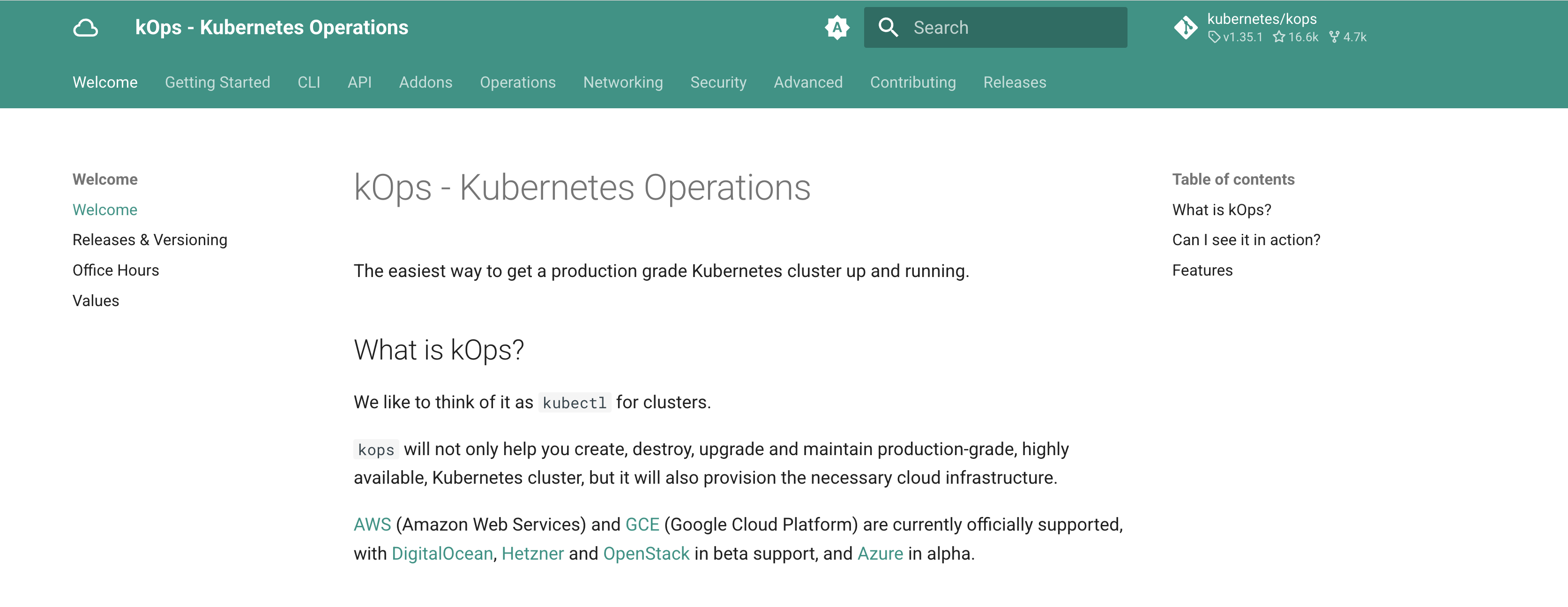
kOps (Kubernetes Operations) is an open-source CLI tool for provisioning and managing production-grade Kubernetes clusters across multiple cloud providers. AWS and GCE are officially supported, with DigitalOcean, Hetzner, and OpenStack in beta and Azure in alpha.
It gives you full ownership of the control plane, with master nodes running as compute instances in your own cloud account: accessible, modifiable, and free of any cluster management fee.
Key features:
- Control plane components run as regular compute instances in your own cloud account, giving you direct access to modify and configure them.
- Automatically provisions the underlying cloud infrastructure needed for cluster setup, including DNS, load balancers, and autoscaling groups.
- Runs on multiple cloud providers and supports both x86 and ARM64 processor architectures
Strengths:
- Free to use: no control plane fee, no SaaS subscription. Pay only for the underlying cloud infrastructure you provision.
- A single command provisions a fully configured cluster; master nodes are directly accessible and modifiable giving you full control over your infrastructure.
Weaknesses:
- More operationally complex than managed Kubernetes services. Upgrading and replacing master nodes requires more hands-on work.
- You are fully responsible for security patching and maintenance of master nodes.
Pricing
Free and open-source. Pay only for the underlying cloud infrastructure you provision.
Best for kOps: Teams that need full control over their Kubernetes infrastructure, including direct access to the control plane, without paying a cluster management fee.
Which AWS EKS alternative is right for you?
For teams running Kubernetes workloads and looking to cut costs, Rackspace Spot delivers a free control plane and open-market auction pricing that consistently undercuts EKS, GKE, and AKS. Get started with Rackspace Spot.
AWS EKS alternatives at a glance
Here is how the top AWS EKS alternatives compare across pricing, Kubernetes compatibility, and portability.
Frequently Asked Questions
Why do developers seek alternatives to AWS EKS?
Cost and operational overhead. The $0.10/hr control plane fee compounds across clusters, and pre-deployment configuration consumes significant engineering time. For teams where cost is the primary driver, Rackspace Spot offers a free control plane and open-market compute from $0.001/hr.
Is AWS ECS or EKS better?
ECS is simpler, free at the control plane, and AWS-native. EKS gives you standard Kubernetes and multi-cloud portability. For standard Kubernetes without the control plane fee and without AWS lock-in, Rackspace Spot removes both constraints.
What are the key differences between EKS, ECS, and Fargate?
EKS runs standard Kubernetes; ECS runs on AWS's own container orchestration engine; Fargate is a serverless compute layer for either.
Is ECS Fargate cheaper than EC2?
For bursty workloads, Fargate wins on per-vCPU-second billing. For steady-state, Reserved Instances on EC2 typically win. For teams willing to step outside AWS entirely, Rackspace Spot delivers up to 85% savings on Kubernetes compute compared to AWS EKS spot pricing.
Which is better, AKS or EKS?
AKS has a free standard-tier control plane, saving $74 per cluster per month. For teams on Azure, AKS is the natural choice. For escaping the hyperscaler orbit entirely, Rackspace Spot offers a free control plane and $21.60/month spot compute for a standard 3-node cluster.
What is the Amazon equivalent of Kubernetes?
EKS is Amazon's managed Kubernetes service. ECS is Amazon's proprietary orchestrator, not Kubernetes-compatible.
Is Kubernetes still relevant in 2026?
Yes. The CNCF's 2025 Annual Survey, published in January 2026, found that 82% of container users now run Kubernetes in production. The question for most teams is not whether to use Kubernetes, but which platform to run it on. For teams looking to run Kubernetes at lower cost than EKS, Rackspace Spot provides a free control plane and market-driven compute pricing.
Which platform is better for small to medium-sized teams?
Rackspace Spot is the best platform for small to medium-sized teams that need managed Kubernetes at the lowest possible cost, with a free control plane and open-market compute from $0.001/hr.
For standard Kubernetes with transparent pricing, DOKS. For simplicity without Kubernetes, ECS.
Are there other services I might be overlooking?
You might be overlooking Rackspace Spot, which offers a free control plane and open-market auction compute with bids starting at $0.001/hr.
What's the best choice between a managed cloud solution like AWS EKS and an independent product like OpenShift or Rancher, for a large enterprise having the know-how to manage both?
Managed cloud solutions are the best choice when you want the provider to handle control plane operations, upgrades, and infrastructure overhead for you.
Independent platforms like OpenShift or Rancher are better suited for hybrid, on-premises, or multi-cloud environments.
For enterprises where compute cost is the deciding factor, Rackspace Spot offers the cheapest managed Kubernetes solution.