


"We spent how much on egress last month?"
Every FinOps practitioner has heard some version of that question, usually in a meeting where nobody has a good answer. The bill arrives itemized across a dozen services and three regions, the finance team wants a forecast for next quarter, and the engineering team is certain none of this was their idea. That gap between what a company spends on cloud infrastructure and what anyone can explain about it is exactly why cloud spend management exists as its own discipline now, not a footnote inside IT budgeting.
Only three in 10 organizations say they understand where their cloud spend actually goes, according to Splunk's research on cloud cost trends. Flexera's 2026 State of the Cloud report puts a number on the consequence: 29% of cloud spend is wasted, even as 85% of organizations name wasted spend as a top challenge. Those two numbers describe the same failure from two angles: teams know they're bleeding money, and most of them can't say exactly where.
Is this the same thing as cost optimization? Is it FinOps by another name?
Not exactly, and the distinction matters more than most published guides suggest. This guide draws that line clearly, walks through the strategy that makes cloud spend management work in practice, and closes with an honest, criteria-based comparison of the tools available today, organized by category rather than a single vendor's self-ranking.
Scope note: this article covers cloud infrastructure spend, meaning compute, storage, and network. It does not cover SaaS license spend management, which is a related but separate discipline with its own tools and buying criteria.
What is cloud spend management?
Cloud spend management is the discipline of tracking, allocating, and controlling how much an organization spends on cloud infrastructure across every provider, service, and team. It covers the full lifecycle: visibility into current spend, attribution of that spend to the teams and workloads generating it, and governance over how spend changes going forward.
That scope is deliberately narrow. Cloud spend management deals with infrastructure, compute instances, block and object storage, managed databases, load balancers, and data transfer. It does not deal with SaaS subscriptions like Salesforce or Slack seats, which fall under SaaS spend management, a separate category with its own vendors and renewal-driven buying cycles. The two get conflated constantly because both involve a bill and a budget owner, but the cost drivers, the optimization levers, and the tools that solve each problem barely overlap.
The reason this became a named discipline instead of a line item inside general IT budgeting comes down to complexity. A single team can spin up a database, a load balancer, and a storage bucket across three regions in an afternoon, and the resulting bill won't show up clearly for weeks. Traditional budgeting assumes spend is planned in advance. Cloud spend is generated by decisions made continuously by hundreds of individual engineers, which is why three in 10 organizations can explain where it goes.
Cloud spend management vs. cloud cost optimization vs. FinOps
These three terms get used almost interchangeably across vendor blogs, but the keyword data behind this article shows real, distinct search demand for each one. Searchers are asking different questions, and a page that treats them as synonyms misses the actual distinction practitioners care about.
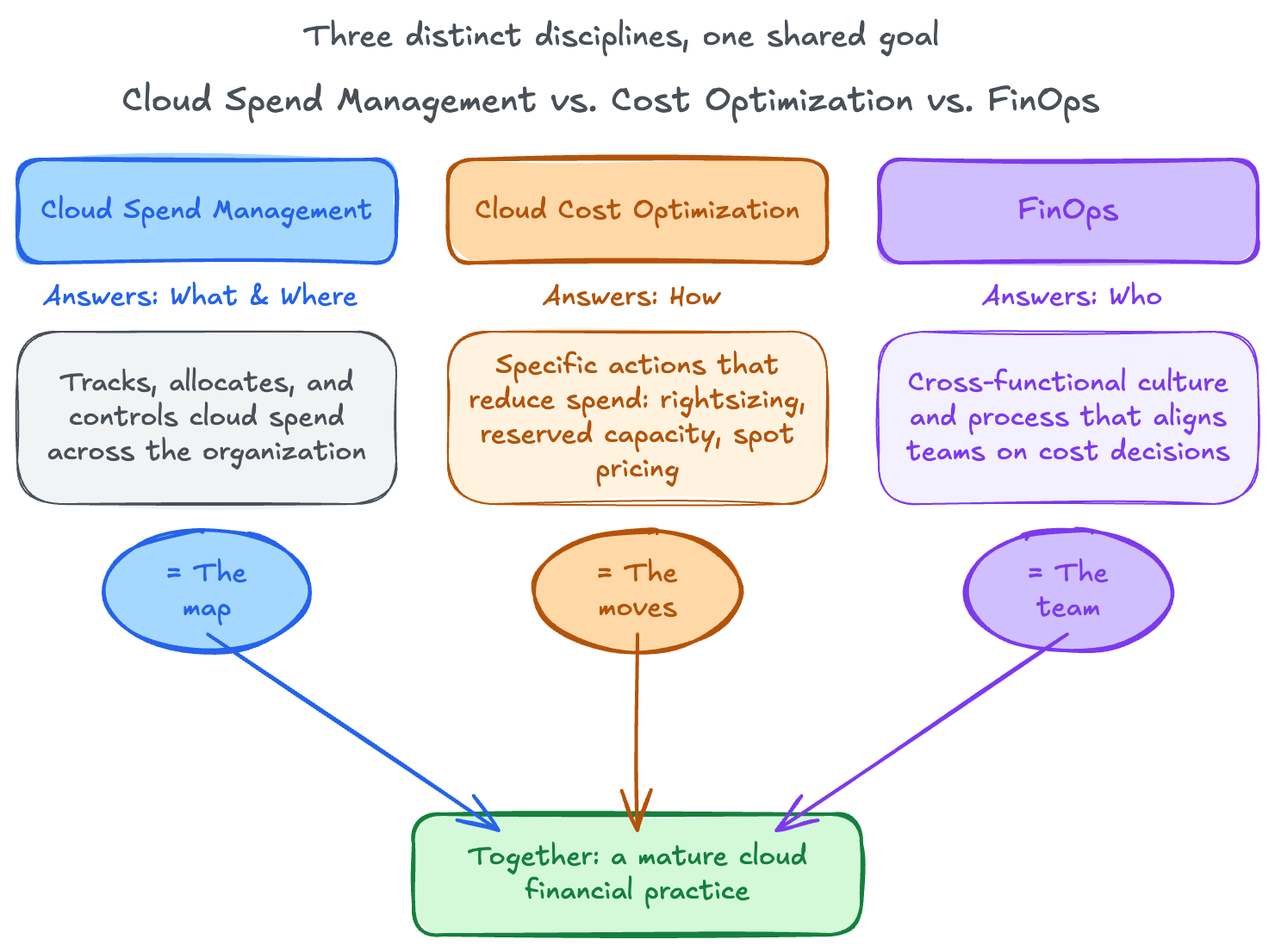
Here's how the three relate:
- Cloud spend management answers what you're spending and where. It's the ongoing discipline of tracking, allocating, and controlling cost across the organization.
- Cloud cost optimization answers how you reduce that spend. It's the specific set of actions, rightsizing instances, committing to reserved capacity, using spot pricing, that lower the number once you know what it is.
- FinOps answers who makes those decisions and how they collaborate. The FinOps Foundation defines it as a cultural and operational practice that brings engineering, finance, and business teams together around shared cloud cost accountability.
Flexera's own framework for this, Inform, Optimize, Operate, and Integrate, maps closely to this breakdown. Inform corresponds to spend management's visibility work. Optimize corresponds to cost optimization's specific tactics. Operate and Integrate correspond to the FinOps layer that keeps the first two running as an organizational habit rather than a quarterly fire drill.
A useful way to hold all three at once: cloud spend management is the map, cloud cost optimization is the set of moves you make once you can read the map, and FinOps is the team that agrees on which moves to make and why.
Why cloud spend gets out of control
Cloud spend rarely spirals because of one bad decision. It spirals because several small, individually reasonable decisions compound across an organization with no single owner watching the total.
1. Pricing model complexity. Every major provider offers pay-as-you-go, subscription, reserved, and spot pricing simultaneously, often for the same underlying resource. An engineer choosing an instance type is rarely also comparing four pricing models against forecasted usage. They pick what works and move on.
2. Decentralized purchasing. Cloud infrastructure doesn't route through procurement the way a software license does. Any engineer with API credentials can provision a database or a GPU cluster in minutes, with no approval gate between the decision and the bill.
3. Lack of visibility across multi-cloud environments. Flexera and HPE both point to the same underlying problem: when spend is split across AWS, Azure, and Google Cloud, no single provider's native dashboard shows the full picture. Teams end up reconciling three different billing formats by hand, or not reconciling them at all.
4. Overprovisioning and idle resources. Instances sized for peak load run at that size around the clock. Development environments spun up for a sprint outlive the sprint by months. Nobody deletes a resource they're not sure someone else is using.
Hidden costs: Egress fees and cloud shadows
Beyond those four causes, hidden costs are the least understood and the most expensive to discover late.
Egress fees, the cost of moving data out of a cloud provider's network, are structured to be easy to ignore during planning and impossible to ignore on the invoice. A workload that reads infrequently but writes constantly across regions can accumulate egress charges that dwarf its compute cost, and because egress is billed per gigabyte moved rather than per resource provisioned, it doesn't show up in the same capacity-planning conversations that catch an oversized instance.
The second form is what Splunk's research calls cloud shadows: ungoverned resources spun up by individual teams or regions outside of any central tracking. A shadow resource isn't malicious. It's a test database someone stood up 18 months ago that nobody remembered to tear down, replicated across three environments because three different teams solved the same problem independently. Cloud shadows are structurally similar to shadow IT, except the resources are billed hourly instead of sitting on a shelf.
Both problems share a root cause: they're invisible until someone builds the visibility to catch them, which is exactly what the next section addresses.
Core principles of cloud spend management
Every mature cloud spend management practice rests on four principles.
1. Visibility and transparency. You cannot manage spend you cannot see. This principle means cost data broken down by service, team, and environment, updated frequently enough to catch problems before the monthly invoice does.
2. Accountability and ownership. Chargeback and showback models assign cloud costs back to the teams generating them. Chargeback bills the cost directly to a team's budget. Showback reports the cost without moving money, which is often the more politically workable starting point.
3. Cost allocation and tagging. Tags attached to every resource at creation time are what make visibility and accountability possible at scale. Without consistent tagging, a bill is just a large number with no way to trace it back to a decision.
4. Continuous optimization as an ongoing discipline. The organizations that struggle most with cloud spend treat it as a cleanup project: something you do once, usually after a budget scare, and then move on from. The ones that succeed treat it as a permanent operating rhythm, reviewed on the same cadence as any other recurring business cost.
Cloud pricing models you're managing against
Any cloud spend management strategy has to work against the pricing reality underneath it. The major providers offer several core pricing models:
- Pay-as-you-go: billed by actual usage, no commitment, the most flexible and the most expensive per unit of compute.
- Subscription: fixed recurring fee for a defined capacity, common for managed services and SaaS-adjacent products.
- Reserved instances: a discount, often 40 to 60% off on-demand pricing, in exchange for a one- or three-year commitment.
- Spot instances: unused provider capacity sold at a steep discount, with the tradeoff that the provider can reclaim the instance on short notice.
That last category deserves a closer look, because how a provider actually determines the spot price varies more than most buyers realize. AWS uses price smoothing based on supply and demand rather than clearing prices through direct competitive bidding.
Rackspace Spot Instances take the opposite approach: an open-market auction where bids start as low as $0.001 per hour and the price you pay reflects actual supply and demand in real time. For workloads that tolerate interruption, such as batch processing, CI/CD pipelines, and ML training runs, that transparency changes how confidently a team can plan around spot pricing. The full history of how spot pricing evolved is worth reading if you're deciding whether spot capacity fits your workload.
Choosing the right pricing model for each workload is only half the strategy. The other half is building a process that revisits those choices as workloads change, which is where an actual strategy comes in.
Building a cloud spend management strategy
trategy that holds up in practice starts with visibility, then moves through audit and into action, generalized here for any cloud footprint:
- Take a spend snapshot. Pull current spend across every provider and account into one view before changing anything. You need a baseline to measure against.
- Allocate costs through tagging. Apply the team, environment, and project tags from your principles above to every resource. Untagged resources are the first thing to fix, not the last.
- Analyze consumption and growth patterns. Look for spend that's growing faster than the business activity it supports.
- Audit for waste. Idle resources, abandoned test environments, and shadow deployments show up here. The audit step is usually where the first real savings appear.
- Compare consumption to capacity. Match actual usage against provisioned size to find both overprovisioning and, less commonly, undersized resources causing performance problems.
- Build an optimization plan with engineering buy-in. A cost plan that engineering doesn't agree with gets quietly reversed within a quarter.
- Plan forward capacity and negotiate commitments. Once usage patterns are stable and understood, reserved capacity and committed-use discounts become worth the tradeoff.
- Review continuously. The process is a cycle, not a project with an end date.
Steps 6 and 7 are where the specific infrastructure choices matter most, and where the pricing model gap between providers becomes a real lever rather than a theoretical one. A team auditing idle compute in step 4 and finding node pools sized for peak traffic that sits idle overnight is looking at exactly the problem Rackspace Spot's Autoscaler is built to solve: it scales node count to actual demand automatically, rather than requiring an engineer to manually resize a cluster after the audit flags it.
One case study on cutting cloud costs walks through what that looks like in production.
Step 7's commitment decisions apply to more than compute. A team running a managed PostgreSQL instance on AWS RDS or Google Cloud SQL and modeling reserved-instance savings should model the alternative too: Rackspace DBaaS starts around $30 a month for a small development configuration with two replicas included by default for high availability, against RDS pricing that adds replica costs and network transfer charges on top of the base instance rate. The savings case is workload-specific, but it's worth putting on the same spreadsheet as the reserved-instance math.
A strategy built around these eight steps only works if it accounts for the reality that most organizations aren't running one cloud.
Cloud spend management in multi-cloud and hybrid environments
Multi-cloud and hybrid environments multiply every challenge already covered. Cost attribution gets harder because no single provider's console shows spend across the others. Vendor lock-in risk cuts both ways: heavy reserved-instance commitments to one provider reduce flexibility to move workloads, but avoiding commitments entirely means paying on-demand rates indefinitely.
Resource governance is the hardest part to standardize. A tagging policy that works cleanly on AWS often needs translation to match Azure's resource group model or Google Cloud's project structure, and without that translation, the unified view that visibility depends on falls apart at the first cross-provider report.
The practical fix is treating cross-provider normalization as a first-class requirement in whatever tool or process handles cost allocation, not an afterthought bolted on after the tagging policy is already written. That requirement is also the first thing to check when evaluating a spend management tool, which is where the conversation shifts from strategy to software.
What to look for in a cloud spend management tool
Gartner's Peer Insights analysis of the cloud financial management tools market defines three mandatory features any real tool in this category must have: configurable reporting and forecasting dashboards, analytics for resource optimization, and cost incident or anomaly detection. That's a useful, vendor-neutral starting bar, because it comes from aggregate analyst review rather than any single company's marketing.
Beyond that baseline, the practitioner-level criteria that separate a genuinely useful tool from a glorified dashboard include:
- Unit economics support: the ability to tie cost to a business metric, cost per customer, per transaction, per feature, not just cost per service.
- AI cost visibility: a distinct, fast-growing line item that many older tools still lump into generic compute spend.
- Multi-cloud and Kubernetes support: native handling of cross-provider normalization and container-level cost allocation, not a bolted-on integration.
- Ease of implementation: how much tagging and configuration work is required before the tool produces a usable report.
One distinction worth making explicit before the comparison section: a spend-visibility tool and a lower-cost infrastructure provider solve different problems. A tool like the ones compared below tells you where your money is going. Choosing infrastructure with a more transparent pricing model, the kind covered in the pricing models section above, changes how much money goes out in the first place. Most mature practices need both, not one instead of the other.
That question, cloud-native SaaS delivery versus on-prem or self-hosted tooling, deserves a direct answer too: a cloud-native, SaaS-delivered spend management platform stays current with new services and pricing changes across providers without a manual update cycle, which matters given how frequently the major providers add new SKUs and pricing tiers.
With the criteria set, the next question is which tools actually meet it.
Best cloud spend management tools and platforms
The tools in this space fall into distinct categories built for different problems, not one flat ranked list. Sorting them this way also avoids the trap most listicles fall into: a Kubernetes-focused list undersells full-stack platforms, and a full-stack platform's own blog ranks itself first every time.
1. Full-stack multi-cloud FinOps platforms
Flexera One, CloudZero, Ternary, Finout, and Apptio Cloudability all aim to cover the entire cloud bill across every major provider from one dashboard. CloudZero differentiates on unit economics and AI cost visibility. Flexera leans on its Inform-Optimize-Operate-Integrate framework and strong current-state benchmarking data. These are the right starting point for organizations spending across three or more providers with no existing tooling in place.
2. Hyperscaler-native tools
AWS Cost Explorer, Azure Cost Management + Billing, and Google Cloud Cost Management come free with each respective provider. They're accurate for single-provider spend and improving steadily on forecasting, but none of them show cross-provider spend, which makes them a starting point rather than an end state for any organization running more than one cloud.
3. Kubernetes and cloud-native cost tools
Cast AI, Kubecost, Spot by NetApp, and ScaleOps focus specifically on container-level cost allocation, a layer that general-purpose tools often handle poorly because a single node runs pods from multiple teams simultaneously. If Kubernetes is where most of your spend lives, this category matters more than the full-stack platforms above.
4. Observability-integrated cost tools
Datadog Cloud Cost Management and Harness CCM position cost as an extension of observability, correlating cost anomalies directly with performance and deployment events. That angle differs genuinely from FinOps-first tools: instead of asking "what did this cost," it asks "what deployment caused this cost spike," which shortens the time between a cost anomaly and the engineering fix.
5. Governance-first platforms
Kion, CloudBolt, and Stacklet focus on policy enforcement ahead of spend rather than reporting after the fact. Stacklet, built on the open-source Cloud Custodian project, applies policy-as-code to cloud resources, which means governance rules that prevent an oversized instance from launching in the first place rather than flagging it in next month's report. This category fits organizations where compliance and governance requirements are as pressing as the cost problem itself.
6. Shift-left and pre-provisioning cost tools
Infracost estimates the cost impact of infrastructure-as-code changes before they're deployed, showing the dollar difference directly in a pull request. This pre-deployment check catches cost problems at the one point in the lifecycle where they're cheapest to fix: before the resource exists.
7. Enterprise and legacy hybrid platforms
IBM Turbonomic and CloudHealth by VMware serve large enterprises with substantial on-prem and hybrid infrastructure alongside cloud, where a cloud-only tool would miss half the environment.
Seven categories, seven different problems. The comparison table below puts them side by side against the criteria that matter most when narrowing the list.
Metrics and KPIs to track
Choosing and implementing a tool only pays off if the organization tracks whether it's working. The following key performance indicators (KPIs) matter most:
- Cost per unit of work: cost per transaction, per customer, or per feature, tying spend directly to business output.
- Percentage of spend allocated versus unallocated: the share of the bill that's traceable to a specific tag. Anything under 90% signals a tagging gap worth closing.
- Cloud efficiency ratio: actual spend against budgeted spend, tracked monthly.
- Reserved and committed spend coverage: the percentage of steady-state usage covered by a commitment discount versus paid at on-demand rates.
- Month-over-month cost trend and variance versus forecast: the earliest signal that something has drifted from plan.
Common mistakes to avoid
Even well-intentioned teams fall into the same handful of traps:
- Treating spend management as a one-time cleanup project instead of a continuous practice.
- Over-indexing on committed discounts while neglecting rightsizing, or the reverse: rightsizing constantly while ignoring commitment opportunities that would save more.
- Ignoring hidden costs like egress fees until they appear as a surprise on the invoice.
- Choosing a tool based on dashboard polish alone, without verifying tagging and allocation accuracy first.
- Confusing SaaS spend management with cloud infrastructure spend management, and buying the wrong category of tool as a result.
The takeaway
A tool doesn't fix cloud spend. Visibility, tagging, and a team that reviews the numbers on a real cadence fix cloud spend. The tool just makes that process faster once the discipline is already in place. Start with a spend snapshot and a tagging policy before evaluating a single platform on this list. Once you can see where the money goes, choosing what to do about it gets a lot easier, whether that means picking a FinOps platform from the table above or checking whether an interruption-tolerant workload belongs on cheaper infrastructure in the first place. If it's the latter, you can check current auction pricing and place a bid in a few minutes.
Frequently Asked Questions
How do you manage cloud spend?
Cloud spend management starts with visibility: pulling cost data from every provider into one view, tagging resources by team and environment, and auditing regularly for waste. From there, allocation and accountability keep spend tied to the teams generating it, and continuous optimization keeps the number from drifting upward unnoticed.
How to manage and control cloud spend?
Control comes from combining the eight-step strategy outlined above with clear ownership: someone specific reviews spend on a recurring cadence, has the authority to flag anomalies, and works with engineering to act on what the audit finds.
What's the difference between cloud spend management and cloud cost optimization?
Cloud spend management is the ongoing discipline of tracking and controlling what you spend. Cloud cost optimization is the specific set of actions, rightsizing, reserved capacity, spot pricing, that reduce that spend once you understand it.
What's the difference between cloud spend management and FinOps?
Cloud spend management is the practice itself. FinOps is the cross-functional cultural and operational framework, defined by the FinOps Foundation, that brings engineering, finance, and business teams together to make spend decisions collaboratively.
What are the best practices for cloud spend management?
Take a spend snapshot, tag every resource, analyze consumption patterns, audit for waste, compare usage to capacity, build an optimization plan with engineering buy-in, plan commitments once usage stabilizes, and review the whole cycle continuously rather than treating it as a one-time project.
Do I need a dedicated cloud spend management tool, or are native cloud provider tools enough?
Native tools like AWS Cost Explorer work well for single-provider visibility. Once an organization runs workloads across two or more providers, a dedicated tool becomes necessary because no native console shows cross-provider spend in one place.
How often should you review cloud spend?
Monthly at minimum, aligned with the billing cycle. Organizations with fast-growing or highly variable spend often review weekly, particularly during the audit and optimization phase of a new spend management initiative.
What are hidden cloud costs I should watch for?
Egress fees, the cost of moving data out of a provider's network, and cloud shadows, ungoverned resources spun up outside central tracking, are the two most commonly missed. Both are structured to be invisible during planning and expensive on the invoice.
Is cloud spend management the same as SaaS spend management?
No. Cloud spend management covers infrastructure: compute, storage, and network. SaaS spend management covers software license and subscription costs. The tools, cost drivers, and optimization levers for each are largely different, even though both eventually show up as a bill someone has to explain.
How do successful companies manage cloud storage spending?
They tag storage resources by team and environment from creation, set lifecycle policies that automatically move or delete aging data, and monitor storage class selection against actual access patterns rather than defaulting to the highest-performance tier for everything.