


You're about to enter your credit card for your first AWS account. The product is called the AWS Free Tier, but you're still wondering whether "free" really means free.
You're not alone. Thousands of developers ask the same question every month, yet many of the guides ranking today still explain an AWS Free Tier that no longer exists.
Today, new AWS accounts choose between a Free plan and a Paid plan. Both start with $100 in credits, which can grow to $200, and both include more than 30 always-free services. The biggest surprise for many users isn't an unexpected bill, it's discovering that the Free plan automatically closes when your credits expire or after six months.
This guide explains how the AWS Free Tier works today, what's actually free, where charges still happen, and what to expect when your Free plan ends.
What is AWS Free Tier?
AWS Free Tier is Amazon's way of letting you try its cloud services without paying upfront. As of the July 2025 overhaul, every new AWS account chooses between a Free account plan and a Paid account plan at signup. Both plans start with a $100 credit, and you can earn up to $100 more, for a maximum of $200. Both plans also include access to more than 30 "always free" services with permanent monthly usage limits.
If you searched "aws free tier" specifically to find AWS's own signup page, that's the top result and it's the fastest path to the console. But a growing share of this search comes from a different question: what can I actually do with it, and where does it stop being free? That's what the rest of this guide answers.
What changed on July 15, 2025?
Before July 15, 2025, the AWS Free Tier was built around three components: Always Free services, a 12-month free usage tier, and short-term service trials. Many articles still describe this model, even though it no longer applies to new AWS accounts.
On July 15, 2025, AWS replaced the old structure with a credit-based model. New customers now choose between a Free plan and a Paid plan, both starting with $100 in credits that can grow to $200 by completing onboarding activities.
Before July 15, 2025
- Always Free services with permanent monthly usage limits
- A 12-month free usage tier for eligible services, such as Amazon Elastic Compute Cloud (Amazon EC2) and Amazon Simple Storage Service (Amazon S3)
- Short-term free trials for selected AWS services
After July 15, 2025
- Choose between a Free plan or a Paid plan during signup
- Receive $100 in credits, with up to $100 more available by completing five onboarding activities:
- Launch and terminate an Amazon Elastic Compute Cloud (Amazon EC2) instance
- Configure an Amazon Relational Database Service (Amazon RDS) database
- Deploy an AWS Lambda function
- Test a prompt in Amazon Bedrock
- Create a budget alert in AWS Budgets
- The Free plan lasts for 6 months or until your credits are exhausted, after which the account closes automatically
- The Paid plan provides access to all AWS services and switches to standard pay-as-you-go pricing after credits are used
- More than 30 always-free services remain available under both plans
If you created your AWS account before July 15, 2025, none of these changes apply. Your account remains on the legacy AWS Free Tier with its original 12-month free usage period and Always Free services.
The biggest change isn't the increase in credits. It's that the Free plan automatically closes when your credits expire or after six months, while the Paid plan continues billing at standard pay-as-you-go rates. Understanding that distinction is essential before choosing a plan.
Free plan vs. Paid plan: What you actually get
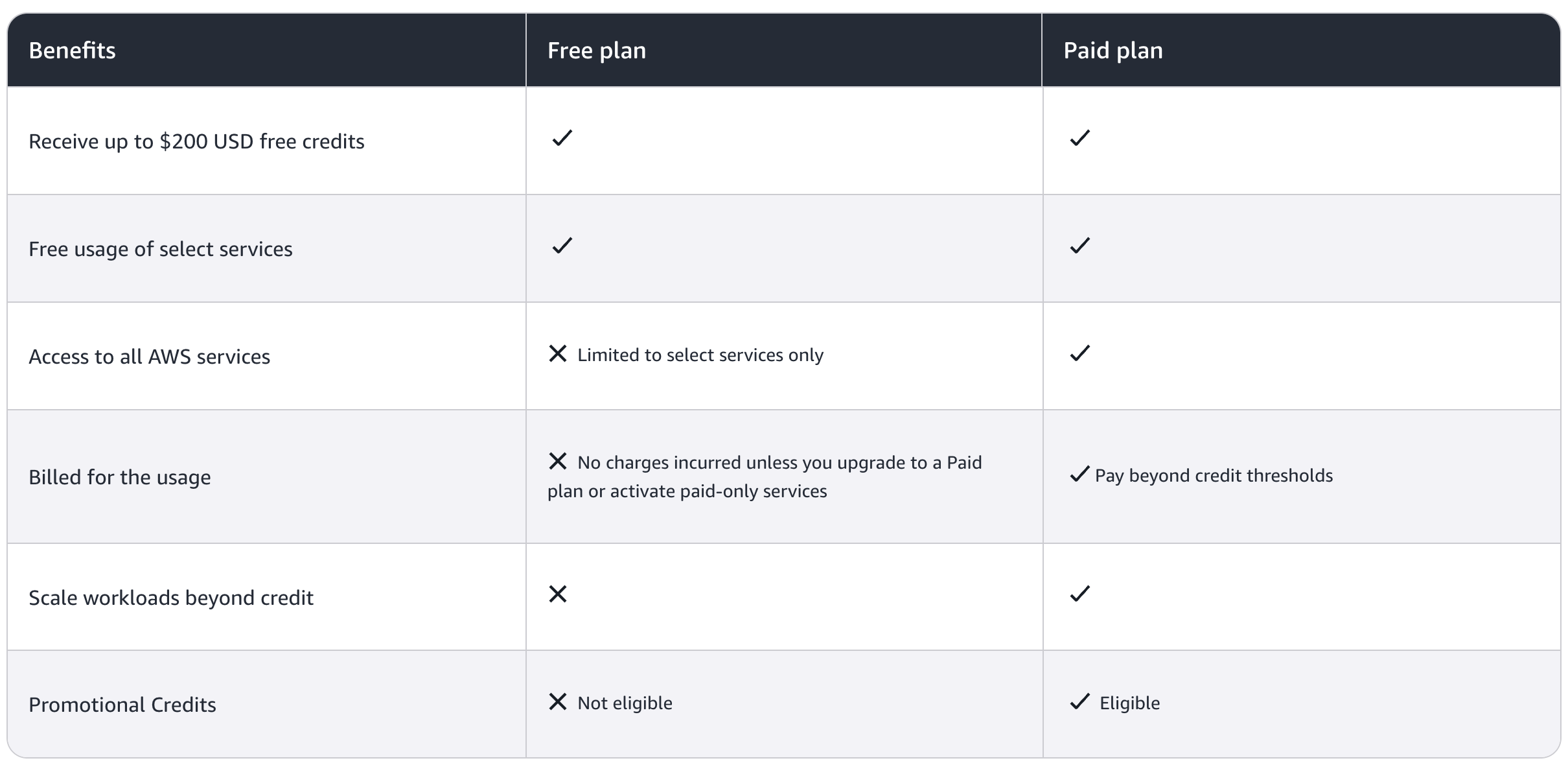
The plan you choose during signup determines which AWS services you can access, how your credits are used, and what happens when they run out.
Free plan vs. Paid plan
The Free plan is designed to eliminate unexpected charges. It limits access to services that could quickly consume your credits, including Reserved Instances, Savings Plans, AWS Support subscriptions, and certain AWS Marketplace products. If you try to use one of these services, AWS prompts you to upgrade to the Paid plan.
The Paid plan removes these restrictions and provides access to the full AWS service catalog. Once your credits are exhausted, standard pay-as-you-go pricing begins automatically.
Regardless of the plan you choose, the same 30+ always-free AWS services remain available within their monthly usage limits.
What's always free, regardless of plan or credits
More than 30 AWS services include always-free monthly usage limits that don't consume your credits and never expire. These benefits are available whether you're on the Free plan, the Paid plan, or an AWS account that's been active for years.
Some of the most commonly used always-free services include:
These allowances reset every month and remain available for as long as your AWS account exists.
For example, a personal portfolio website hosted on Amazon S3 and Amazon CloudFront, with a contact form powered by AWS Lambda and Amazon DynamoDB, can often operate entirely within these always-free limits. As traffic grows or you add additional projects to the same account, those shared monthly allowances are consumed more quickly, increasing the likelihood of charges or credit usage.
Understanding the difference between always-free services and credit-funded services is one of the easiest ways to avoid unexpected AWS costs.
Is AWS Free Tier actually free? Common ways people get charged
The short answer is yes, but only within the limits of the AWS Free Tier. Exceed those limits and you'll either consume your credits faster or, on the Paid plan, begin paying standard AWS rates.
The most common reasons users receive unexpected charges include:
- Exceeding always-free usage limits. Services such as Amazon DynamoDB and AWS Lambda include generous monthly allowances, but active workloads can exceed them. Once you pass those limits, additional usage consumes your credits or incurs standard charges, depending on your plan.
- Forgetting to cancel a short-term trial. Short-term trials are available only on the Paid plan. Once a trial ends, the service automatically switches to standard pay-as-you-go pricing unless you stop using it.
- Using services unavailable on the Free plan. Reserved Instances, Savings Plans, AWS Support subscriptions, and some AWS Marketplace products require the Paid plan. If you use them, standard AWS pricing applies.
- Data transfer charges. AWS includes 100 GB of outbound data transfer per month, but traffic between Availability Zones in the same region isn't covered by that allowance. These networking charges are easy to overlook when deploying multi-tier applications.
- Leaving resources running. Forgotten Amazon Elastic Compute Cloud (Amazon EC2) instances, Elastic Block Store (Amazon EBS) volumes, Elastic IP addresses, or load balancers can continue generating charges even if you're no longer using them.
- Running the Paid plan without budgets or alerts. Unlike the Free plan, the Paid plan continues billing after your credits are exhausted. Setting up AWS Budgets and billing alerts is one of the simplest ways to avoid unexpected costs.
Most of these charges are preventable with a few minutes of setup and regular monitoring. What isn't avoidable on the Free plan is the six-month limit or the automatic account closure once your credits are exhausted.
What happens when your Free Tier ends
What happens when your AWS Free Tier ends depends entirely on the plan you selected during signup.
On the Free plan, your account closes automatically when you reach six months or exhaust your credits, whichever comes first. AWS sends email reminders when your remaining credits reach 50%, 25%, and 10%, and again 15, 7, and 2 days before the six-month deadline. Once either limit is reached, your account is closed automatically.
Your data isn't deleted immediately. AWS retains it for 90 days, giving you time to upgrade to the Paid plan and recover your resources, including any unused credits. After 90 days, the account and all associated resources are permanently deleted.
On the Paid plan, there is no automatic account closure. Once your credits are exhausted, your account remains active and standard pay-as-you-go billing begins automatically.
Regardless of your plan, a few simple practices can help you avoid unexpected costs:
- Set AWS Budgets and billing alerts, even at a threshold as low as $1.
- Right-size resources before scaling beyond a proof of concept.
- Review running resources and tags regularly to identify unused infrastructure.
Once your workloads outgrow the AWS Free Tier, the next decision isn't whether to keep using the cloud. It's whether to continue paying on-demand prices or evaluate alternative pricing models that better match your workloads.
What to do if you need low-cost compute after your Free Tier ends
The AWS Free Tier covers more than many people expect. A simple application built with AWS Lambda, Amazon Simple Storage Service (Amazon S3), Amazon CloudFront, and Amazon DynamoDB can often remain within the always-free limits indefinitely.
As your workloads grow, AWS provides several ways to reduce costs. Savings Plans reward predictable long-term usage, Reserved Instances offer discounted pricing for committed capacity, and Spot Instances provide lower-cost compute for interruption-tolerant workloads.
If you're evaluating alternatives beyond AWS, Rackspace Spot is another option worth considering. In addition to managed Kubernetes, virtual machines, networking, storage, load balancing, and managed PostgreSQL Database as a Service (DBaaS), Rackspace Spot offers an open-market auction for Spot instances. Unlike AWS Spot Instances, where prices are determined by AWS, Rackspace Spot allows customers to bid for spare compute capacity, with bids starting as low as $0.001 per hour.
Current rates are available on the Rackspace Spot pricing page.
Conclusion
The AWS Free Tier is more flexible than its predecessor, offering up to $200 in credits alongside more than 30 always-free services. Understanding how credits work, which services remain free, and what happens when your plan ends is the best way to avoid unexpected charges.
As your workloads grow beyond the AWS Free Tier, it's worth comparing pricing models across providers. While AWS offers Savings Plans, Reserved Instances, and Spot Instances, platforms such as Rackspace Spot provide another option for organizations looking to reduce compute costs through managed Kubernetes and an auction-based marketplace for Spot instances
Frequently Asked Questions
Does AWS have a free tier?
Yes. AWS Free Tier gives new accounts a choice between a Free plan and a Paid plan. Both start with $100 in credits, which can grow to $200 by completing onboarding activities, and both include access to more than 30 always-free services with permanent monthly usage limits.
What is AWS Free Tier?
AWS Free Tier is Amazon's program for exploring AWS services without paying upfront. Since July 15, 2025, new accounts choose between a Free plan and a Paid plan, both funded by sign-up credits and supported by a collection of always-free services.
How do I get AWS Free Tier?
Create an AWS account and choose either the Free plan or Paid plan during signup. You'll need a valid payment method for identity verification. Once your account is active, you'll receive $100 in credits immediately and can earn up to $100 more by completing five onboarding activities.
Does AWS Free Tier require a credit card?
Yes. AWS requires a valid credit or debit card during signup for identity verification, even if you choose the Free plan. On the Free plan, AWS won't charge you beyond your available credits because the account closes automatically when those credits are exhausted or after six months.
How do I use AWS Free Tier?
Monitor your credits and eligible services through the AWS Billing and Cost Management console. To minimize costs, start with always-free services, set up AWS Budgets, and enable billing alerts before launching additional resources.
What can I build with AWS Free Tier?
You can build a static website with Amazon Simple Storage Service (Amazon S3) and Amazon CloudFront, create application programming interfaces (APIs) using AWS Lambda, and develop small applications backed by Amazon DynamoDB. Many beginner and personal projects can remain within the always-free limits if usage stays modest.
What happened to the old AWS Free Tier?
AWS replaced the legacy Free Tier for new accounts on July 15, 2025. The previous 12-month usage tier and universal short-term trials were replaced with the new Free plan and Paid plan model. Accounts created before that date continue using the legacy AWS Free Tier.
Can I exceed the AWS Free Tier?
Yes. If you exceed the limits of always-free services or consume all of your available credits, additional usage either reduces your remaining credits or, on the Paid plan, incurs standard AWS charges. Monitoring usage and setting billing alerts helps prevent unexpected costs.
Will I be charged automatically when my AWS Free Tier ends?
It depends on your plan. The Free plan never charges you automatically. Instead, your account closes after six months or when your credits are exhausted. The Paid plan remains active and automatically switches to standard pay-as-you-go pricing once your credits run out.
How long does AWS Free Tier last?
The Free plan lasts for up to six months or until your credits are exhausted, whichever comes first. Accounts created before July 15, 2025, remain on the legacy AWS Free Tier, which includes a 12-month free usage period for eligible services.
Which AWS services are always free?
More than 30 AWS services include always-free monthly usage limits. Popular examples include AWS Lambda, Amazon DynamoDB, Amazon Simple Storage Service (Amazon S3), Amazon CloudFront, and Amazon CloudWatch. These allowances reset every month and don't consume your sign-up credits.
Is there a good alternative to AWS if I need inexpensive compute?
AWS offers Savings Plans, Reserved Instances, and Spot Instances for reducing compute costs. If you're looking beyond AWS, Rackspace Spot is worth evaluating. It provides managed Kubernetes, virtual machines, managed PostgreSQL Database as a Service (DBaaS), networking, storage, load balancing, and an auction-based marketplace for Spot instances that helps reduce compute costs for suitable workloads.
Can I run Kubernetes cheaply while I'm still learning?
Yes. Amazon Elastic Kubernetes Service (Amazon EKS) is available on AWS, but it extends beyond the AWS Free Tier. If you're looking for a lower-cost Kubernetes platform, Rackspace Spot provides managed Kubernetes with a free control plane, built-in autoscaling, and support for Terraform and the spotctl command-line interface (CLI), making it a practical platform for learning and experimentation.
Is Rackspace Spot cheaper than AWS?
For interruption-tolerant workloads, it can be. Rackspace Spot's auction-based marketplace for Spot instances allows customers to bid for spare compute capacity, with bids starting as low as $0.001 per hour. Organizations running batch processing, continuous integration and continuous delivery (CI/CD) pipelines, extract, transform, and load (ETL) jobs, and artificial intelligence (AI) training often evaluate Rackspace Spot as a lower-cost alternative to traditional on-demand compute.
Which cloud provider has the best free tier?
Amazon Web Services (AWS), Microsoft Azure, and Google Cloud all offer free tiers, but they differ in structure and service limits. AWS now uses a credit-based model with always-free services, while Azure and Google Cloud provide different combinations of credits and free resources. The best choice depends on the services and workloads you plan to run.