


Before you deploy on Azure, you need a realistic estimate of what your infrastructure will cost. Whether you're planning a cloud migration, deploying a new application, or estimating the cost of scaling an existing workload, the Azure Pricing Calculator is usually the first place to start.
The Azure Pricing Calculator helps you estimate the cost of Azure services before deployment based on your anticipated usage, service configuration, region, and pricing model. It uses Microsoft's retail pricing to estimate what your planned infrastructure is expected to cost, making it easier to plan budgets and compare different deployment options. While it's an excellent planning tool, actual costs can differ as workloads evolve, usage patterns change, and additional services are introduced after deployment.
This guide explains how the Azure Pricing Calculator works, how to build accurate estimates for Azure services such as Virtual Machines, Storage, Backup, and Site Recovery, and why actual cloud costs often differ from initial estimates. You'll also learn why Kubernetes workloads are particularly difficult to estimate using a static pricing calculator.
What is the Azure Pricing Calculator?
The Azure Pricing Calculator is a free, web-based Microsoft tool that helps you estimate the cost of Azure services before deployment. Also referred to as the Azure Cost Calculator or Azure cost estimator, it turns your anticipated Azure usage into an estimated cost, making it easier to plan budgets, compare deployment options, and forecast cloud spending.
You build an estimate by selecting the Azure services you plan to use and configuring them to match your expected workload. The calculator estimates monthly and upfront costs using Microsoft's current retail pricing, which is sourced from the Azure Retail Prices API.
You don't need an Azure account to use the calculator, and it doesn't provision or deploy Azure resources. However, if you sign in with an eligible Azure billing account, you can estimate costs using your negotiated pricing instead of standard retail pricing.
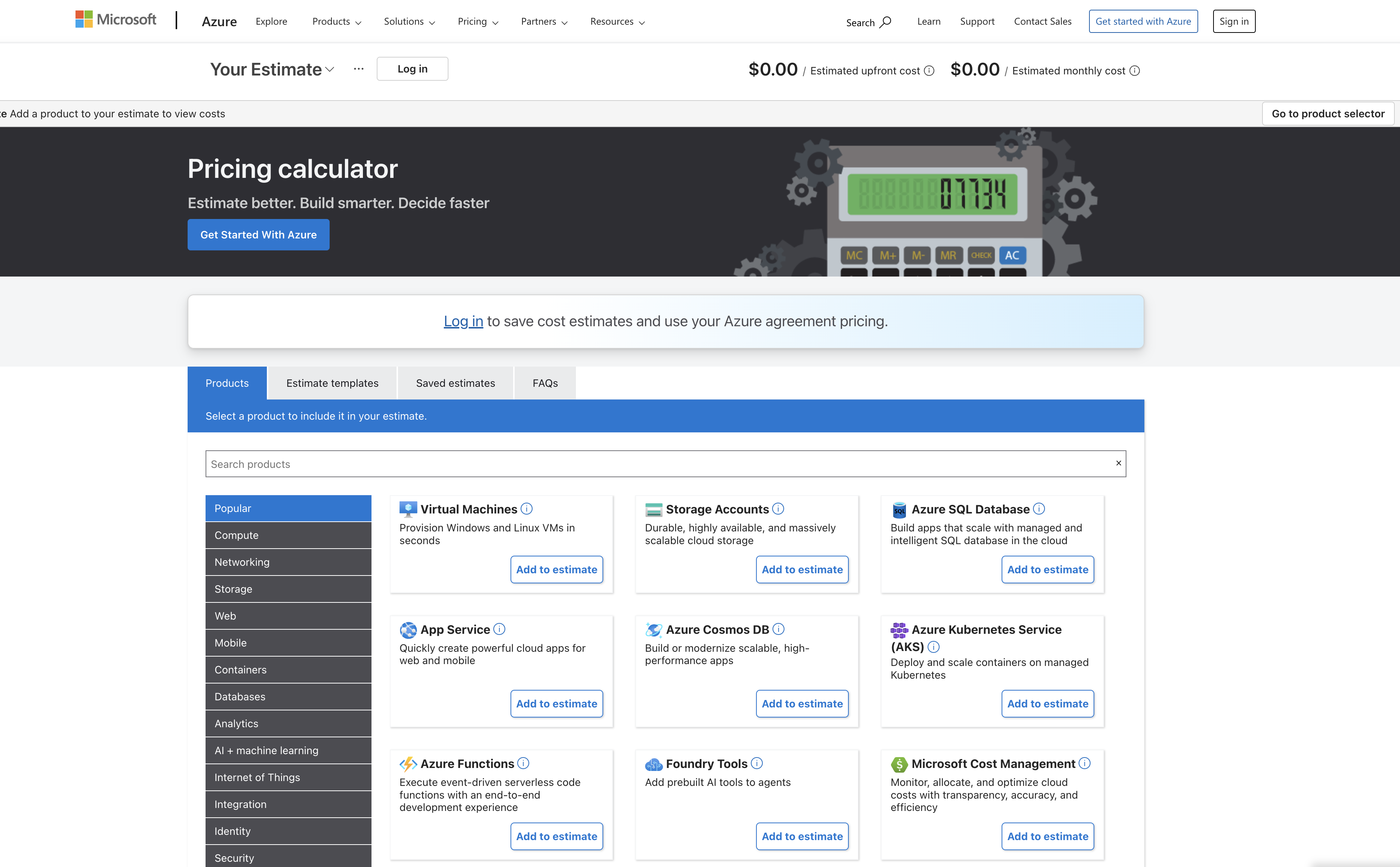
Every estimate follows the same workflow. First, use the product picker to search or browse Azure services. Next, configure each service by selecting options such as region, operating system, pricing tier, and expected monthly usage. As you update these settings, the estimation summary recalculates automatically, allowing you to build an estimate for a complete Azure architecture rather than pricing each service individually.
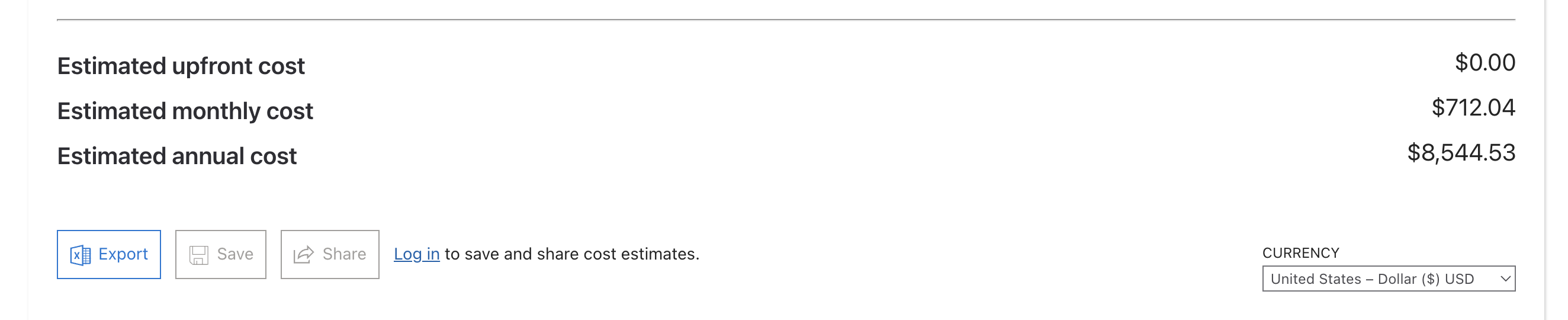
Once your estimate is complete, you can save it, export it to Excel, share it with colleagues, or create multiple estimates to compare different deployment scenarios before deployment.
How to Use the Azure Pricing Calculator: Step by Step
Building an accurate estimate starts with entering the right configuration. The Azure Pricing Calculator estimates costs based on the services, settings, and expected usage you provide, so taking a few minutes to configure each option correctly will produce a much more realistic estimate.
1. Add a Service to Your Estimate
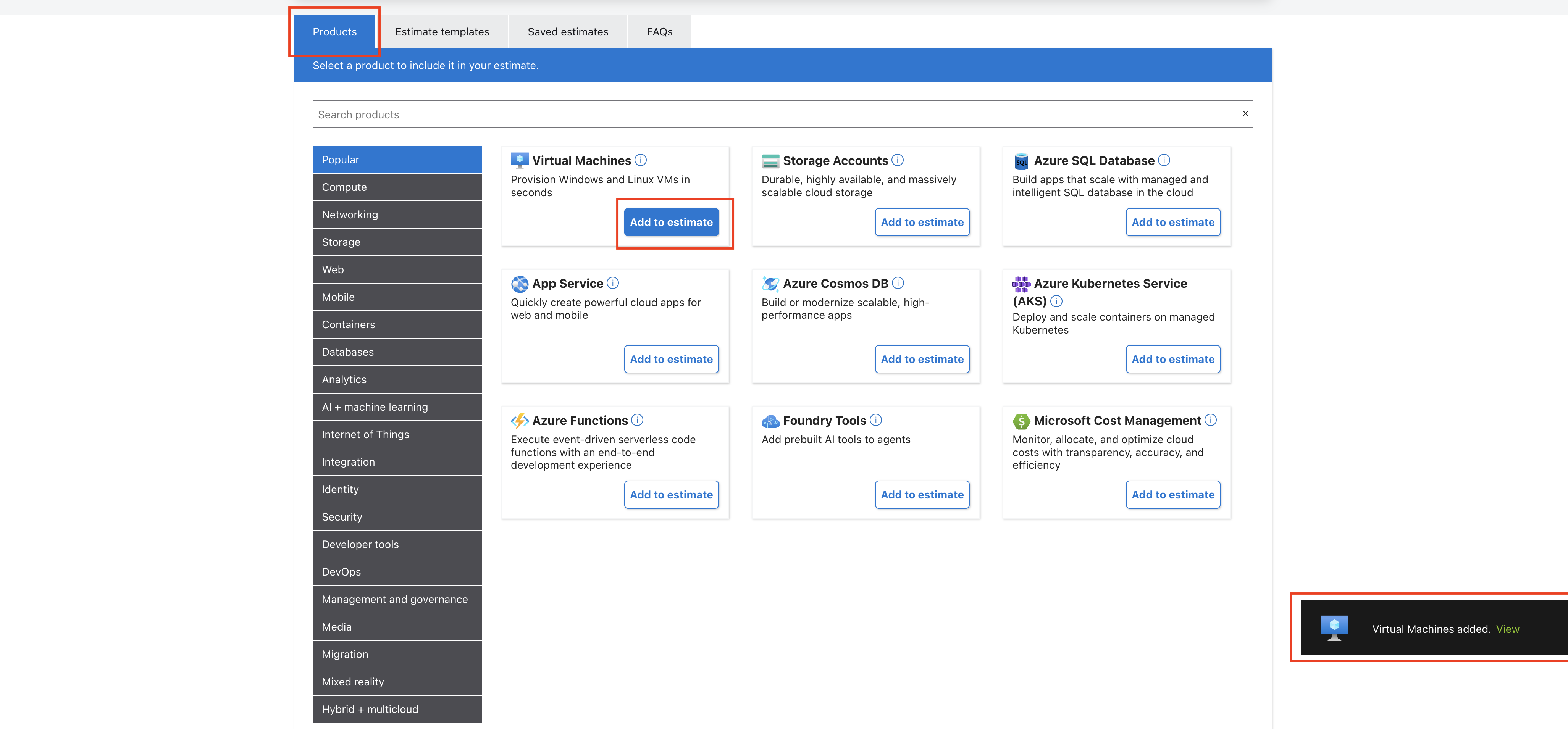
From the Products tab, search for the Azure service you want to estimate or browse the available categories. Once you've found the service, click Add to estimate. For this walkthrough, we'll use Virtual Machines, one of the most commonly estimated Azure services.
2. Configure the Service
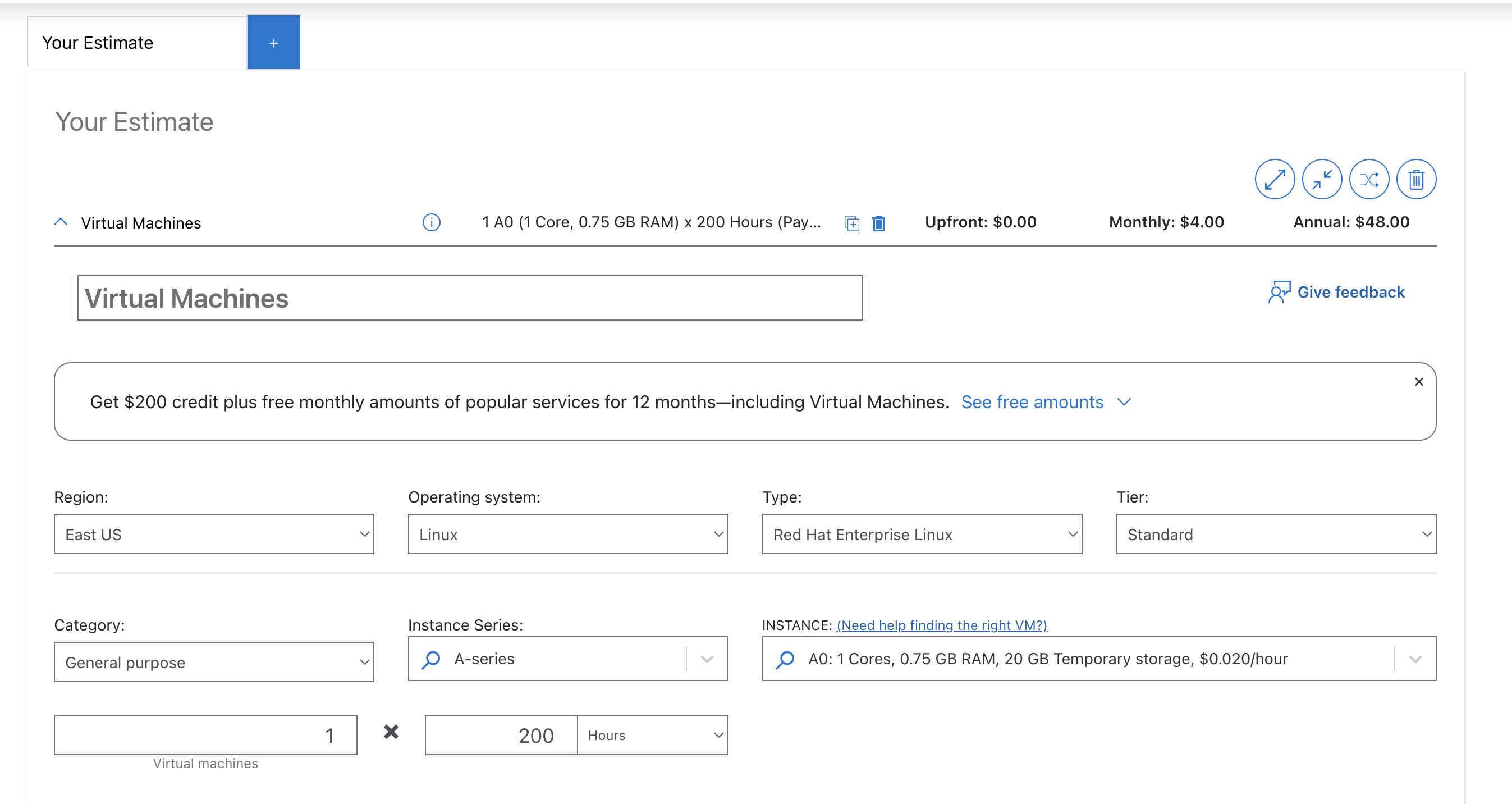
After adding the service, configure the settings that affect pricing, including the region, operating system, VM size, and expected monthly usage. Every change updates the estimate automatically, making it easy to compare different configurations.
3. Choose a Pricing Model
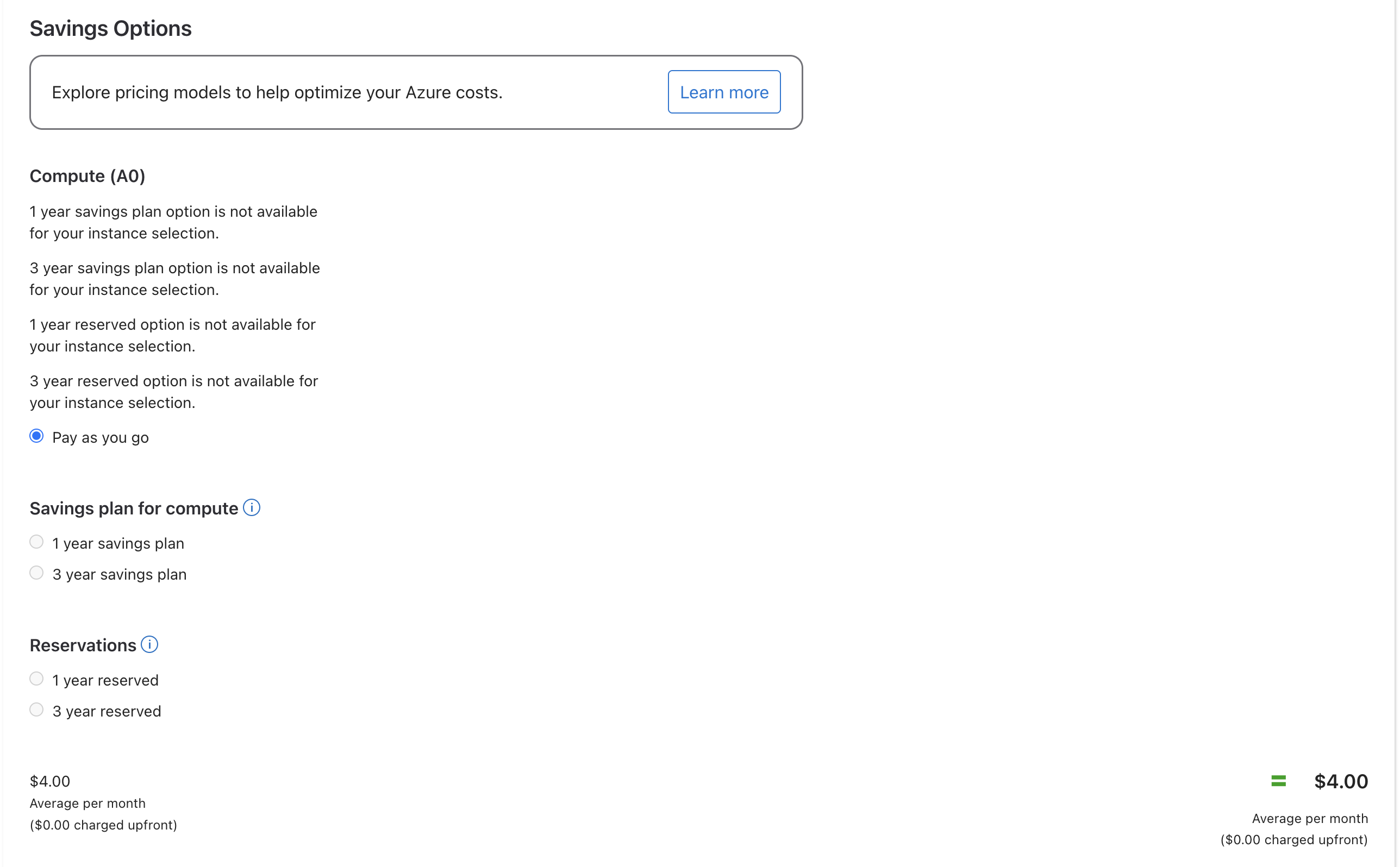
Select the pricing option that best matches your workload. Depending on the service, Azure may offer Pay-As-You-Go, Reserved Instances, or Azure Savings Plans. Longer commitments typically reduce costs, while Pay-As-You-Go offers the greatest flexibility.
4. Add Supporting Services
Continue adding every Azure service your deployment requires, such as managed disks, networking resources, load balancers, backup, or storage. Estimating all services together provides a much more accurate picture of your expected monthly costs.
5. Review Your Estimate
Check that your region, resource sizes, usage hours, and pricing options reflect your planned deployment. If you're comparing multiple scenarios, save separate estimates instead of repeatedly editing the same one.
6. Save and Export
Once you're satisfied with the estimate, save it for future reference or export it to Excel to share with colleagues or include it in budgeting and planning documents.
Estimating Costs for Specific Azure Services
The Azure Pricing Calculator can estimate complete cloud architectures, but many users simply want to calculate the cost of a single Azure service. While the process is similar for every service, the pricing factors vary depending on what you're deploying. Below are the main settings to pay attention to when estimating some of Azure's most commonly used services.
Estimate Azure Virtual Machine Costs
When estimating the cost of an Azure Virtual Machine (VM), start by configuring the region, operating system, VM series, instance size, usage hours, and pricing model. Each of these settings affects the final estimate.
VM series determine the balance of CPU, memory, and storage resources. General-purpose series such as Dv5 and Dsv5 are suitable for most business applications, while compute-optimized and memory-optimized series are designed for more specialized workloads. Selecting a larger or more specialized VM than your application requires increases costs without improving performance.
The pricing model also has a significant impact on the estimate. Depending on the VM and region, you may be able to compare the different pricing models like the Pay-As-You-Go, Reserved Instances, and Azure Savings Plans to see how different commitment options affect your monthly costs.
Estimate Azure Storage Costs
Azure Storage estimates are based on more than just the amount of data you store. The calculator considers three primary factors:
- Capacity – the amount of data stored.
- Transactions – how often data is read from or written to storage.
- Redundancy – the level of data replication you choose.
Azure offers several redundancy options, including Locally Redundant Storage (LRS), Zone-Redundant Storage (ZRS), and Geo-Redundant Storage (GRS). Higher redundancy levels provide greater durability and availability but also increase storage costs.
When estimating storage, configure all three factors in the calculator. Estimating capacity alone often understates the total cost, especially for applications with frequent read and write operations.
Estimate Azure Backup Costs
Azure Backup costs depend primarily on the number of protected resources and your chosen retention policy. Protected resources can include virtual machines, databases, Azure Files, and other supported workloads.
Longer retention periods create more recovery points, increasing the amount of backup storage required. When estimating Azure Backup costs, consider both the protection charge and the storage required to retain backups over time.
Estimate Azure Site Recovery Costs
Azure Site Recovery estimates are driven by two main factors: the amount of data continuously replicated to the recovery region and the compute resources used during failover testing.
Replication costs increase as workloads grow and data changes more frequently. Regular failover tests also provision temporary compute resources, which are billed separately while the test is running. Including both replication and testing in your estimate provides a more realistic picture of disaster recovery costs.
Even a carefully configured estimate has limitations. Some costs only become apparent after workloads begin running, particularly when infrastructure scales dynamically or additional services are introduced over time. Understanding these limitations helps explain why actual Azure bills often differ from initial estimates, which we'll explore in the next section.
Why Estimates Differ from Actual Azure Costs
The Azure Pricing Calculator is one of the best tools for estimating cloud costs before deployment, but every estimate has limitations. Some costs are overlooked during planning, while others only become apparent once workloads are running in production.
In most cases, the difference between an Azure Pricing Calculator estimate and your actual Azure bill falls into one of two categories:
- Supporting services or charges that weren't included in the estimate.
- Dynamic workloads whose infrastructure changes after deployment.
Understanding both helps you build more realistic estimates and avoid unexpected cloud costs later.
Commonly Missed Costs
One of the most common reasons Azure bills exceed expectations is that supporting services are never added to the estimate. It's easy to focus on compute and storage while overlooking the infrastructure required to keep an application running.
The following services are among the most commonly overlooked when estimating Azure costs:
Most of these services won't appear in your estimate unless you explicitly search for and add them. An estimate built around Virtual Machines alone may look complete while still missing several important cost components.
AKS and Kubernetes-Specific Blind Spots
Kubernetes presents a different kind of estimation challenge. The Azure Pricing Calculator estimates a static infrastructure configuration, while Kubernetes clusters continuously adjust infrastructure as application demand changes.
When estimating an Azure Kubernetes Service (AKS) cluster, you specify a fixed number of nodes, their virtual machine size, and the pricing model. Once the cluster is deployed, however, Kubernetes schedules pods based on CPU and memory requests, while the Cluster Autoscaler automatically adds or removes worker nodes as demand changes.
As traffic fluctuates, the infrastructure running your workloads rarely matches the configuration used to build the original estimate.
Several factors contribute to this difference:
- Clusters are often overprovisioned to maintain spare capacity for unexpected traffic spikes.
- Resource requests don't always reflect actual application usage.
- The AKS control plane and optional premium features introduce additional costs beyond worker nodes.
- Autoscaling continuously changes infrastructure consumption throughout the day.
The Azure Pricing Calculator remains an excellent planning tool, but it's designed around fixed infrastructure. Kubernetes, by design, is dynamic, making precise long-term cost estimates much more difficult.
Alternative Pricing Models for Dynamic Workloads
Infrastructure configuration isn't the only factor that affects Kubernetes costs. The pricing model you choose can have an equally significant impact.
Microsoft offers Azure Spot Virtual Machines for interruption-tolerant workloads, allowing organizations to reduce compute costs by using spare Azure capacity at discounted rates. These instances are commonly used for batch processing, CI/CD pipelines, testing environments, and other workloads that can tolerate interruptions.
Rackspace Spot approaches the problem differently.
Instead of offering provider-managed Spot discounts, Rackspace Spot uses an open-market auction model where customers bid for compute capacity. Spot instance bids start as low as $0.001 per hour, with pricing determined by real-time supply and demand rather than a fixed provider discount.
For Kubernetes environments, Rackspace Spot combines this pricing model with the Rackspace Spot Autoscaler, allowing node pools to scale according to actual application demand instead of remaining fixed at the capacity estimated before deployment.
This model is particularly well suited for workloads such as:
- Batch processing
- Continuous Integration and Continuous Delivery (CI/CD)
- Machine learning and AI training
- Data processing pipelines
- Other interruption-tolerant Kubernetes workloads
Mission-critical applications that require guaranteed availability are generally better suited to on-demand infrastructure or reserved capacity.
If you're comparing cloud providers or evaluating alternative infrastructure platforms, it's also worth estimating costs across multiple environments before making a decision. In addition to Azure's Pricing Calculator, Rackspace Spot provides its own cloud cost calculators, allowing you to quickly estimate pricing for virtual machines, managed Kubernetes clusters, and other cloud resources before deployment.
Key Takeaway
The Azure Pricing Calculator is an excellent starting point for forecasting Azure infrastructure costs, but it shouldn't be treated as a prediction of your final bill.
As workloads evolve, additional services are introduced, and Kubernetes clusters begin scaling dynamically, actual costs naturally diverge from the original estimate. Building comprehensive estimates, accounting for supporting services, selecting the appropriate pricing model, and continuously monitoring cloud usage after deployment are all essential practices for keeping Azure spending under control.
Frequently Asked Questions
How do I calculate Azure costs?
Use the Azure Pricing Calculator to estimate the cost of the Azure services you plan to deploy. Select each service, configure the region, expected usage, pricing model, and resource size, then add supporting services such as storage, networking, bandwidth, and monitoring. Including every component in a single estimate provides a much more accurate view of your expected Azure costs.
What is the Azure Pricing Calculator used for?
The Azure Pricing Calculator helps you estimate the monthly and annual cost of Azure resources before deployment. It's commonly used to budget for cloud migrations, plan new workloads, compare pricing models such as Pay-As-You-Go, Reserved Instances, and Azure Savings Plans, and evaluate different infrastructure configurations before committing to a deployment.
How do I calculate Azure Virtual Machine (VM) costs?
To estimate Azure Virtual Machine costs, configure the VM's region, operating system, instance series, VM size, usage hours, and pricing model in the Azure Pricing Calculator. You should also include related resources such as managed disks, networking, and backup services to avoid underestimating the total cost of running the virtual machine.
How do I calculate Azure Storage costs?
Azure Storage pricing depends on three primary factors: the amount of data stored, the number of storage transactions, and the redundancy option you choose, such as Locally Redundant Storage (LRS), Zone-Redundant Storage (ZRS), or Geo-Redundant Storage (GRS). Configure all three in the Azure Pricing Calculator to produce a more realistic estimate.
How do I calculate Azure Backup costs?
Azure Backup costs are determined by the number of protected instances and the retention period configured for each backup policy. Longer retention periods generate more recovery points, increasing the amount of backup storage required and, therefore, the total cost.
How do I calculate Azure Site Recovery costs?
Azure Site Recovery pricing is based primarily on the amount of data continuously replicated to the recovery region and the compute resources used during failover testing. Running regular disaster recovery tests creates temporary virtual machines that are billed while they're active, so they should be included when estimating recovery costs.
How accurate is the Azure Pricing Calculator?
The Azure Pricing Calculator provides a reliable estimate based on the configuration you enter, but it's not a prediction of your final Azure bill. Actual costs can differ if workloads scale dynamically, usage patterns change, or supporting services such as VPN Gateway, Azure Monitor, bandwidth, or Microsoft Entra External ID aren't included in the estimate.
Why does my Azure bill differ from the Pricing Calculator estimate?
Differences usually occur because workloads change after deployment or some services weren't included in the original estimate. Autoscaling platforms such as Azure Kubernetes Service (AKS), variable network traffic, storage growth, monitoring costs, and additional Azure services can all increase actual spending beyond the initial estimate.
Do I need an Azure account to use the Azure Pricing Calculator?
No. You can use the Azure Pricing Calculator without signing in to an Azure account. However, signing in allows eligible customers to estimate costs using negotiated pricing associated with their organization's Azure agreement instead of standard retail pricing.
Can I export my Azure Pricing Calculator estimate?
Yes. The Azure Pricing Calculator allows you to save, share, and export estimates, making it easier to collaborate with colleagues, compare deployment scenarios, and include projected Azure costs in budgeting or procurement discussions.
Does the Azure Pricing Calculator include Azure Savings Plans?
Yes. For supported services such as Virtual Machines, the Azure Pricing Calculator lets you compare multiple pricing options, including Pay-As-You-Go, Reserved Instances, and Azure Savings Plans. Comparing these options helps you determine which pricing model offers the best value for your expected workload.