


"AWS is ridiculously expensive when it comes to running a database and a web server 24/7. To be honest, I can't afford it. Is there a cheaper alternative to it?"
EC2 is the line item most teams notice first when an AWS bill gets out of hand. It is billed by the second, spread across dozens of instance families, and layered with reserved capacity, savings plans, and spot markets that most engineers never have time to fully optimize. Meanwhile, cheaper alternatives that can run the exact same virtual machine workloads already exist.
The options for AWS EC2 alternatives in 2026 range from hyperscalers that match EC2 feature-for-feature, to developer-friendly platforms like Rackspace Spot that solve the cost problem at a more fundamental level: an open-market auction instead of a fixed, opaque rate card. The right answer depends entirely on your workload.
This guide covers 10 AWS EC2 alternatives in 2026, with honest assessments of pricing, workload fit, strengths, and the specific teams each one is built for.
Here is a quick look at the 10 AWS EC2 alternatives covered in this guide:
- Rackspace Spot
- DigitalOcean
- Google Cloud Platform
- Microsoft Azure
- Vultr
- Hetzner
- Oracle Cloud Infrastructure
- Akamai Connected Cloud
- OVHcloud
- IBM Cloud
What is AWS EC2?
Amazon Elastic Compute Cloud (EC2) is AWS's core virtual machine service, letting teams rent compute capacity by the second across more than 800 instance types spanning general purpose, compute-optimized, memory-optimized, storage-optimized, and accelerated (GPU) families. It is the foundational building block most other AWS services sit on top of. EC2 runs on the AWS Nitro System, a combination of dedicated hardware and lightweight hypervisors that offload virtualization, storage, and networking functions away from the host CPU, giving instances near bare-metal performance and hardware-level isolation between tenants.
EC2 offers four purchasing models: On-Demand (pay the listed hourly rate with no commitment), Reserved Instances and Savings Plans (discounts of 37-72% in exchange for a 1- or 3-year commitment), and Spot Instances (discounts of up to 90% for interruptible workloads, priced by an algorithm rather than an open market). A small general-purpose instance like a t3.medium (2 vCPUs, 4 GiB RAM) runs about $0.0416/hour, or roughly $30/month, on-demand in us-east-1.
EC2 became the default because it was first, has the deepest instance catalog, and most engineers already know it. But for smaller teams and startups running straightforward compute workloads, that same depth turns into billing complexity that costs more than it should.
Why teams look for EC2 alternatives
Unpredictable billing. Compute, storage, networking, and data transfer all bill separately, and costs scale invisibly as usage grows.
Reserved capacity requires guessing right. Savings Plans and Reserved Instances only pay off if you commit to the correct instance family and term length in advance, a wrong guess locks in savings you can't fully use.
Spot pricing is opaque. AWS Spot Instance prices are set by an internal algorithm, not visible supply and demand, making it hard to predict when a workload will be reclaimed or what it will cost next week.
Vendor lock-in. AMIs, security groups, and instance metadata patterns are AWS-specific enough that migrating a large EC2 fleet elsewhere takes real engineering time.
Cloud repatriation. Teams that over-provisioned EC2 after a scaling event are moving compute back to cheaper alternatives after cost overruns.
These are the specific factors to evaluate against when choosing an alternative.
Top AWS EC2 alternatives in 2026
1. Rackspace Spot

Rackspace Spot is a cloud-native, OpenStack-powered infrastructure platform that provisions virtual machines called Cloudspaces through an open-market auction. Cloudspace VMs run on a KVM-based hypervisor layer built on top of Rackspace's OpenStack Nova compute pool, giving each instance an isolated virtual CPU, memory, and network allocation without the overhead of a shared control plane. Instead of AWS's opaque Spot pricing algorithm, teams place real bids for compute capacity, and instances provision the moment a bid matches available supply. Bids start as low as $0.001/hour, working out to roughly $0.72/month for a single continuously running server.
Best for: Teams running batch jobs, distributed AI/ML training, CI/CD pipelines, ETL, and rendering workloads that can tolerate interruption or are built with checkpointing.
The history of AWS spot instances shows that AWS previously ran an open-market auction before dismantling it in 2017 in favor of an algorithmic model. Rackspace Spot revives the original mechanism, passing price savings directly to users instead of setting rates behind closed doors.
Key features:
- Three compute flavors: General Purpose (balanced vCPU-to-RAM), Compute Heavy (more vCPU per GB of RAM, for CPU-bound jobs), and Memory Heavy (more RAM per vCPU, for caching and in-memory workloads), each spanning Medium (2 vCPU) through Double Extra Large (16 vCPU) sizes.
- Two data center generations with different economics: Gen-1 data centers run on older Intel Xeon E5 v2 hardware with a flat $0.001/hr spot floor across every flavor and size, topping out at 2,000 Mbps of bandwidth on the largest instances; Gen-2 data centers run newer hardware with spot floors scaling from $0.01/hr to $0.15/hr depending on size, and are the only generation offering GPU-backed servers.
- GPU Virtual Servers in select Gen-2 regions, including a 24-vCPU/128 GB RAM configuration with 1x NVIDIA A30 and a 48-vCPU/128 GB RAM configuration with 1x NVIDIA H100, both with encrypted multipath NVMe storage and 25 GiB networking.
- Open-market auction pricing: bids start at $0.001/hr for a server, with prices set by real supply and demand rather than a rate card AWS controls unilaterally.
- On-demand and spot instances from the same platform, so teams can mix guaranteed capacity with interruptible capacity for the same application.
- Second-by-second billing with no long-term contracts, reserved capacity purchases, or savings-plan commitments required to see meaningful savings.
- GitOps-ready infrastructure: Terraform provider support and the spotctl CLI let teams provision virtual machines as code across development, staging, and production.
- Persistent Volumes: Rackspace Spot offers persistent volumes across SATA (
sata,sata-large) and SSD (ssd,ssd-large,spot-ceph) storage classes, starting at $0.02/GB-month, with high-performance NVMe (ssdv2,ssdv2-performance) available on Gen-2 data centers at $0.06/GB-month. - Load Balancers: Rackspace Spot offers load balancers at a flat $10/month with no per-traffic charges.
- Database-as-a-Service (DBaaS) for PostgreSQL. For teams looking to switch from Vultr's managed databases, Rackspace Spot's DBaaS delivers fully managed PostgreSQL.
Strengths:
- Lowest-cost compute: transparent, market-driven pricing with full visibility into capacity and price thresholds before bidding, unlike AWS Spot's black-box algorithm.
- No long-term contracts: teams pay for what they use, billed to the second, with no reserved-instance guesswork required to unlock savings.
- Node pre-emption alerts: teams running spot instances get advance notice before a server faces pre-emption, giving engineers time to react before interruption.
Weaknesses:
- Rackspace Spot currently supports only managed PostgreSQL as its Database-as-a-Service offering, compared to the broader range of managed database engines available from the major hyperscalers.
- Smaller regional footprint: fewer data center locations than AWS, which limits options for latency-sensitive or globally distributed deployments.
- Server variety is limited to Rackspace's cloud capacity pool: teams needing highly specific instance configurations may find fewer options than AWS's 800-plus instance types.
Pricing
Compute pricing follows an open-market auction model with second-by-second billing. Market rates start from $0.001/hour per server, and a continuously running instance can cost as little as $0.72/month.
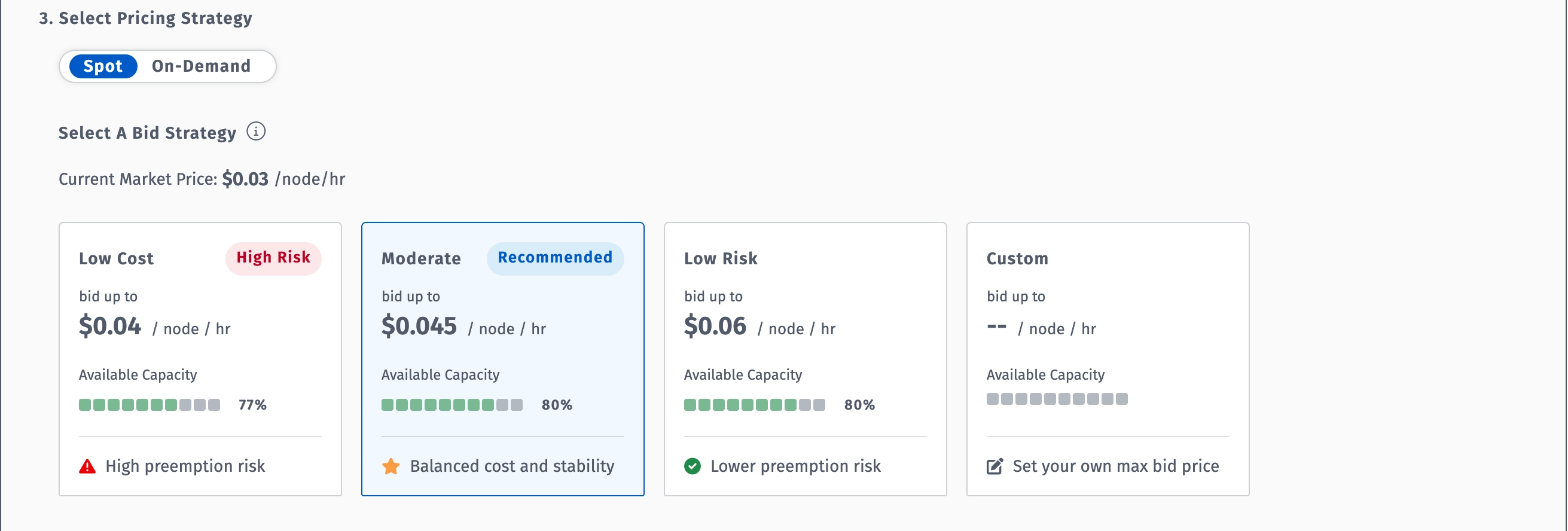
The comparison below uses a common mid-size general-purpose VM, 4 vCPUs and 16 GB of RAM, the size most teams actually run for a production web server or application backend, priced across AWS, Azure, Google Cloud, and Rackspace Spot on both on-demand and spot/market rates:
* Current market price for a comparable 4 vCPU, 16 GB RAM VM in Rackspace Spot's San Jose region at the time of writing. Prices vary by region and market demand.
The gap holds when you look at spot/market pricing on the same instance size:
* Current market price for a comparable 4 vCPU, 16 GB RAM Spot VM in Rackspace Spot's San Jose region at the time of writing. Prices fluctuate based on supply and demand.
The takeaway: Rackspace Spot's on-demand rate for this instance size already undercuts every major hyperscaler's on-demand price by roughly 79%.
2. DigitalOcean

DigitalOcean is a developer-focused cloud platform built for startups and small-to-medium teams. Its virtual machines, called Droplets, run on KVM with dedicated Intel and AMD hardware beneath a straightforward five-category sizing model, trading AWS's hundreds of instance types for flat-rate pricing and predictable monthly caps.
Best for: Startups and small engineering teams who need EC2-equivalent compute without AWS's operational complexity.
Key features:
- Basic Droplets: shared-vCPU instances from $4/month, ideal for bursty, low-traffic workloads that don't need dedicated CPU threads.
- General Purpose Droplets: dedicated vCPUs at roughly a 4:1 memory-to-CPU ratio, ranging from 2 to 60 vCPUs and 8 GB to 240 GB of RAM; Premium variants add up to 10 Gbps outbound networking on newer Intel Xeon Scalable hardware.
- CPU-Optimized Droplets: a 2:1 memory-to-CPU ratio with dedicated vCPUs at 2.6 GHz or higher, scaling from 2 to 60 vCPUs and 4 GB to 120 GB RAM, built for media streaming, gaming, and data analytics.
- Memory-Optimized Droplets: 8 GiB of RAM per vCPU, scaling up to 32 vCPUs and 256 GB RAM, aimed at in-memory databases like Redis and large working-set analytics.
- Storage-Optimized Droplets: local NVMe SSDs tuned for transaction-heavy workloads needing an order-of-magnitude faster disk I/O than regular SSD-backed plans.
- Per-second billing (effective January 2026) with a 60-second minimum charge, cutting costs on short-lived jobs like CI runs and batch processing.
Strengths:
- The UI continues to feel like the gold standard for cloud consoles: clean, intuitive, and easy to navigate.
- NVMe-backed storage with sequential reads scaling past 1.7 GB/s at 512k block size, strong for database and log-heavy workloads.
Weaknesses:
- CPU benchmark performance sits below competitors in the same price bracket in 2026. A Geekbench 6 single-core score of 772 is the honest weak point for CPU-intensive workloads.
- No phone support, no money-back guarantee, and a smaller global footprint than Vultr's 32 regions.
Pricing
Droplets from $4/month. Managed databases from $15/month.
3. Google Cloud Platform
Google Cloud Platform (GCP) is an enterprise hyperscaler with a strong position in machine learning, analytics, and general-purpose compute. Compute Engine organizes its virtual machines into four machine families, each targeting a different resource profile, and supports both predefined and fully custom vCPU-to-memory configurations. One of two primary options for teams evaluating alternatives to both AWS and Azure.
Best for: Teams with ML/AI workloads or BigQuery pipelines needing hyperscaler-grade reliability for their compute layer.
Key features:
- General purpose (E2, N2, N2D, C4D): E2 covers cost-efficient shared and standard workloads from 2 to 32 vCPUs; N2 and N2D scale up to 128 and 224 vCPUs respectively with flexible memory-per-vCPU ratios and up to 100 Gbps networking.
- Compute-optimized (C2, C2D): C2 offers 4 to 60 vCPUs on Intel Cascade Lake for single-threaded HPC and gaming workloads; C2D scales to 112 vCPUs and up to 896 GB RAM on AMD EPYC Milan with up to 3 TiB of attachable local SSD.
- Memory-optimized (M1, M2, M3): built for SAP HANA and other in-memory databases, with M-series machines scaling up to hundreds of vCPUs and multiple terabytes of RAM.
- Accelerator-optimized (A2, A3, G2): pre-attached NVIDIA GPUs for ML training and inference, with flexible GPU attachment (T4, P4, V100) also available on general-purpose N1 instances.
- Custom machine types that let you set exact vCPU-to-memory ratios instead of choosing from fixed instance families.
- Sustained-use discounts that apply automatically the longer an instance runs, without requiring an upfront commitment.
Strengths:
- Compute discounts apply automatically the longer an instance runs, unlike AWS which requires upfront commitment for a comparable discount.
- Per-second billing across the full Compute Engine catalog, with no minimum billing increment.
Weaknesses:
- Egress fees and inter-region transfer charges create the same unpredictability as AWS.
- Proprietary services create vendor lock-in over time, making migration increasingly difficult the deeper you build into the ecosystem.
Pricing
Compute Engine from $0.006/hour. Free tier includes one e2-micro instance per month permanently, with 30 GB standard persistent disk and 1 GB outbound transfer.
4. Microsoft Azure

Microsoft Azure is a cloud computing platform offering a broad range of services including virtual machines, databases, AI tools, and hybrid cloud infrastructure. Azure organizes its VM catalog into letter-coded series, each targeting a specific vCPU-to-memory profile, with naming conventions that encode processor vendor, storage type, and generation directly into the SKU. It is best known for its deep integration with the Microsoft ecosystem, including Windows Server, SQL Server, and Microsoft 365.
Best for: Organizations running Microsoft workloads, teams with existing Windows Server or SQL Server infrastructure, and enterprises that need a proven path from on-premises VMs to the cloud without abandoning their current stack.
Key features:
- B-series: burstable, low-cost VMs that accumulate CPU credits during idle periods for occasional bursts of demand, suited to dev/test and low-traffic workloads.
- D-series: general-purpose VMs with a balanced vCPU-to-memory ratio, scaling from 2 to 96 vCPUs across Intel and AMD (the "a" sub-family) variants, with optional local NVMe temp disk (the "d" sub-family).
- E-series: memory-optimized VMs ranging from 2 to 64 vCPUs and 16 to 432 GiB RAM, built for relational databases and in-memory caching; high-memory Easv6 variants reach 96 vCPUs and 672 GiB on 4th-gen AMD EPYC.
- F-series: compute-optimized VMs with a 2:1 vCPU-to-memory ratio for CPU-bound analytics and batch processing.
- M-series: ultra memory-optimized VMs scaling up to 416 vCPUs and multiple terabytes of RAM for SAP HANA and other massive in-memory workloads.
- N-series: GPU-accelerated VMs (NV, ND, NC families) for AI training, inference, and visualization workloads.
- Azure Hybrid Benefit: customers with Windows Server Software Assurance can apply existing licenses to Azure VMs at no additional cost.
- Azure Spot Virtual Machines for interruptible workloads at a discount off pay-as-you-go rates.
Strengths:
- Azure Hybrid Benefit produces real compute savings for organizations already paying for Microsoft E3 or E5 licenses, with no AWS equivalent.
- Deep integration with existing Windows Server and Active Directory infrastructure simplifies lift-and-shift migrations.
Weaknesses:
- Pricing complexity mirrors AWS. Egress charges, storage transaction costs, and licensing interactions require the same FinOps attention.
- Azure's networking model is the most complex of the three hyperscalers, consistently cited as the primary operational challenge by practitioners.
Pricing
Virtual Machines priced per second with no upfront commitment. Spot VMs offer discounted rates for interruptible workloads.
5. Vultr
Vultr is a cloud infrastructure provider offering virtual machines, bare metal servers, GPU instances, and object storage across 33 global data center regions. Its Cloud Compute lineup splits into shared-vCPU and dedicated-vCPU tiers, each with sub-types tuned for different hardware generations and workload profiles. It is built for developers and engineering teams that need flexible, straightforward compute without the complexity or pricing overhead of the major hyperscalers.
Best for: Developers and engineering teams that need flexible global compute with straightforward hourly billing and full root access to their infrastructure.
Key features:
- Regular Performance: shared vCPUs on previous-generation Intel hardware with standard SSD, from $2.50/month for 1 vCPU and 512 MB RAM, suited to low-traffic sites and dev/test.
- High Performance: shared vCPUs on newer AMD EPYC or Intel hardware with local NVMe, from $6/month, for small databases and general web hosting.
- High Frequency: shared vCPUs clocked above 3 GHz with NVMe storage, tuned for single-core-sensitive workloads like small game servers and CMS platforms.
- Optimized Cloud Compute: dedicated AMD vCPUs with NVMe SSD in General Purpose, CPU Optimized, and Memory Optimized configurations, eliminating noisy-neighbor contention entirely.
- VX1 Cloud Compute: Vultr's newest line, with up to 50 Gbps networking, High Performance Block Storage boot support, and billing on actual hours used rather than a 672-hour monthly cap.
- GPU-accelerated instances, bare metal servers, S3-compatible object storage, and managed databases round out the platform.
Strengths:
- Instances provision in under 15 seconds and support up to 50 Gbps networking. Vultr claims up to 82% better performance per dollar compared to hyperscaler cost-optimized instances.
- Consistent performance variation of under 4% for CPU and under 7% for disk IOPS across US locations.
Weakness:
- Vultr is competitive for the US market but more expensive than European alternatives for EU workloads.
Pricing
Cloud Compute from $5/month. Bare metal pricing available on request via the deploy page or API.
6. Hetzner
Hetzner is a German cloud and bare metal provider founded in 1997, offering virtual machines, dedicated servers, and storage solutions at some of the lowest prices in the market. Its cloud VMs split into four distinct server lines by processor architecture and tenancy model. It has built a strong reputation in developer and engineering communities as the go-to alternative when cost is the primary driver.
Best for: Cost-driven teams, particularly those based in Europe where Hetzner's pricing and transfer allowances are most competitive.
Key features:
- CX-series (Shared, Cost-Optimized): shared Intel or AMD vCPUs with local NVMe in a RAID10 array, from 2 vCPU/4 GB RAM/40 GB storage at roughly $4.59/month; the cheapest entry point, available only in EU regions.
- CPX-series (Shared, Regular Performance): shared AMD EPYC vCPUs available globally, including US and Singapore, with meaningfully stronger single-core performance than CX.
- CAX-series (Shared, ARM): Ampere Altra ARM64 vCPUs at the lowest price point in the lineup, for containerized or ARM-compiled workloads.
- CCX-series (Dedicated): dedicated AMD EPYC vCPUs with no neighboring-tenant contention, built for production databases and CI/CD pipelines where consistent performance matters more than raw price.
- All lines include 20 TB of monthly outbound transfer in EU locations, one IPv4 address, and full Terraform, Ansible, and Docker support through a first-class hcloud CLI.
- Bare metal servers available from €39/month for teams needing dedicated hardware outside the cloud VM lineup.
Strengths:
- EU data residency, excellent connectivity, generous 20 TB transfer limits, and aggressive pricing make it the strongest cost alternative to AWS for European teams.
- First-class API and Terraform provider support makes infrastructure-as-code automation straightforward.
Weaknesses:
- No managed database product.
- No live chat support and new account verification can delay access by up to 3 business days.
Pricing
Cloud VMs from ~3.99 EUR/month. No egress fees within the included transfer allowance.
7. Oracle Cloud Infrastructure

Oracle Cloud Infrastructure (OCI) is Oracle's cloud computing platform offering compute, storage, networking, and databases. Compute capacity is organized into "shapes" rather than instance types, billed in OCPUs (physical cores, roughly equal to 2 vCPUs on x86 hardware) with memory and network bandwidth scaling proportionally. It is best known for its Autonomous Database, a generous permanent free tier, and competitive pricing for Oracle-based workloads.
Best for: Teams and developers who want enterprise-grade compute at lower cost, with a permanent free tier.
Key features:
- Standard flexible shapes (VM.Standard.E5.Flex): built on 4th-generation AMD EPYC processors, provisionable from 1 to 64 OCPUs with 16 GB of memory per OCPU, scaling a single VM up to 1 TB of RAM.
- Dense I/O shapes: locally attached NVMe-based SSDs for large databases and big data workloads that need high-throughput local storage rather than network-attached block storage.
- HPC shapes: bare-metal-only instances with RDMA networking that bypasses the CPU for direct memory access, built for tightly-coupled, massively parallel workloads.
- Ampere A1/A2 flexible shapes: Arm-based compute, including the Always Free VM.Standard.A1.Flex tier, for cost-sensitive general-purpose workloads.
- GPU shapes: Intel or AMD CPUs paired with NVIDIA GPUs for accelerated workloads.
- Always Free tier with no time limits on more than 20 services including Arm Compute and Storage, plus $300 in free credits for additional services.
Strengths:
- Strong compute and network performance for latency-sensitive workloads, with more predictable pricing than competing clouds.
- The Always Free tier includes two compute instances, NVMe SSD-powered block storage, high-bandwidth object storage, and load balancing, with no expiration.
Weaknesses:
- Dynamic scalability lags behind leading platforms, making OCI less effective for workloads with unpredictable or fluctuating demand.
- Complex setup and management can be intimidating for new users, and OCI lags behind AWS and Azure in third-party integrations.
Pricing
Always Free tier permanent. Compute from $0.0060/OCPU-hour.
8. Akamai Connected Cloud

Akamai Connected Cloud, formerly known as Linode, is a cloud infrastructure provider that combines straightforward IaaS with the global reach of Akamai's edge network. Its virtual machines, called Linodes, run on KVM hypervisors with NVMe SSD storage across several plan families, each defined by a different vCPU-to-memory ratio. It offers compute, object storage, and load balancers, backed by one of the largest content delivery and security networks in the world.
Best for: Developers and small to mid-sized teams that need reliable compute with built-in edge delivery, DDoS protection, and straightforward pricing.
Key features:
- Shared CPU: the general-purpose entry tier, from $5/month for 1 vCPU, 1 GB RAM, and 25 GB SSD, with CPU resources shared across neighboring Linodes.
- Dedicated CPU: guaranteed, competition-free vCPU cores in Compute Optimized (roughly 2 GB RAM per vCPU, for video encoding and CI/CD) and General Purpose (roughly 4 GB RAM per vCPU, for production applications) configurations.
- High Memory: a high RAM-to-vCPU ratio, from 24 GB RAM with 2 dedicated vCPUs, purpose-built for in-memory databases and caching layers like Redis and Memcached.
- Premium CPU: the latest-generation AMD EPYC hardware for the strongest single- and multi-thread performance in the lineup, aimed at latency-sensitive production workloads.
- GPU instances ranging from RTX 4000 Ada through RTX PRO 6000 Blackwell for accelerated and inference workloads.
- Bundled outbound transfer starting at 1 TB per Shared CPU instance, with additional egress priced at $0.005/GB in most regions.
Strengths:
- Stable networking and mature support channels, with added benefit for teams already using Akamai's CDN or security products.
- Phone support available, unlike most providers in this tier.
Weaknesses:
- Narrower managed service portfolio than AWS, with limited enterprise tooling.
- Pricing has become less competitive since the Akamai acquisition.
Pricing
Compute from $5/month. Object Storage from $0.02/GB.
9. OVHcloud
OVHcloud is a European cloud provider offering Public Cloud compute instances, bare metal, and VPS hosting from its own data centers, with a long-standing reputation for aggressive pricing on general-purpose virtual machines. Public Cloud instances are organized into named server lines by resource ratio, each running on OVHcloud-owned hardware rather than leased capacity.
Best for: Cost-conscious teams, particularly those with EU data residency requirements, who want a straightforward alternative to EC2 without hyperscaler pricing complexity.
Key features:
- B2/B3 (General Purpose): balanced vCPU-to-RAM instances with vCores clocked at 2 GHz and above and roughly 25 GB of NVMe storage per vCore, suited to development servers and standard web or enterprise applications.
- C2/C3 (Compute Optimized): higher clock speeds of 3 GHz and above for high-frequency computing and parallel workloads, with the same storage-per-vCore allocation as the B-line.
- R2 (RAM-optimized): a higher memory-to-vCPU ratio for in-memory caching and database workloads that need more headroom than the general-purpose line provides.
- Storage Optimized instances with locally attached NVMe cards for superior transactional and big-data I/O performance.
- Public Cloud instances billed hourly or monthly, with monthly billing up to 50% cheaper than hourly for always-on workloads on Gen-2 hardware.
- Savings Plans for 1- to 36-month commitments on Public Cloud resources.
Strengths:
- Entry-level General Purpose instances start at roughly $0.012/hour, undercutting equivalent EC2 on-demand pricing for small, always-on workloads.
- Owns its own data center hardware rather than leasing capacity, which keeps prices comparatively stable year over year.
Weaknesses:
- Smaller service catalog than the major hyperscalers, with fewer managed higher-level services layered on top of compute.
- Support and documentation are less consistently translated outside French and English than competitors with larger US support teams.
Pricing
Public Cloud General Purpose instances from approximately $0.012/hour (~$9/month). [VERIFY: confirm current OVHcloud entry-level instance pricing for the reader's target region before publishing.]
10. IBM Cloud

IBM Cloud is a cloud computing platform offering infrastructure, platform services, AI, and hybrid cloud capabilities. Its Virtual Server for VPC product is organized into NUMA-aligned profile families, each targeting a specific vCPU-to-memory ratio, with every profile including local NVMe-based instance storage for temporary and swap space. It is built for enterprise workloads and is particularly strong in regulated industries, compliance-heavy environments, and organizations with existing IBM infrastructure.
Best for: Regulated industries and enterprises needing EC2-equivalent compute with the strongest compliance coverage on this list.
Key features:
- Balanced profiles: a mix of performance and scalability for common workloads and midsize databases, with moderate vCPU-to-memory ratios.
- Compute profiles: roughly 4 GiB of RAM per vCPU, built for CPU-intensive demands like production batch processing and front-end web servers under moderate to high traffic.
- Memory profiles: a high RAM-to-vCPU ratio for large caching workloads, intensive database applications, and in-memory analytics.
- Very High Memory and Ultra High Memory profiles: up to 1 vCPU per 14 GiB of RAM, scaling to as much as 3,072 GB RAM for SAP HANA and other massive in-memory workloads.
- Flex profiles: the lowest price-per-vCPU option, scaling from 1 to 64 vCPUs across Nano, Balanced, Compute, and Memory configurations on 2nd- and 4th-generation Intel Xeon or 3rd-generation AMD EPYC hardware.
- GPU and AI Accelerator profiles for generative AI and traditional ML workloads, plus dedicated hosts for single-tenant physical isolation.
- FedRAMP High, HIPAA, GDPR, ISO 27001, SOC 2, and PCI DSS compliance coverage across the VPC platform.
Strengths:
- The strongest compliance coverage in this list, purpose-built for regulated industries.
- Direct link peering across cloud vendors that competing platforms do not match.
Weakness:
- Not a beginner-friendly platform. Setup and management are complex and geared toward enterprise procurement teams.
Pricing
Virtual servers from $0.04/hour. Enterprise configurations require direct engagement.
Start saving with the best AWS EC2 alternative in 2026
For teams looking for a cost-effective AWS EC2 alternative, Rackspace Spot's open-market auction pricing delivers virtual machine compute at a fraction of what you are paying today. Evaluate it against your current EC2 spend before your next billing cycle closes.
Frequently Asked Questions
Who is AWS EC2's biggest competitor?
Microsoft Azure Virtual Machines and Google Compute Engine come closest by market share. If you are looking outside the major hyperscalers, Rackspace Spot is worth considering for compute savings, Hetzner for cutting costs in Europe, and DigitalOcean if you want a simpler developer experience.
Is there anything cheaper than EC2?
Rackspace Spot delivers significantly lower compute costs through its open-market auction model, with bids starting at $0.001/hour, making it a stronger option for batch jobs and ML training than EC2 Spot's algorithmic pricing.
What is the Big 3 of cloud computing?
The Big 3 are Amazon Web Services, Microsoft Azure, and Google Cloud Platform. For teams looking for a cost-effective compute alternative to all three, Rackspace Spot offers open-market auction pricing that significantly undercuts hyperscaler VM rates.
Why is OCI cheaper than EC2 for some workloads?
OCI's Always Free tier and lower OCPU-hour pricing make it competitive for Oracle-based and general-purpose workloads. For compute-heavy workloads outside of Oracle, Rackspace Spot is worth evaluating as a more cost-effective alternative to both.
Is Google Compute Engine cheaper than EC2?
For steady-state workloads, often yes. Compute Engine applies sustained-use discounts automatically without requiring reserved-instance commitments. Rackspace Spot offers a much cheaper option than both for interruptible workloads through its open-market auction.
What can replace AWS EC2?
Rackspace Spot covers the core virtual machine requirements at a fraction of the cost, making it the most direct replacement for teams looking to reduce their compute spend without sacrificing infrastructure quality.
Is there a cheaper alternative to EC2 for running a database and a web server?
Yes. Rackspace Spot's DBaaS starts at approximately $30/month compared to AWS RDS, while Rackspace Spot servers start from $0.001/hr, making them among the cheapest compute options on the market. Hetzner is also worth considering, with VMs from approximately 3.99 EUR/month including 20 TB transfer.
Are there any good EC2 alternatives for smaller ML workloads?
Yes. Rackspace Spot's server pricing makes compute significantly cheaper for training jobs, with spot instance costs starting at $0.001/hr, allowing you to run ML workloads at very low cost.
Is self-hosting a viable alternative to EC2?
For predictable workloads, yes. Teams moving to Hetzner bare metal report savings of 70-90%. For teams that want cheaper compute without the overhead of managing their own hardware, Rackspace Spot is a strong alternative to both self-hosting and EC2.
What are the pros and cons of moving compute off EC2?
Pros: cost reduction, billing predictability, and reduced vendor lock-in. Cons: migration effort, loss of AWS integrations, and hidden dependencies. For teams moving to Rackspace Spot, the migration process is straightforward, with full Terraform support, a CLI, and documentation to get workloads running quickly.