


Managing a Kubernetes application by hand means juggling a Deployment YAML, a Service YAML, a ConfigMap, an Ingress, and a Secret, then repeating the whole set for dev, staging, and production with small variations in each.
Helm is the Kubernetes package manager that turns that entire set of files into one versioned, parameterized, one-command deployable unit called a chart.
This guide covers what Helm is, how a chart is built, and the full install-to-production command set, including what changed in Helm v4, the current stable release.
helm install, helm upgrade, helm rollback, On a real cluster. A small Kubernetes cluster on Rackspace Spot runs for as little as $0.72 a month, cheap enough to point Helm at, install the sample chart below, and tear the cluster down when you're done.
Understanding Helm as the Kubernetes Package Manager
What Is Helm and Its Role in Kubernetes
Helm is the de facto package manager for Kubernetes, the same role apt plays for Debian, brew for macOS, or npm for Node.js.
It packages a Kubernetes application into a chart, a versioned bundle of templated manifests and default configuration, and installs, upgrades, or removes that application with a single command instead of a stack of kubectl apply calls.
Helm sits alongside kubectl, not in place of it: kubectl manages individual resources, Helm manages an application as one unit made up of many resources.
Helm's architecture changed twice. Helm v2 ran a server-side component called Tiller inside the cluster, which handled the actual API calls and became a recurring security concern since it typically ran with broad, sometimes cluster-admin, permissions.
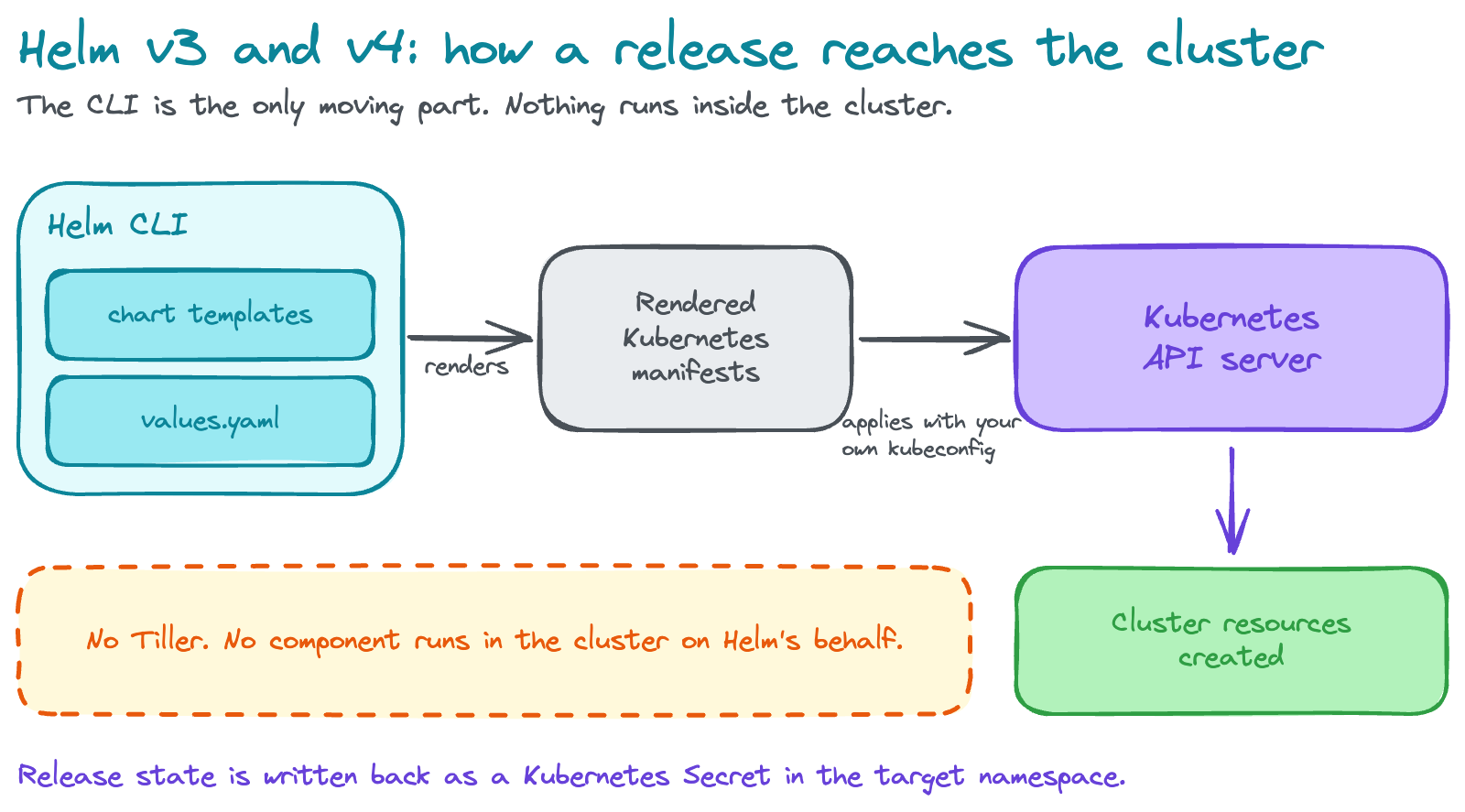
Helm v3, released in 2019, removed Tiller entirely: the Helm CLI talks directly to the Kubernetes API using your own credentials, and release state is stored as Kubernetes Secrets in the target namespace.
Helm v4, released in 2026, is now the current stable version, with v3 moved to support mode. V4 keeps the client-only, no-Tiller architecture from v3 and adds a WebAssembly-based plugin system, Kubernetes server-side apply support, and reproducible chart builds, covered in the v3-vs-v4 comparison later in this guide.
Core Concepts and Architecture of Helm
Three concepts define how Helm works:
- Charts: the packaging unit, a directory (or .tgz archive) of templated Kubernetes manifests plus default configuration values
- Releases: a specific deployed instance of a chart in a cluster, identified by a release name; installing the same chart twice with different release names creates two independent releases
- Repositories: where charts are stored and versioned for distribution, either an HTTP-based Helm repository or an OCI-compliant registry
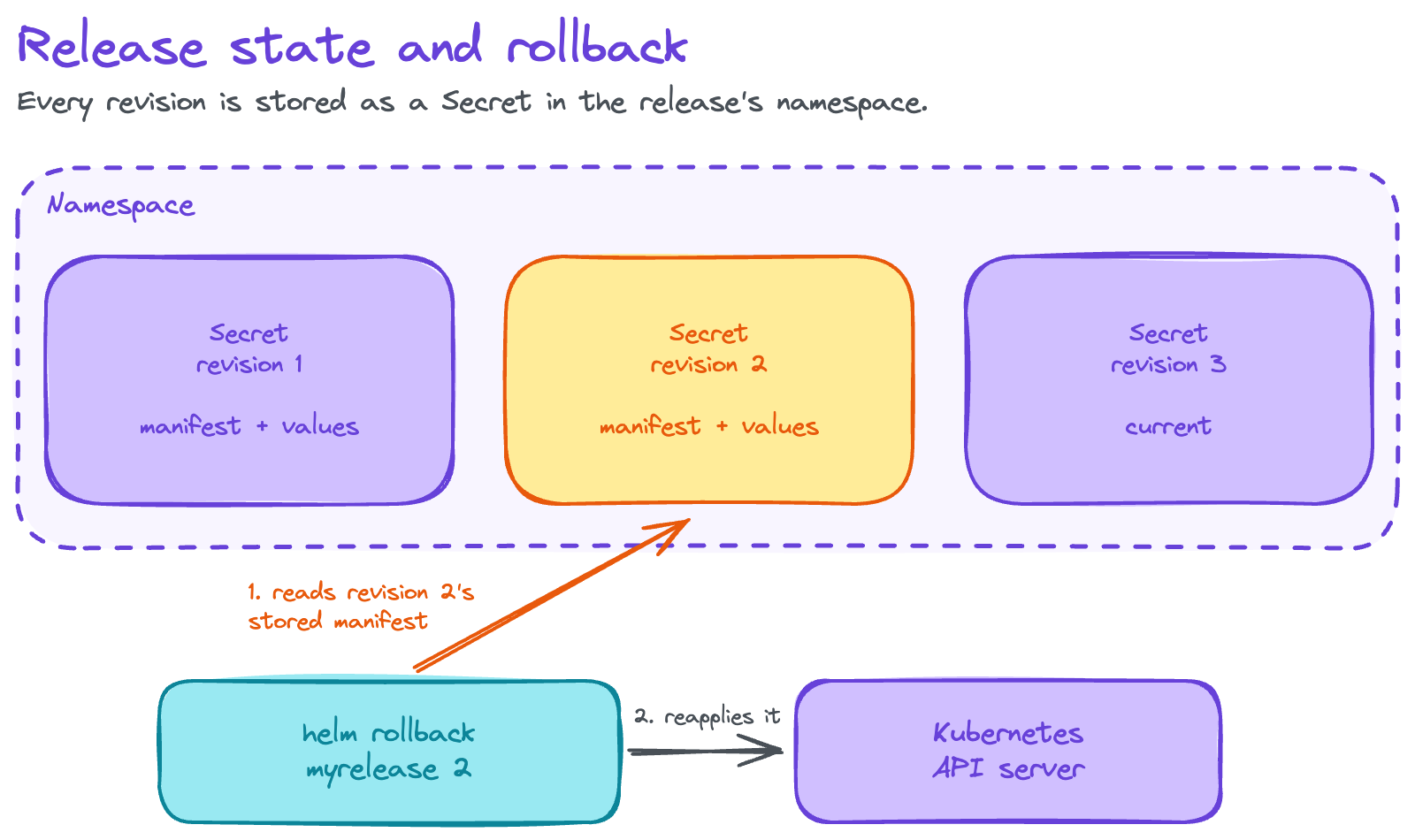
In Helm v3 and v4, the Helm CLI is the only moving part: it renders a chart's templates into final Kubernetes manifests, then calls the Kubernetes API server directly to apply them. No component runs inside the cluster on Helm's behalf. Each release's state, including the full manifest it deployed and its values, is stored as a Kubernetes Secret in the release's namespace, which is what makes helm rollback possible: Helm reads the previous release's stored manifest and reapplies it.
Helm Chart Structure and Anatomy
A Helm chart follows a fixed directory layout:
mychart/
  Chart.yaml          # chart metadata
  values.yaml          # default configuration values
  charts/               # bundled chart dependencies
  templates/            # templated Kubernetes manifests
    deployment.yaml
    service.yaml
    _helpers.tpl
    NOTES.txt
The Chart.yaml file
Chart.yaml holds the chart's metadata:
- apiVersion: v2 for current Helm 3 and 4 charts
- name: the chart's name
- version: the chart's own semantic version
- appVersion: the version of the application the chart deploys, tracked separately from the chart's own version
- description: a short summary of what the chart does
- type: application or library
A library chart provides reusable template snippets for other charts to import and can't be installed on its own; an application chart is a normal, installable chart.
apiVersion: v2
name: mychart
description: A sample Helm chart for Kubernetes
type: application
version: 0.1.0
appVersion: "1.0.0"
The values.yaml file
values.yaml defines the default configuration a chart's templates render against, replicaCount, image repository and tag, resource requests and limits, and anything else the chart exposes as configurable. Every value referenced in a template with .Values.something must have a corresponding entry here, or a sensible default set in the template itself.
replicaCount: 2
image:
  repository: nginx
  tag: "1.27"
resources:
  requests:
    cpu: 100m
    memory: 128Mi
templates/, charts/, and NOTES.txt
- templates/ holds the Go-templated Kubernetes manifests Helm renders and applies
- charts/ holds any chart dependencies, either as subdirectories or .tgz packages, bundled directly into the parent chart
- NOTES.txt, if present in templates/, renders and prints to the terminal after a successful helm install or helm upgrade, typically showing the reader how to access the application they just deployed
Chart versioning follows semantic versioning strictly for the version field:
- Patch releases for bug fixes
- Minor releases for backward-compatible additions
- Major releases for breaking changes to the chart's values structure
Helm Templating Engine and YAML Manifests
Helm renders manifests using Go's text/template engine. Templates reference values and metadata through built-in objects:
.Values: the merged configuration values (defaults fromvalues.yaml, overridden by anything passed at install or upgrade time).Release: release-specific data, including.Release.Name,.Release.Namespace, and.Release.IsUpgrade.Chart: the contents ofChart.yaml, including.Chart.Nameand.Chart.Version.Files: access to non-template files in the chart.Capabilities: information about the target Kubernetes cluster's API versions.Template: the current template file's own name and path
apiVersion: apps/v1
kind: Deployment
metadata:
  name: {{ .Release.Name }}-{{ .Chart.Name }}
spec:
  replicas: {{ .Values.replicaCount }}
  template:
    spec:
      containers:
        - name: {{ .Chart.Name }}
          image: "{{ .Values.image.repository }}:{{ .Values.image.tag }}"
Three practices avoid the most common Helm templating problems:
- Named templates: repeated template logic belongs in
_helpers.tpl, referenced elsewhere with{{ include "mychart.labels" . }}, which keeps label and selector definitions consistent across every manifest in the chart instead of copy-pasted - Local rendering: run
helm template <chart>to render manifests locally without touching a cluster, the fastest way to catch templating and indentation mistakes - Whitespace trimming: YAML is whitespace-sensitive, so a misindented
{{- with .Values.foo }}block is the most common source of a chart that renders but deploys incorrectly; the-in{{-and-}}trims surrounding whitespace and is worth using by default in conditional blocks
Configuration Values and Parameterization in Helm
Helm merges values from multiple sources, in this order of precedence, lowest to highest:
- The chart's own
values.yaml - A parent chart's values, if this is a subchart
--values(or-f), one or more custom YAML files passed at install or upgrade time--set,--set-string, or--set-file, individual key overrides passed directly on the command line
helm install myrelease ./mychart --values values-production.yaml --set replicaCount=5--set supports dot notation for nested values (--set image.tag=1.28) and comma-separated lists for arrays.
For validating that supplied values match an expected shape before a deploy fails midway through, a chart can include values.schema.json, a JSON Schema file Helm checks values against before rendering templates.
The same chart, deployed with a different values file per environment, is the core pattern behind most real Helm usage: one set of templates, several environment-specific configurations.
Helm Chart Development, Dependency Management, and Repositories
Developing and Packaging Helm Charts
helm create mychart scaffolds a new chart with a working example Deployment, Service, Ingress, and ServiceAccount already templated, the fastest starting point for a new chart rather than writing the directory structure by hand. From there:
helm create mychart
helm lint mychart
helm template mychart
helm install --dry-run --debug myrelease ./mychart
helm package mychart- helm lint checks a chart for structural and syntax problems before you try to install it
- helm template renders the final manifests to stdout without contacting a cluster
helm install --dry-run --debuggoes a step further: it renders the manifests and simulates the install against the target cluster's API without actually creating anything, surfacing errors a template-only render would misshelm packagebundles the chart directory into a versioned.tgzarchive,mychart-0.1.0.tgz, ready to push to a repository
A chart's version (the chart's own release number) and appVersion (the application version it deploys) are independent. Bumping a chart's version for a templating fix doesn't require bumping appVersion, and shipping a new application image often means bumping appVersion without any chart template changes at all.
For more worked examples beyond the one built in this guide, the Helm project's own examples repository includes additional starter charts ready to install directly.
Chart Dependency Management
A chart declares its dependencies directly in Chart.yaml:
dependencies:
  - name: postgresql
    version: "12.x.x"
    repository: "https://charts.bitnami.com/bitnami"
    condition: postgresql.enabled
helm dependency update downloads every listed dependency into the chart's charts/ directory based on the current Chart.yaml and generates a Chart.lock file pinning the exact resolved versions, which is what makes a chart's dependency tree reproducible across environments and CI runs.
Dependencies can be configured further:
- condition toggles a dependency on or off from the parent chart's values (
postgresql.enabled: falseskips it entirely) - tags group multiple dependencies under one shared toggle
- Value overrides: a parent chart overrides a subchart's values by nesting them under the subchart's name in the parent's own values.yaml
Dependency order matters for deploy sequencing: Helm installs a chart's own resources and its dependencies together in a single release, so a subchart a Deployment depends on (like a database) should generally define readiness probes the parent's application can wait on, rather than assuming it's already available.
Helm Chart Repositories and Distribution
helm repo add bitnami https://charts.bitnami.com/bitnami
helm repo update
helm repo list- helm repo add registers an HTTP-based chart repository locally
- helm repo update refreshes the local index cache of every added repository
- helm repo list shows what's currently registered
A stale local repo index, one that hasn't been refreshed since a chart was updated upstream, is one of the most common sources of "it installed the wrong version" confusion; run helm repo update before troubleshooting anything else if an install pulls an unexpected version.
Hosting a private repository is typically done through:
- ChartMuseum, a dedicated chart repository server
- Nexus or Artifactory, if a team already runs one for other artifact types
- A cloud provider's container registry
Publishing publicly goes through Artifact Hub, the community index most helm search hub results pull from.
The modern default, and where the Helm project has been steering distribution, is OCI-compliant registries: Docker Hub, Amazon ECR, and most cloud registries now support storing and pulling charts the same way they store container images, addressed with an oci:// URL instead of a traditional Helm repo.
For any new chart distribution setup in 2026, OCI is the current best practice over a standalone HTTP chart repository. Charts can be signed and their provenance verified with helm verify, confirming a downloaded chart hasn't been tampered with since it was packaged.
Helm Chart Best Practices and Reusability
Charts built for reuse follow a few consistent practices:
- Environment reuse: share one set of templates and vary only the values file per environment,
values-dev.yaml,values-staging.yaml,values-production.yaml, rather than maintaining near-duplicate templates per environment - Named templates and partials: in
_helpers.tpleliminate duplicated label, selector, and annotation blocks across a chart's manifests; the CNCF's general guidance is to generate labels and selectors through one shared helper so every resource in the chart stays consistent automatically when the label scheme changes - Umbrella charts: for applications made of several services, a parent umbrella chart with each service as a subchart keeps the whole application's lifecycle, install, upgrade, rollback, as one release instead of several independently versioned ones
Helm CLI Operations, Release Management, and Application Lifecycle
Helm Installation and CLI Setup
brew install helm                          # macOS
choco install kubernetes-helm               # Windows (Chocolatey)
winget install Helm.Helm                    # Windows (Winget)
scoop install helm                          # Windows (Scoop)
sudo snap install helm --classic            # Linux (Snap)
sudo dnf install helm                       # Fedora 35+
Or install directly from the official script, which now installs Helm v4 by default:
curl -fsSL -o get_helm.sh https://raw.githubusercontent.com/helm/helm/main/scripts/get-helm-4
chmod 700 get_helm.sh
./get_helm.sh
Helm reads the same kubeconfig file kubectl uses to connect to a cluster, so once kubectl is configured, Helm is too, no separate authentication step.
Useful environment variables include HELM_NAMESPACE (sets a default namespace for every command instead of passing -n each time) and HELM_CACHE_HOME (relocates the local chart cache).
Helm's plugin system extends the CLI with additional subcommands, helm plugin install <url>, useful ones include helm diff and helm secrets, covered later in this guide.
That kubeconfig connection step assumes a cluster already exists. A managed cluster like Rackspace Spot, which supports installing Helm charts and running custom operators without restriction, gives you a fresh cluster and a working kubeconfig in minutes, a fast, low-cost target to point Helm at while learning or testing a chart.
Core Helm Commands for Chart Installation and Management
| Command | What it does |
|---|---|
helm install <release> <chart> |
Installs a chart as a new named release |
helm show chart / values / readme <chart> |
Inspects a chart's metadata, defaults, or documentation before installing |
helm list |
Lists releases currently deployed in the current (or all) namespaces |
helm status <release> |
Shows a release's current deployment status and notes |
helm get manifest <release> |
Prints the exact manifests currently deployed for a release |
helm search repo / hub <keyword> |
Searches added repositories, or Artifact Hub, for a chart |
A typical first install looks like this:
helm search repo nginx
helm show values bitnami/nginx
helm install my-nginx bitnami/nginx --set service.type=ClusterIP
helm status my-nginx
Helm Upgrade and Release Versioning
helm upgrade myrelease ./mychart --values values-production.yaml
helm upgrade --install myrelease ./mychart --values values-production.yaml- helm upgrade deploys a new revision of an existing release with updated values or a new chart version, and Helm keeps a full revision history you can inspect with helm history myrelease
- helm upgrade --install is idempotent: it upgrades the release if it exists and installs it fresh if it doesn't, which is why nearly every CI/CD pipeline uses upgrade --install rather than a separate install-or-upgrade branch in the pipeline script
- --atomic makes the upgrade roll back automatically to the previous working revision if the new one fails health checks, instead of leaving the release in a broken, half-upgraded state
Every revision's manifest and values are stored as a Kubernetes Secret, which is what helm rollback and helm history both read from.
Helm Rollback Mechanisms and Version Control
helm history myrelease
helm rollback myrelease 3
helm rollback <release> <revision> reverts a release to a specific prior revision by reapplying that revision's stored manifest, no rebuild or redeploy from source required, which is one of Helm's most cited advantages over managing raw manifests directly.
A concrete production scenario: a helm upgrade ships a bad config change, the new Pods start crash-looping, helm history myrelease shows the working revision number from before the upgrade, and helm rollback myrelease <that number> restores it in seconds.
Two related tools round out version control:
- history-max on
helm upgradecaps how many old revisions Helm retains per release, worth setting explicitly on high-frequency-deploy releases so the revision Secrets don't accumulate indefinitely - The
helm diffplugin renders what a pendingupgradewould actually change against the currently deployed manifest, letting you review a diff before running the command for real instead of finding out fromkubectlafter the fact
Helm Uninstall and Application Lifecycle Management
helm uninstall myrelease
helm uninstall myrelease --keep-history
helm uninstall removes a release and every resource it deployed. By default it also deletes the release's revision history, which means helm rollback is no longer possible once a release is gone; pass --keep-history if there's any chance you'll want to reinstall and roll back later.
Helm hooks let a chart run jobs at specific points in a release's lifecycle:
pre-installandpost-installaround installationpre-upgradeandpost-upgradearound upgradespost-deleteafter removal
These are commonly used for database migrations or cleanup jobs that need to run outside the normal resource lifecycle. Resource policies (helm.sh/resource-policy: keep as a resource annotation) exclude specific resources, like a PersistentVolumeClaim, from deletion on uninstall, so application data survives even when the release doesn't.
Two pitfalls worth naming directly, since they cause real incidents:
- Plaintext secrets committed in
values.yaml: use--setfrom a CI secret store or thehelm secretsplugin with an encrypted values file instead - Editing a Helm-managed resource directly with
kubectl edit: this creates drift Helm doesn't know about and can silently revert or conflict with on the nexthelm upgrade
Once a resource is Helm-managed, changes belong in the chart's values or templates, not applied out-of-band.
Helm in CI/CD Pipelines and Deployment Automation
Helm fits into CI/CD as the deployment step, in one of two ways:
- Traditional pipelines: a pipeline in Jenkins, GitLab CI, or GitHub Actions runs
helm upgrade --install --atomicagainst the target cluster after tests pass, using--valuesto select the environment-specific configuration and pulling secrets from the CI platform's secret store rather than a committed file - GitOps: tools like Argo CD and Flux take this further, watching a Git repository of chart values and reconciling the cluster to match automatically, with Helm operators handling the actual chart rendering and apply step behind the GitOps controller
Promoting a release from staging to production, in the GitOps model, is a pull request changing which values file or image tag a Git-tracked manifest points to, not a manual command run by hand.
That same environment-promotion pattern extends naturally to per-environment infrastructure: GitOps-driven managed clusters make spinning up a disposable dev or staging target for a Helm chart cheap enough to tear down after every pipeline run, rather than keeping a permanent cluster idle between deploys.
Common Helm Pitfalls to Avoid
| Pitfall | Fix |
|---|---|
| Stale local repo index causes an install to pull an unexpected chart version | Run helm repo update before installing or troubleshooting a version mismatch |
Plaintext secrets committed in values.yaml |
Pass secrets with --set from a CI secret store, or use the helm secrets plugin with encrypted values |
Revision history lost after helm uninstall, rollback no longer possible |
Pass --keep-history on uninstall if reinstalling later is possible |
Editing a Helm-managed resource directly with kubectl edit creates drift |
Make the change in the chart's values or templates and run helm upgrade instead |
Running Your Helm Charts on Low-Cost Managed Kubernetes
You can deploy and test your Helm charts on a Rackspace Spot cluster: fully managed Kubernetes priced through an open-market auction, with bids starting at $0.001/hr and the control plane included at no extra charge. Clusters support both spot and on-demand node pools, and you can bring your own Helm charts and operators out of the box, no platform-specific packaging required.
Frequently Asked Questions
What is Helm in Kubernetes?
Helm is the Kubernetes package manager: it bundles a set of Kubernetes manifests into a versioned, parameterized chart and installs, upgrades, or removes that chart as a single unit with one command, instead of managing each manifest with kubectl individually.
What is a Helm chart?
A Helm chart is a directory (or packaged .tgz archive) containing templated Kubernetes manifests, default configuration values in values.yaml, and metadata in Chart.yaml. Installing a chart with a set of values produces a release, a specific running instance of that chart in a cluster.
What is Helm in DevOps?
In a DevOps pipeline, Helm is the deployment mechanism: CI builds and pushes a container image, then a pipeline step runs helm upgrade --install to deploy that image through a chart, often driven by a GitOps controller like Argo CD or Flux that keeps the cluster synced to what's declared in Git.
What's the difference between Helm v3 and v4?
Both share the same client-only architecture with no Tiller. Helm v4, the current stable release, adds a WebAssembly-based plugin system, Kubernetes server-side apply support, content-based chart caching, structured logging, and reproducible chart builds on top of v3's foundation. Most existing v3 charts continue to work, though some CLI flags and SDK behavior changed.
Is Helm still using Tiller?
No. Tiller, the server-side component from Helm v2, was removed entirely in Helm v3 (2019). Helm v3 and v4 both connect the CLI directly to the Kubernetes API using your own credentials, with release state stored as Kubernetes Secrets instead of a separate in-cluster service.
How is Helm different from kubectl?
kubectl applies and manages individual Kubernetes resources one at a time. Helm manages a whole application, potentially dozens of resources, as one versioned release: one command installs everything, one command upgrades everything with new values, and one command rolls the entire release back to a prior state.
Where can I find a Helm chart example or GitHub repo?
This guide includes complete, runnable chart snippets (Chart.yaml, values.yaml, a templated Deployment) throughout.
For additional starter charts, see the Helm project's own examples repository or browse Artifact Hub for thousands of production charts.
How do I roll back a Helm release?
Run helm history <release> to see prior revisions, then helm rollback <release> <revision-number> to revert to one of them. Helm reapplies that revision's stored manifest directly, no rebuild required, provided the release wasn't uninstalled with history deleted first.
Is Helm too complex for a small team or a quick deploy?
Not for the core workflow. helm install, helm upgrade, and helm rollback cover most day-to-day usage with a shallow learning curve, especially for a team already comfortable with kubectl and YAML. The complexity concentrates in chart authoring (templating, dependencies, hooks), which a small team can defer entirely by installing existing charts from Artifact Hub rather than writing their own.