


"Docker or Kubernetes, which one do I actually need?"
It's the question every team asks the moment a project outgrows a single container, and most explanations answer it as though you're picking between two competing products but you're actually not.
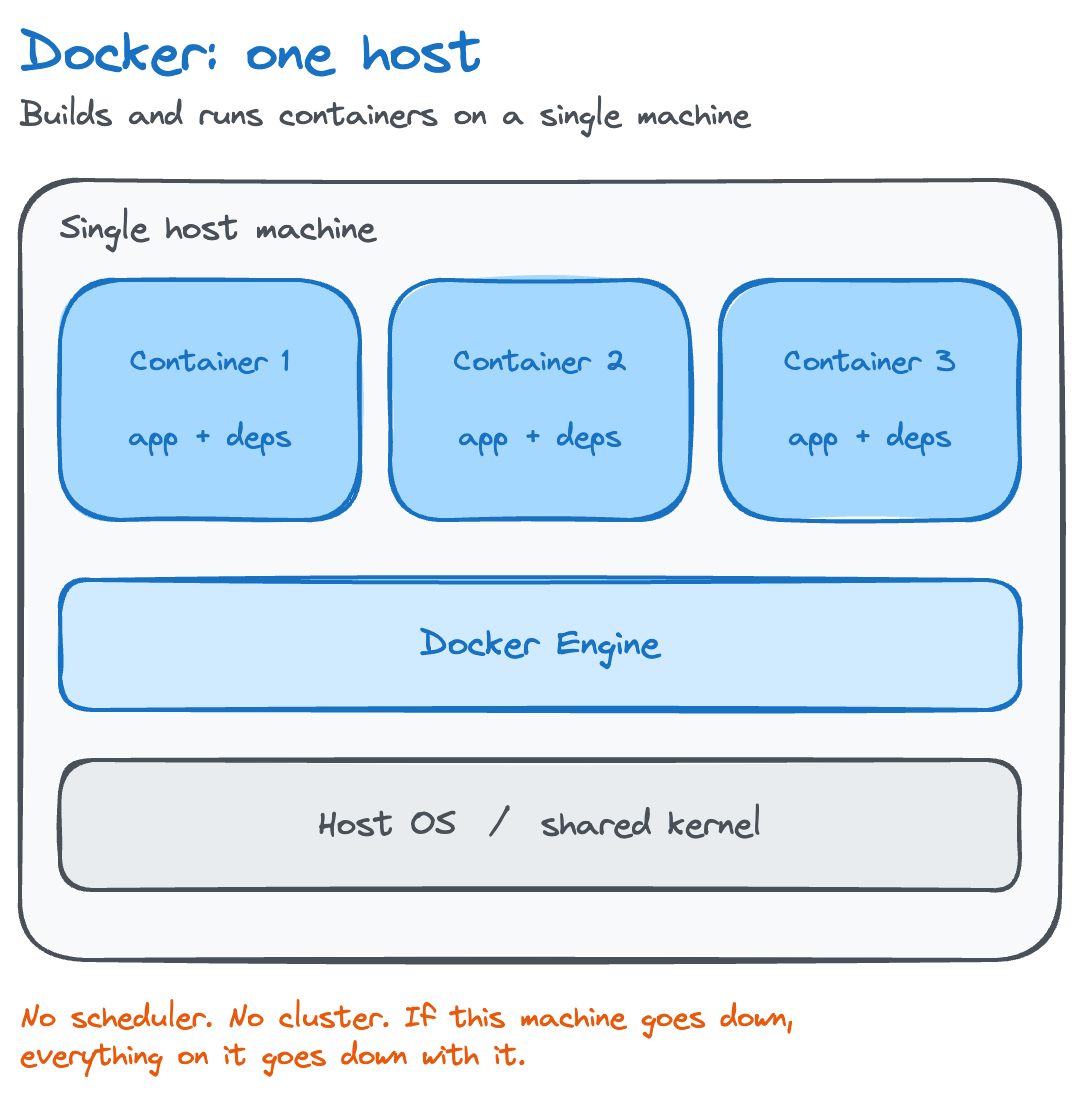
Docker builds and runs containers on one machine. Kubernetes takes containers, often ones Docker built, and orchestrates them across a cluster of machines. Most production systems run both, layered on top of each other, not one instead of the other.
This guide breaks down what Docker and Kubernetes actually do, where their architectures diverge, when you need one, both, or neither, and the comparison people usually mean to make but rarely find: Kubernetes vs. Docker Swarm.
Understanding the Core Distinctions Between Kubernetes and Docker
What Docker Is and What It Does
Docker is a containerization platform and runtime. It packages an application, its dependencies, and its configuration into a single, portable container image.
Docker Engine builds that image from a Dockerfile, then runs it as a container: an isolated process with its own filesystem, network interface, and resource limits, sharing the host machine's kernel instead of running a full guest OS.
Developers interact with Docker through the CLI or Docker Desktop, running commands to build images, start and stop containers, and push images to a registry.
Docker operates on a single host. It builds, ships, and runs individual containers well, but has no built-in concept of a cluster and doesn't decide which of several machines a container should run on.
What Kubernetes Is and What It Does
Kubernetes is a container orchestration platform. Instead of running containers on one machine, it manages a cluster of machines, deciding where each container runs, restarting it if it fails, and scaling it up or down based on demand. Kubernetes automates deployment, scaling, and day-to-day management across as many nodes as the cluster contains.
Kubernetes originated at Google, built on lessons from its internal cluster manager, Borg, and was open-sourced in 2014, then donated to the newly formed Cloud Native Computing Foundation in 2015. It's an orchestrator, not a containerization tool: it doesn't build container images, it schedules and manages containers that something else, usually Docker, already built.
The Fundamental Difference: Containerization vs. Container Orchestration
Docker builds and runs one container on one machine. Kubernetes manages many containers across many machines. That's the entire distinction, and it's why Docker and Kubernetes aren't direct competitors: the containers Kubernetes orchestrates are frequently the exact containers Docker built.
Here's a useful analogy: Docker builds the shipping container. Kubernetes runs the port, deciding which ship each container goes on, rerouting it if that ship breaks down, and bringing in more cranes when traffic spikes.
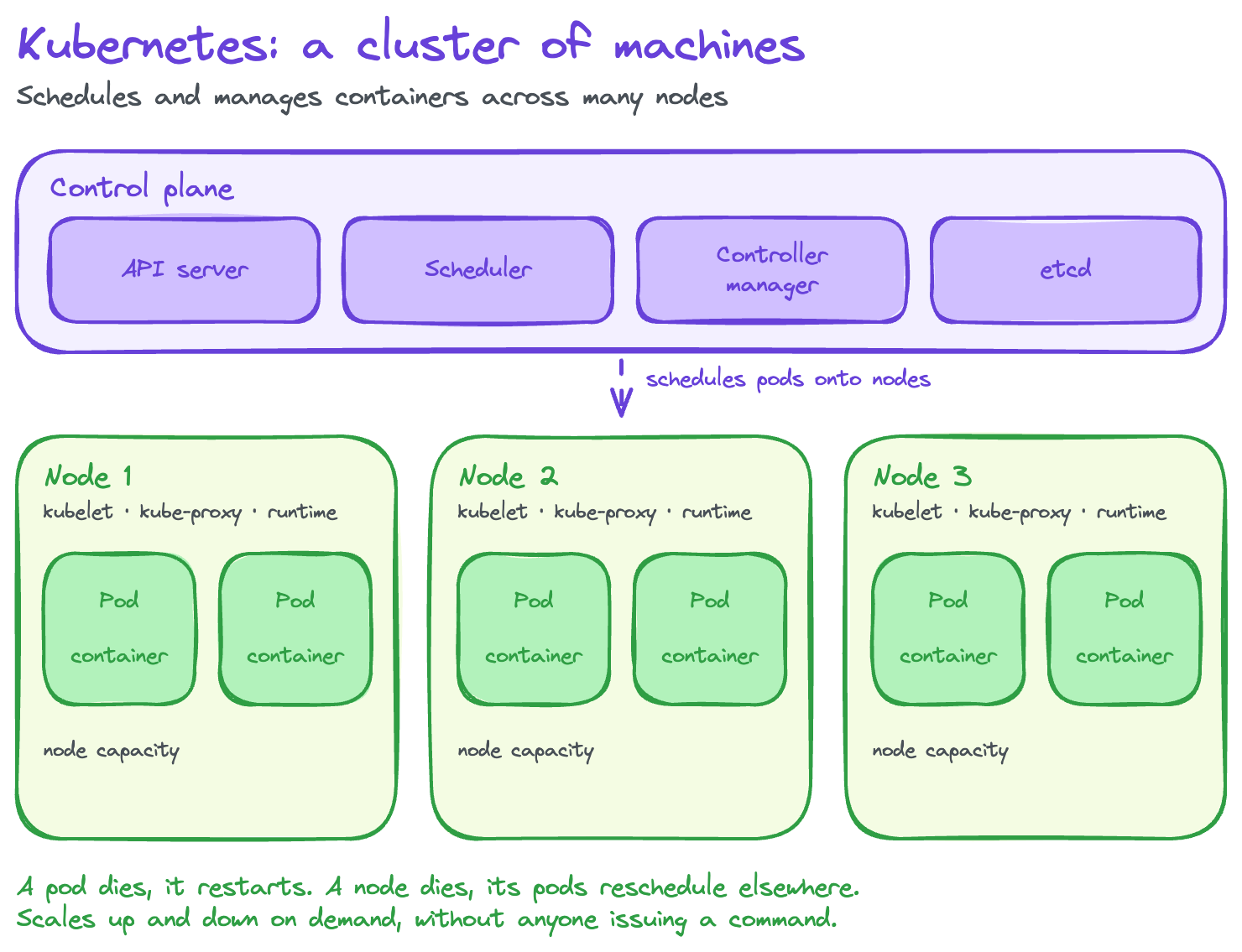
The table below summarizes the practical difference at a glance:
A single machine running a well-built Docker container can be genuinely reliable. What it can't do is survive that machine going offline, which is the exact problem Kubernetes exists to solve. Once availability across multiple machines matters, the comparison that actually applies is Kubernetes vs. Docker's own orchestrator, Docker Swarm.
Docker Swarm vs. Kubernetes: The Actual Orchestration Comparison
Docker Swarm is Docker's native orchestration mode, built directly into the Docker Engine. Turn it on with a single command, and Docker manages a cluster of nodes: scheduling containers, load-balancing between them, and handling basic service scaling. Swarm's biggest advantage is how little there is to learn: know Docker, and you already know most of Swarm.
Kubernetes takes longer to set up and has a steeper learning curve, but it scales further and does more. It supports workload types Swarm doesn't (StatefulSets, DaemonSets, custom resources), gives finer-grained control over scheduling and networking, and sits at the center of an ecosystem, Helm, Prometheus, Argo CD, service meshes, that Swarm never developed to the same depth.
Swarm suits a small cluster that needs basic redundancy without a dedicated platform team. Kubernetes wins once the cluster, team, or workload complexity outgrows what Swarm handles, which is most of what "Kubernetes vs. Docker" articles are actually trying to describe.
Architecture, Features, and Technical Capabilities Compared
Docker's Architecture and Container Management Model
Docker runs on a client-server model. The Docker CLI sends commands to the Docker daemon, which builds images, starts containers, and manages local networking and storage. Images are built in layers from a Dockerfile and stored in a registry, Docker Hub or a private one, for reuse across machines.
For applications made of more than one container, Docker Compose defines them in a single YAML file and starts them together on one host, wiring up networking and shared volumes automatically:
services:
  web:
    image: nginx:1.27
    ports:
      - "8080:80"
    depends_on:
      - db
  db:
    image: postgres:16
    environment:
      POSTGRES_PASSWORD: example
    volumes:
      - db-data:/var/lib/postgresql/data

volumes:
  db-data:
Running docker compose up starts both containers, connects them on a shared network where web can reach db by name, and mounts the named db-data volume. Docker supports bridge, host, and overlay networking modes, and persists data outside a container's lifecycle through volumes. Compose can start five containers together, but it has no mechanism to run them across five different machines, the boundary Kubernetes is built to cross.
Kubernetes Architecture: Clusters, Nodes, and the Control Plane
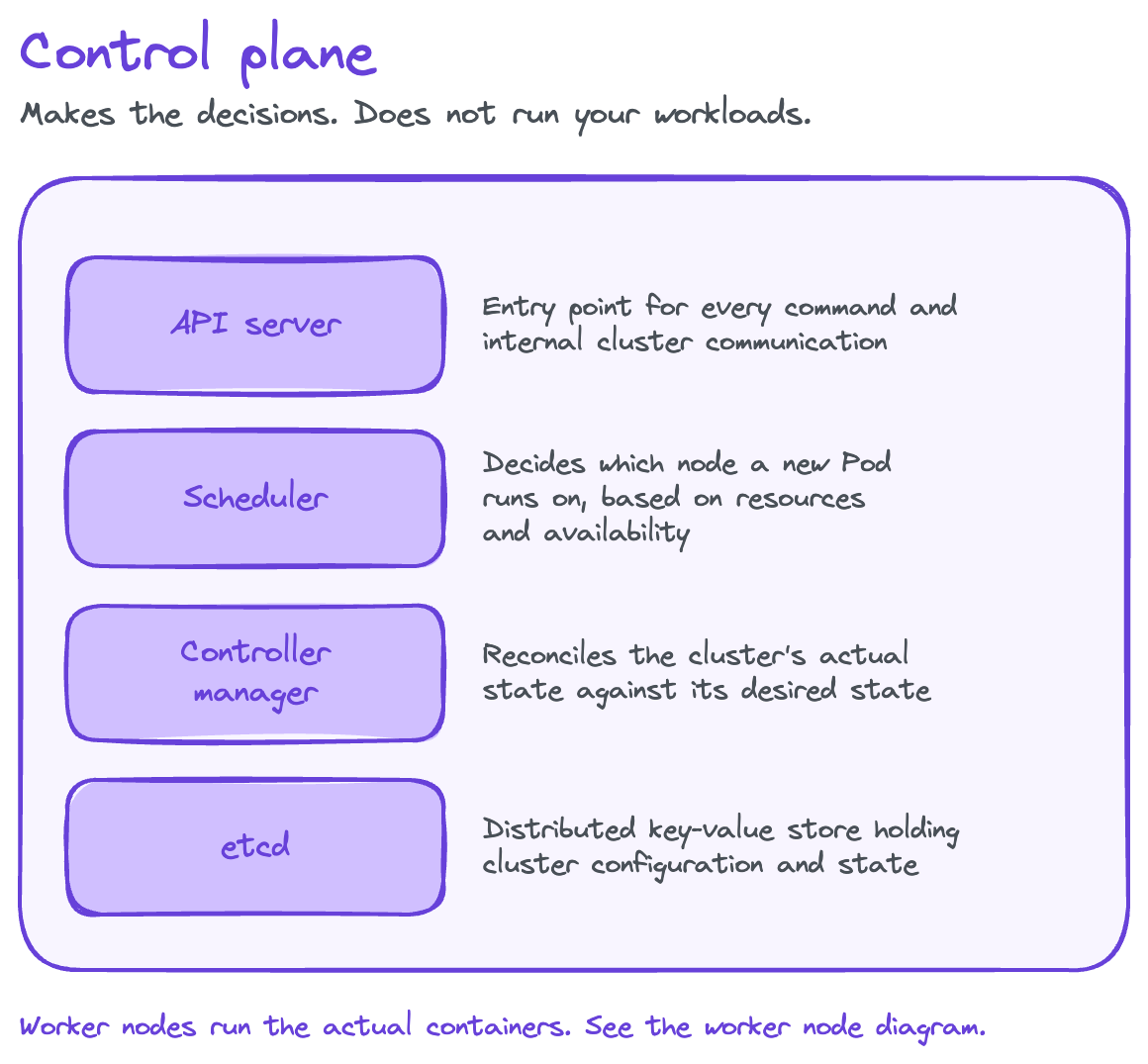
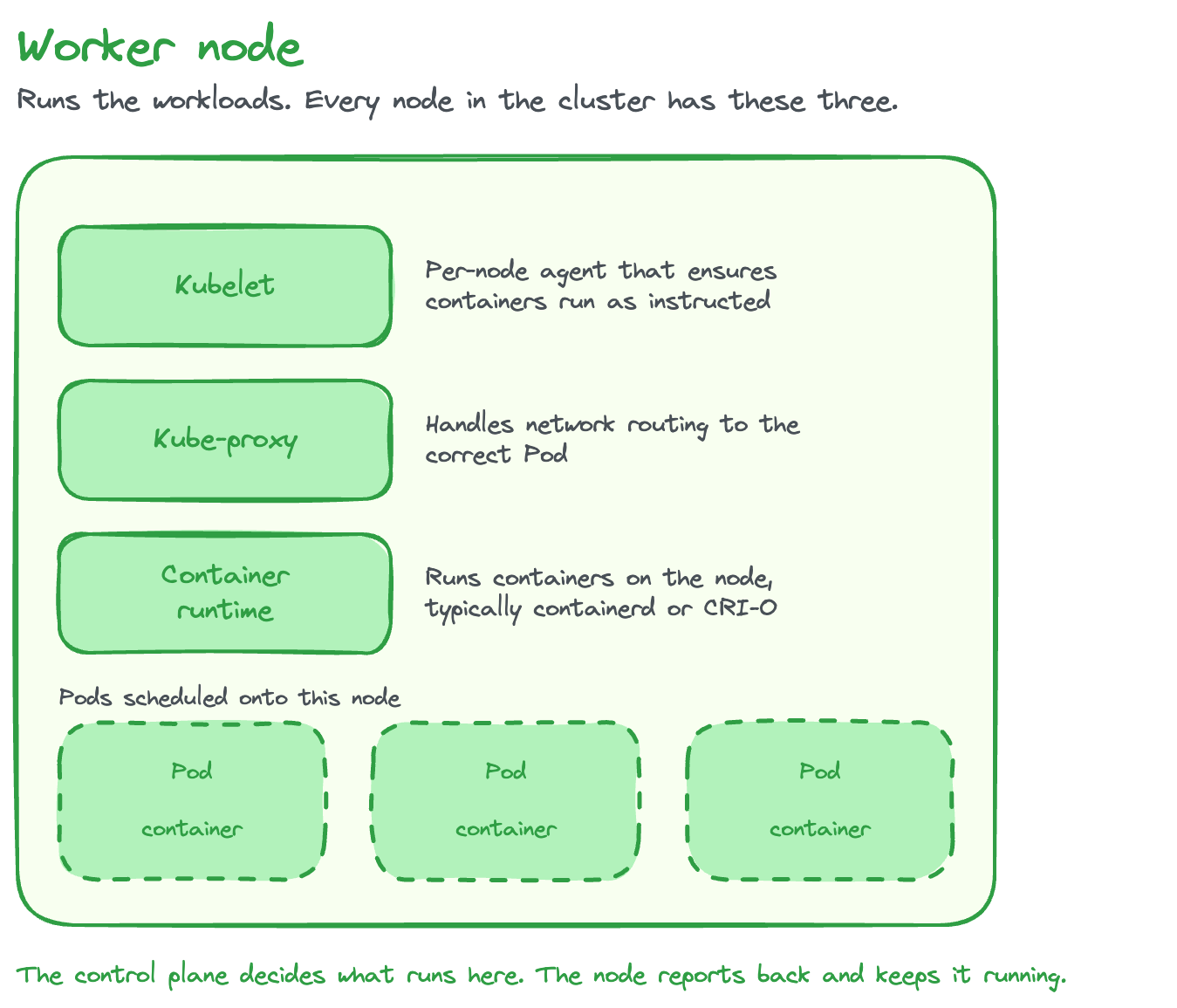
A Kubernetes cluster splits into two kinds of machines: the control plane, which makes decisions, and worker nodes, which run workloads.
Control plane components
- API server: entry point for every command and internal cluster communication
- Scheduler: decides which node a new Pod runs on, based on resources and availability
- Controller manager: reconciles the cluster's actual state against its desired state
- etcd: the distributed key-value store holding cluster configuration and state
Worker node components
- Kubelet: the per-node agent that ensures containers run as instructed
- Kube-proxy: handles network routing to the correct Pod
- Container runtime: runs containers on the node, typically containerd or CRI-O
The smallest deployable unit in Kubernetes is a Pod, a wrapper around one or more tightly coupled containers that share networking and storage, rather than a container directly. Kubernetes talks to the container runtime through the Container Runtime Interface (CRI), a standard API that lets any compliant runtime plug in without runtime-specific code. Namespaces, labels, and selectors then organize and target resources, letting teams partition a single cluster across environments or projects.
Scheduling and Workload Deployment
Docker deploys containers directly onto whichever host you run the command on. There's no scheduling decision to make, since there's only one place for the container to go. Kubernetes schedules across every node in the cluster, matching each Pod's resource requests and limits against available capacity before deciding where it lands.
Kubernetes manages workloads through higher-level objects rather than individual Pods:
- Deployment handles rolling updates and rollbacks for stateless applications, maintaining a target replica count automatically
- ReplicaSet keeps a specified number of Pod copies running
- StatefulSet handles applications that need stable network identities and persistent storage, like databases
- DaemonSet ensures exactly one Pod runs on every node, useful for logging or monitoring agents
Docker Compose has no equivalent to any of these: it starts what you tell it to start and doesn't continuously reconcile drift from a desired state the way Kubernetes does.
Scaling Capabilities: Docker vs. Kubernetes
Scaling a Docker container means starting more containers manually, or scripting it yourself, typically on the same host, since Docker alone has no cross-machine capacity to scale into. Docker Swarm adds a scaling command (docker service scale) that increases replica count across the cluster, but the decision to scale is still one you issue explicitly.
Kubernetes automates scaling three ways:
- Horizontal Pod Autoscaler (HPA) adds or removes Pod replicas based on observed CPU, memory, or custom metrics
- Vertical Pod Autoscaler (VPA) adjusts CPU and memory requests on existing Pods based on observed usage
- Cluster autoscaling adds or removes entire nodes as aggregate demand changes
Kubernetes' scaling model is declarative: define the target state, for example "keep CPU utilization near 60%", and the control plane continuously works to hold the cluster there, absorbing a traffic spike without anyone issuing a manual scale command.
High Availability and Self-Healing
A standalone Docker container has no built-in high availability. Docker can restart a crashed process locally with a restart policy, but if the entire host goes down, so does everything running on it. There's no other machine for the workload to move to.
Kubernetes is designed around the assumption that individual machines fail:
- Pod crash: the kubelet restarts it
- Node failure: the controller manager detects the loss and reschedules that node's Pods onto healthy nodes
- Liveness and readiness probes: distinguish a container that's merely slow to start from one that's genuinely broken, routing traffic only to Pods that report themselves ready
Docker Swarm offers node-failure recovery too, but with a simpler health-check model and less granular control over what "healthy" means. This gap, self-healing versus none, is the single biggest reason production teams choose Kubernetes for anything mission-critical.
Networking: Service Discovery and Load Balancing
On a single Docker host, containers discover each other through Docker's built-in DNS: containers on the same network reach each other by name. It's simple because the scope is small.
Kubernetes has to solve the same problem across an entire cluster, where Pods are created, destroyed, and rescheduled constantly, each getting a new IP address every time. Services provide a stable identity in front of a changing set of Pods:
- ClusterIP exposes a Service inside the cluster
- NodePort opens a static port on every node
- LoadBalancer provisions an external load balancer through the cloud provider
Ingress adds HTTP-aware routing on top, handling host- and path-based rules and TLS termination for multiple Services behind one address. For service-to-service traffic that needs encryption, retries, or observability, a service mesh like Istio adds a further layer. Docker's overlay networking connects multi-host Swarm clusters similarly, but Kubernetes' networking stack handles far higher Pod churn and finer routing rules.
Configuration Management and Storage
Docker manages configuration through environment variables and bind mounts, files or directories from the host injected directly into a container. It's straightforward, but tightly coupled to whatever host the container runs on.
Kubernetes separates configuration and secrets from application code entirely. ConfigMaps store non-sensitive configuration data, and Secrets store sensitive values like credentials, both consumed by Pods without being baked into the container image.
For storage, PersistentVolumes and PersistentVolumeClaims give stateful applications durable storage that survives a Pod being rescheduled to a different node, provisioned through StorageClasses that abstract away the underlying storage system.
Docker volumes solve persistence on one host; Kubernetes solves it across a cluster where the Pod using that storage might not run on the same node tomorrow.
Practical Considerations: Use Cases, DevOps Integration, and Choosing the Right Tool
Use Cases Best Suited for Docker Alone
Docker on its own is the right tool when a single host is genuinely enough:
- Local development and prototyping, where you need a fast, disposable environment
- Small, single-host applications that don't need to survive a machine failure
- CI build and test stages, where containers spin up, run a job, and exit
- Simple microservices that don't yet need cross-host orchestration
- Multi-container apps managed with Docker Compose on one server
Most engineers meet Docker here first, and for a large share of small projects, this is where the requirement genuinely ends.
Use Cases Best Suited for Kubernetes
Kubernetes earns its complexity once an application needs to survive real-world failure conditions at scale:
- Large-scale microservices architectures with many independently deployed services
- Production systems that need high availability and automatic fault tolerance
- Applications with unpredictable traffic that require real autoscaling, not manual intervention
- Multi-cloud or hybrid deployments that need a consistent orchestration layer
- Environments running hundreds or thousands of containers across many teams
- Enterprise workloads with strict configuration, secrets, and access-control requirements
Once you're weighing production traffic, high availability, and multi-cloud reach, the practical question usually shifts. It stops being "Docker or Kubernetes?" and becomes "where do I run Kubernetes?", a question with its own tradeoffs, covered next.
Portability and Flexibility Across Environments
Docker's portability operates at the image level: build once, and that image runs identically on any machine with a compatible runtime, your laptop, a CI runner, or a production server.
Kubernetes extends portability to the infrastructure level. A manifest describes an application's desired state in a way that's largely independent of which cluster runs it, which is what makes cloud-agnostic deployment realistic.
That also turns "which orchestrator" into "which Kubernetes." Most teams run Kubernetes through a managed service rather than operating the control plane themselves, split roughly into hyperscaler services (EKS, GKE, AKS) and cost-focused platforms built around lowering the price of running Kubernetes. Rackspace Spot falls into the second group: fully managed clusters through an open-market auction, where bids start at $0.001/hr and prices move with real supply and demand instead of a fixed on-demand rate.
The control plane is included at no extra charge, while AWS EKS charges roughly $0.10/hr (about $73/month) per cluster for the control plane alone, before a single node is added. That gap compounds for teams running separate dev, staging, and production clusters, since every hyperscaler cluster pays that fee and every Rackspace Spot cluster doesn't. It answers where to run the Kubernetes you already need, not whether to pick Kubernetes over Docker in the first place.
Learning Curve and Ease of Use
Docker's learning curve is gentle. Most developers are building and running their own containers within a day. Kubernetes' curve is steeper, and the difficulty is mostly operational: clusters, YAML manifests, networking policy, and RBAC all have to click together before anything runs reliably in production.
Tools have grown up to flatten that curve. Helm packages complex Kubernetes applications into reusable charts. k3s and Minikube provide lightweight, single-machine Kubernetes for learning and local development. Docker Desktop even bundles a single-node cluster into the same tool most developers already use for Docker.
Managed services close the largest remaining gap: a fully hosted control plane, the kind Rackspace Spot and the major clouds provide, removes most of the day-two operational burden, upgrades, etcd management, control-plane availability, that otherwise falls on whoever runs the cluster.
DevOps and Infrastructure Integration
Docker and Kubernetes typically sit at different stages of the same pipeline rather than competing for the same slot.
Docker handles the build phase: a CI pipeline (Jenkins, GitHub Actions, GitLab CI) builds an image from a Dockerfile and pushes it to a registry.
Kubernetes handles the deploy phase: that image gets referenced in a manifest or Helm chart and deployed to a cluster, often through GitOps tools like Argo CD or Flux that continuously reconcile cluster state against what's declared in source control.
Observability tools like Prometheus and Grafana then monitor the running workloads. The pipeline is "build with Docker, deploy with Kubernetes," and nearly every containerized production system follows it, whether or not the team thinks of it in those terms.
Advantages and Disadvantages Summary
Docker's strengths are simplicity, speed, and portability: fast to learn and consistent from a laptop to a CI runner. Its limitation is scope, with no native answer for orchestration once an application spans more than one machine.
Kubernetes' strengths are scalability, resilience, and self-healing, built for systems that must survive failure and handle variable load without manual intervention. Its costs are complexity, resource overhead, and steep operational demands, particularly for a team running its own control plane.
For most teams that reach production scale, the answer is Docker to build and Kubernetes to run, used together rather than one instead of the other. The two most cited Kubernetes downsides above, operational complexity and resource overhead, are also the two things managed Kubernetes platforms exist to remove.
Container Management Options Beyond the Binary Choice
Docker doesn't just build containers, it can also run them, and for years Kubernetes used Docker Engine as its default runtime through a compatibility shim called dockershim. That changed with Kubernetes v1.24 (2022), which removed dockershim entirely. Kubernetes now talks to runtimes directly through the Container Runtime Interface, typically using containerd or CRI-O instead of Docker Engine.
Kubernetes dropped Docker Engine specifically as its runtime, not Docker itself. It still runs the exact containers Docker builds, since those are standard OCI images, a format Docker helped create and one containerd and CRI-O support natively. Build an image with docker build today, deploy it to a current cluster without changes; the cluster simply runs it with a different, leaner runtime underneath.
Beyond the core pairing, managed platforms like OpenShift and Rancher package Kubernetes with additional tooling and security policy for teams that want its capabilities without assembling every piece themselves. The ecosystem keeps adding layers on top of Kubernetes, not replacements for it. If anything is "dead" here, it's Docker Engine's role as a Kubernetes runtime, not Docker the development tool, and not Kubernetes itself.
How to Run Kubernetes Affordably Once You've Chosen It
If you've concluded you need Kubernetes, the next question is where to run it, not whether Docker or Rackspace Spot is the better choice, and that's what Rackspace Spot answers.
Rackspace Spot runs fully managed Kubernetes on an open-market spot auction: set a max bid, the market's cutoff price sets what you pay, and billing runs to the second rather than a fixed hourly rate.
The control plane is fully managed and included at no extra charge, and clusters support both spot and on-demand node pools, so interruption-tolerant workloads run at auction pricing while the rest sit on stable capacity in the same cluster.
That targets the two barriers this guide has named throughout: complexity, handled by the managed control plane, and cost, handled by open-market pricing instead of fixed hyperscaler rates.
Docker and Kubernetes were never meant to be compared head to head. Docker builds and runs the container; Kubernetes decides where it runs, keeps it running, and scales it when demand changes. The real decision most teams face is when to add Kubernetes on top of the Docker workflow they already have, not which one to pick, and once that moment arrives, get started with Rackspace Spot and run your first cluster in minutes.
Frequently Asked Questions
Is Kubernetes the same as Docker?
No. Docker packages and runs individual containers on one machine; Kubernetes orchestrates many containers across a cluster, often ones Docker built. They sit at different layers of the same problem, which is why production systems commonly use both.
Is Kubernetes replacing Docker?
Kubernetes replaced Docker Engine as its default runtime when dockershim was removed in v1.24 (2022); the cluster now runs containers through containerd or CRI-O directly. It still runs the same containers Docker builds, since those are standard OCI images, not something specific to Docker Engine. Docker itself, the tool developers use to build and test containers locally, isn't going anywhere.
Why use Kubernetes instead of Docker?
Docker alone runs containers on one host, with no built-in way to keep an app running across multiple machines, recover from a node failure, or scale to real-time demand. Kubernetes adds all three: multi-node scheduling, self-healing, and horizontal autoscaling.
What's the difference between Kubernetes and Docker Swarm?
This is the fair, apples-to-apples comparison, since both orchestrate containers across a cluster. Docker Swarm ships built into Docker Engine and is simpler to set up, suiting small clusters and teams that want orchestration without a steep learning curve. Kubernetes has a more complex control plane but supports more workload types, finer-grained scheduling, and a far larger ecosystem, making it the default for larger, more demanding environments.
Kubernetes vs. Docker Compose, what's the difference?
Compose defines and runs multi-container applications on a single host from one YAML file, well suited to local development. Kubernetes manages the same kind of application across a cluster, with scheduling, scaling, and self-healing Compose was never built to provide.
What should I learn first, Docker or Kubernetes?
Learn Docker first. Kubernetes assumes you already understand containers and images, concepts Docker teaches directly through daily use. A few weeks with Docker makes Pods and container specs immediately familiar instead of abstract when you start Kubernetes.
Can I learn Kubernetes in 2 days?
You can learn the core concepts, Pods, Deployments, Services, basic kubectl commands, in a focused couple of days, especially with prior Docker experience. Operational fluency, debugging a failing rollout, tuning autoscaling, takes longer and comes from running real workloads.
Is Kubernetes becoming obsolete?
No. Kubernetes is the de facto standard for container orchestration, and every major cloud provider builds its managed offering, EKS, GKE, AKS, on top of it rather than around it. What's changing is how much of it teams manage directly, not the orchestrator underneath.
Is Kubernetes too complex or expensive for a small team?
It can be, if the team runs the control plane itself, owning etcd, API server availability, and upgrades on top of the application. Managed Kubernetes services remove that load, and providers with a fully hosted, free control plane, Rackspace Spot among them, remove the cost layer too, since you pay for the nodes you run and nothing for the control plane.