


If you're reading this, you're trying to figure out the real difference between Kubernetes and OpenShift. Here's the short version.
Kubernetes is the open-source engine that schedules and runs your containers. OpenShift is Red Hat's enterprise platform, built directly on top of Kubernetes, with a modified operating system, more security turned on by default, and Red Hat's own support behind it.
Kubernetes gives you full control, and you pick every piece and configure it yourself. OpenShift trades some of that control for standardization. Your networking and security defaults come pre-configured, and your node operating system is limited to RHEL or RHCOS (Red Hat's immutable CoreOS variant) instead of whatever Linux distribution you'd otherwise pick. That means less setup work but less room to customize.
Teams that want things running out of the box, security included, tend to reach for OpenShift. Teams that want full control and are comfortable assembling their own stack tend to stick with plain Kubernetes. This guide walks through both, including current 2026 pricing.
Core differences between OpenShift and Kubernetes
Platform origins and foundational architecture
Kubernetes is the open-source container orchestration project governed by the Cloud Native Computing Foundation.
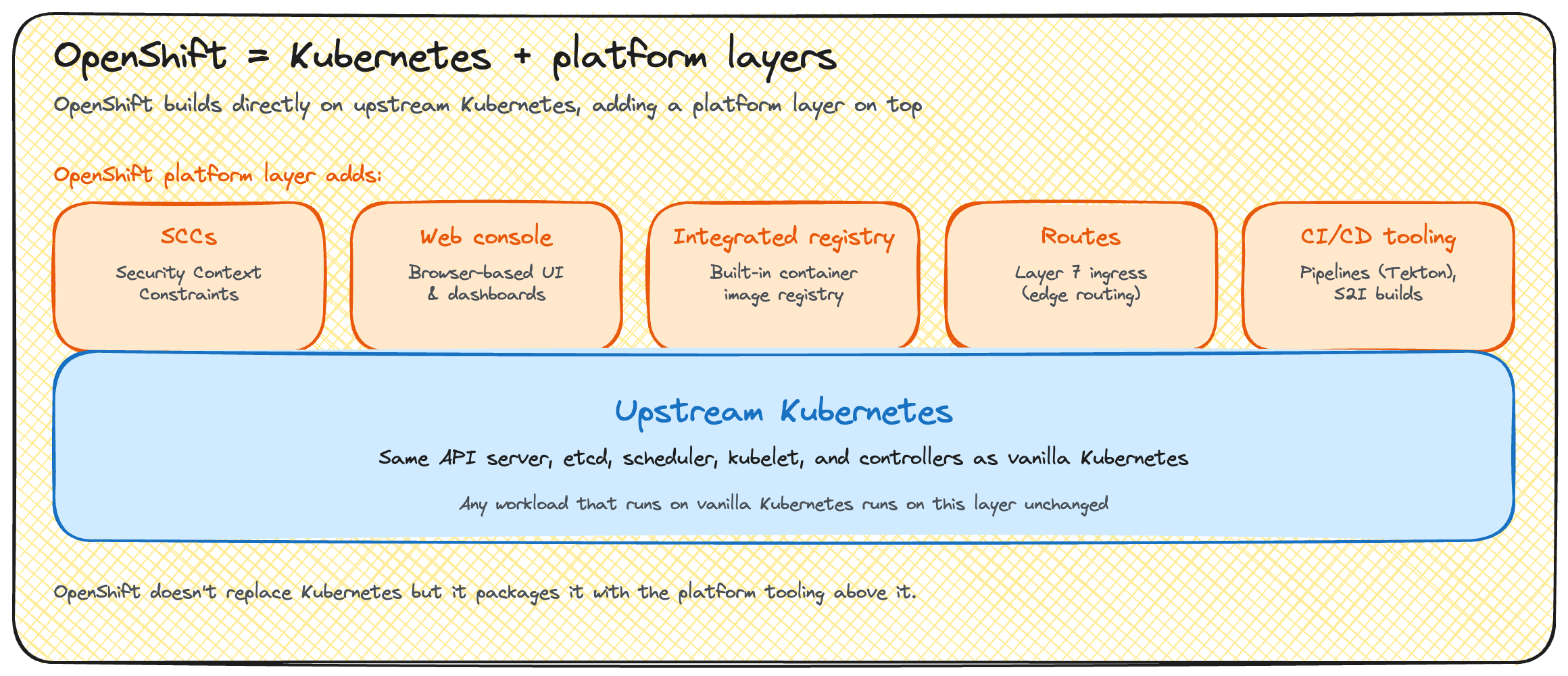
OpenShift is Red Hat's enterprise distribution built on top of it. Red Hat handles most of the heavy lifting, security, tooling, and support all built in, so it feels like one complete product instead of something you assemble piece by piece.
OpenShift ships the same upstream Kubernetes project that powers EKS, GKE, AKS, and Rackspace Spot, just packaged with the patches needed to integrate it as a platform, not a separate fork that's gone its own way. The current release, OpenShift Container Platform 4.22, ships Kubernetes 1.35 as its control plane.
There's also a free version of OpenShift, and that's OKD, the open-source, community-driven project OpenShift itself is built from, without Red Hat's commercial support attached.
Installation and cluster management
To look deeper into the control-versus-standardization tradeoff between these two platforms, we have to understand how each one handles installation and cluster management. Keeping up with cluster upgrades and node patching is one of the most common maintenance headaches for a team running Kubernetes on its own, and it's exactly what OpenShift's guided install process is built to remove.
Installing plain Kubernetes means choosing and configuring your own tooling, kubeadm for a single cluster, kops or kubespray for larger or cloud-specific setups, each requiring you to make decisions OpenShift makes for you.
Meanwhile, OpenShift installs through IPI (Installer-Provisioned Infrastructure) or UPI (User-Provisioned Infrastructure), a guided process with stricter node and OS requirements. OpenShift nodes run RHEL or RHCOS, not an arbitrary Linux distribution.
For cluster management, OpenShift's over-the-air updates patch the underlying node operating system along with the cluster itself. In practice, that's a single, coordinated upgrade instead of separately managing Kubernetes version upgrades and OS patching on your own nodes, which is what plain Kubernetes leaves entirely to you. With managed Kubernetes, a provider handles control plane upgrades, and node OS patching is typically left to you.
On OpenShift specifically, that node-level patching happens through replacement, not repair. For a degraded RHCOS node, the standard fix is to let the Machine Config Operator replace it entirely instead of patching it in place. Day-to-day, you manage MachineConfigs and MachineSets instead of SSH-ing into a node.
Security policies and RBAC
Security is OpenShift's clearest advantage, and it's the reason regulated industries pick it. Kubernetes is permissive by default. A Pod can request root access or host-level privileges unless something else in the cluster explicitly blocks it.
Meanwhile, OpenShift is secure by default, enforced through Security Context Constraints (SCCs), which run no-root-by-default and restrict what a Pod can request before it's ever scheduled. This has a real workload-compatibility cost. Container images built assuming root access often need adjustment to run on OpenShift.
Secure by default doesn't mean self-explanatory, either. The first blocked deployment often sends a new OpenShift user looking for documentation or a platform team's help, even though the SCC is doing exactly what it's supposed to do. Budget time for that ramp-up. It's a one-time cost, not a recurring one.
On the Kubernetes side, PodSecurity admission gets you a comparable model, but it's a cluster-level policy you configure yourself, not a default posture applied automatically the way OpenShift's SCCs are.
RBAC works similarly across both platforms, but OpenShift adds more on top:
- Network policies for controlling traffic between workloads
- Multi-tenancy controls for isolating teams and projects on the same cluster
- Built-in compliance postures, including FIPS and CIS benchmarks
Plain Kubernetes leaves all of that for you to assemble and audit yourself. For a team with a hard compliance mandate, this is the single factor that most often settles the decision.
Networking differences
Kubernetes lets you choose your CNI, Calico, Flannel, Cilium, or Weave, each with different tradeoffs in performance, policy enforcement, and observability. OpenShift ships OVN-Kubernetes as its default SDN, with the CNI choice made for you as part of the platform.
The two also diverge on ingress: OpenShift Routes predate and extend Kubernetes Ingress, adding simpler, OpenShift-native configuration for exposing a Service externally, while plain Kubernetes relies on the Ingress API and whatever controller you install. OpenShift bundles a load balancer and an optional OpenShift Service Mesh (built on Istio), where plain Kubernetes requires setting up a load balancer and any service mesh manually.
Storage and image registry
Storage on both platforms goes through the Container Storage Interface (CSI), a standard any storage vendor can implement. OpenShift Data Foundation adds an integrated, bundled option on top of that, for teams that want persistent storage as part of the platform rather than assembled from community CSI drivers.
Image registries diverge more. Plain Kubernetes has no registry of its own. You point it at Docker Hub, ECR, or another external registry. Meanwhile, OpenShift includes a built-in internal registry as part of the platform. It also ships ImageStreams, an OpenShift-only abstraction that tracks image tag changes and can automatically trigger new deployments when a referenced image updates.
The table below summarizes the differences between OpenShift and Kubernetes at a glance:
Features, ecosystem, and developer experience
Web console and user interface
Plain Kubernetes ships without a UI by default. Meanwhile, OpenShift includes an integrated web console with:
- Distinct developer and administrator perspectives
- A topology view that visualizes running workloads and their connections
- Pre-integrated Prometheus and Grafana dashboards for cluster health
All of it is available immediately after install, rather than assembled from separate projects.
CLI tooling
kubectl is the universal Kubernetes CLI and works against any Kubernetes cluster, OpenShift included. OpenShift's oc CLI extends kubectl with OpenShift-specific commands:
oc accelerates common OpenShift workflows that would take several kubectl commands to reproduce, at the cost of a second CLI to learn on top of kubectl's already broad surface.
Deployment strategies and automation
Kubernetes deploys workloads through Deployments, StatefulSets, and DaemonSets. OpenShift originally used its own DeploymentConfig object, but that's now legacy. New OpenShift work uses standard Kubernetes Deployments directly.
OpenShift's real value now is in the tooling around deployment:
- OpenShift Pipelines, built on Tekton
- Source-to-Image (S2I), which builds a container image directly from application source code without a Dockerfile
- OpenShift GitOps, built on Argo CD
- OperatorHub, for installing and managing operators
Helm works on both platforms without modification.
Monitoring, observability, and logging
OpenShift pre-integrates Prometheus, Alertmanager, and Grafana for metrics, plus a logging stack (LokiStack or the older EFK stack) for centralized logs, all configured and running out of the box. Plain Kubernetes gives you none of this by default. Every piece, metrics collection, alerting, log aggregation, distributed tracing, is a separate project you choose, install, and integrate yourself. That difference is entirely about time-to-value.
That pre-integration comes with a real limit: a Cluster Monitoring Operator manages the stack and enforces its own configuration. Editing the Prometheus custom resource directly doesn't stick. The operator reverts it to the values in its own config map on the next reconcile. Customizing beyond what that config map exposes means working through Red Hat's supported extension points, not the underlying Prometheus resource itself.
Developer productivity and experience
OpenShift's Developer Sandbox and self-service projects let individual developers spin up their own isolated environment without cluster-admin involvement, roughly analogous to a Kubernetes namespace but with more built-in guardrails and a dedicated console view. OpenShift Dev Spaces (formerly CodeReady Workspaces) provides browser-based development environments as an alternative to configuring a local IDE against the cluster.
OpenShift's application catalog and templates give developers a starting point beyond raw Helm charts. All of this is available on plain Kubernetes too, but a team has to assemble it from separate tools. On OpenShift, it's part of onboarding.
Ecosystem and extensibility
Kubernetes sits at the center of the entire CNCF ecosystem, thousands of compatible tools, the broadest possible third-party integration surface, with no single vendor curating what's "supported." Meanwhile, OpenShift narrows that to a curated Red Hat ecosystem, RHEL, Ansible, Quay, Advanced Cluster Management, each certified to work together, trading breadth for assurance.
Community dynamics follow the same pattern: Kubernetes development is global and vendor-neutral, while OKD's community is smaller and more tightly coupled to Red Hat's own roadmap. Neither is strictly better.
Enterprise considerations: Cost, support, and use cases
Pricing, licensing, and cost
Kubernetes itself is free, open-source software. OpenShift is a paid subscription on top of that free foundation, and Red Hat offers it in a few forms:
- Self-managed OCP: you run OpenShift Container Platform on your own infrastructure, cloud or on-premises, and pay a Red Hat subscription for support and updates
- ROSA (Red Hat OpenShift Service on AWS): a fully managed OpenShift cluster on AWS, billed by AWS
- ARO (Azure Red Hat OpenShift): the equivalent fully managed offering on Azure
Red Hat doesn't publish OpenShift Container Platform list pricing directly. Its pricing page directs buyers to a sales conversation, and third-party pricing estimates found online vary too widely and inconsistently to cite a reliable figure here. Contact Red Hat sales for a quote specific to your cluster size and support tier.
ROSA's published rates are more concrete:
- On-demand: $0.171 per hour for 4 vCPU
- 1-year reserved term: $1,000 per 4 vCPU annually
- 3-year reserved term: $667 per 4 vCPU annually (about $0.076/hr)
- Hosted control plane fee: a separate $0.25/hr, on top of any of the above
The real comparison is total cost of ownership, not licensing price alone. OpenShift's subscription cost is partly offset by lower operational overhead: pre-integrated security, monitoring, and upgrades reduce the platform engineering hours a team needs.
Plain Kubernetes has no licensing cost, but it has a real hidden bill: the tooling, hardening, monitoring setup, and skilled platform staff needed to reach OpenShift's baseline capability. That's why "Kubernetes is free" understates the true cost for a team building that capability from scratch.
The pattern across every row is the same: cost moves from a licensing line item toward an operations line item as you move from DIY Kubernetes to OpenShift. Which one is actually cheaper depends entirely on whether your team's time or your subscription budget is the scarcer resource.
For cost-sensitive teams that don't need OpenShift's compliance layer, managed, spot-priced Kubernetes is a third path. Rackspace Spot runs fully managed Kubernetes clusters with a free hosted control plane.
Managed services and cloud offerings
Every major cloud has both a native managed Kubernetes service and a managed OpenShift option:
- ROSA vs. EKS: managed OpenShift vs. Amazon's native managed Kubernetes, both on AWS
- ARO vs. AKS: the same pairing on Azure
- OpenShift Dedicated vs. GKE: managed OpenShift on infrastructure Red Hat operates, versus Google's native managed Kubernetes
The shared-responsibility split differs by offering, but OpenShift's biggest practical advantage in this category is consistency: ROSA, ARO, and OpenShift Dedicated all deliver the identical OpenShift experience regardless of which cloud runs underneath, where native managed Kubernetes services vary in defaults, tooling, and console experience from one cloud to the next.
Rackspace Spot fits into this same category as a low-cost, spot-priced managed Kubernetes option, distinct from managed OpenShift and not positioned as a compliance-equivalent substitute for it.
Enterprise support and vendor backing
OpenShift comes with a Red Hat SLA and certified components, backed by a single vendor's support organization and compliance guarantees. The tradeoff is real dependence on Red Hat, both commercially and technically. By contrast, Kubernetes support comes from the community and the CNCF, or from any of several commercial Kubernetes distributions, spreading vendor risk but requiring a team to assemble its own support relationships rather than getting one contract that covers the whole stack.
Because OpenShift is a Kubernetes distribution, not a fork, workloads deployed on it use standard Kubernetes APIs. Migrating off OpenShift means rebuilding the security, monitoring, and deployment tooling Red Hat provides, not rewriting incompatible workloads.
Patch and release lifecycle follows the same divide, which is that OpenShift's LTS and patch lifecycle is predictable and Red Hat-managed, while upstream Kubernetes moves on a faster, community-driven release cadence.
Scalability, flexibility, and customization
Kubernetes and OpenShift diverge across three scaling dimensions:
- General scaling: Kubernetes scales however you configure it, with no guardrails beyond what you build yourself. OpenShift uses the same underlying control plane, but adds enterprise-safe boundaries and defaults, trading flexibility for fewer footguns.
- Multi-cluster management: OpenShift's Advanced Cluster Management (ACM) versus Cluster API or Rancher for plain Kubernetes.
- Edge deployments: Single Node OpenShift and MicroShift target the same lightweight, resource-constrained use cases that K3s and K0s cover in the plain Kubernetes world.
Use cases, advantages, and choosing between platforms
Kubernetes fits:
- Greenfield projects
- Cost-sensitive teams
- Organizations with strong in-house platform expertise that want maximum flexibility and no vendor dependency
OpenShift fits:
- Regulated industries that need security and compliance out of the box
- Organizations already standardized on Red Hat
- Teams that want to reduce ongoing operational burden even at higher licensing cost
In practice this tracks industry lines: finance, healthcare, and government deployments lean OpenShift for its compliance posture, while startups and cost-sensitive engineering teams lean Kubernetes for its flexibility and lower baseline cost.
A practical decision framework:
- Team expertise: strong in-house Kubernetes skills favor plain Kubernetes, while a smaller or less specialized team benefits more from OpenShift's guardrails
- Budget: OpenShift's subscription cost needs to be weighed against the platform-engineering hours it saves, not compared to Kubernetes' license price alone
- Compliance requirements: hard regulatory mandates (FIPS, CIS, industry-specific frameworks) favor OpenShift's built-in posture
- Existing infrastructure: an organization already running RHEL and other Red Hat products gets more value from OpenShift's integration with that ecosystem
- Scalability needs: teams that need unrestricted, highly custom configurations may find OpenShift's guardrails limiting
For teams choosing Kubernetes purely to save money, managed spot Kubernetes delivers OpenShift's low operational burden at a fraction of the cost. Teams with hard compliance mandates should still choose OpenShift, regardless of cost.
Leveraging managed Kubernetes will save you headaches
The choice covered so far reads as binary, OpenShift or Kubernetes, but the real spectrum has three points:
- DIY Kubernetes: cheap licensing, high operational burden
- Managed Kubernetes: low operational burden, pay-as-you-go pricing, without OpenShift's licensing or its compliance layer
- OpenShift: highest convenience and compliance, highest cost
Rackspace Spot sits at the low-cost end of that managed-Kubernetes band: fully managed clusters through an open-market auction, a free hosted control plane, both spot and on-demand node pools, and support for bringing your own Helm charts and operators without restriction. Rather than setting up your own Kubernetes cluster to try to "save cost," you can rely on Rackspace Spot, where a full 4-node cluster starts at $12.88 a month, with each node priced at $0.72. Check out the Rackspace Spot pricing page for full cost details.
OpenShift is built on Kubernetes and depends on it entirely. They aren't really competitors. The decision that matters is whether your team needs the compliance, support, and out-of-box tooling OpenShift's subscription buys, or whether plain Kubernetes plus the right managed platform gets you there for less. If it's the latter, get started with Rackspace Spot and run your first cluster in minutes.
Frequently asked questions
Why use OpenShift instead of Kubernetes?
OpenShift adds security defaults, an integrated console, built-in CI/CD tooling, an image registry, and Red Hat support on top of standard Kubernetes, reducing the operational work needed to run a production-ready platform. Teams choose it when that reduced operational burden and compliance posture are worth the subscription cost, particularly in regulated industries.
Which is better, OpenShift or Kubernetes?
Neither is universally better; it depends on compliance requirements, budget, and in-house expertise. A team with strong Kubernetes skills, a tight budget, and no hard compliance mandate is usually better served by plain Kubernetes. A team that needs built-in security compliance, reduced operational overhead, or Red Hat's support contract is usually better served by OpenShift.
Does OpenShift require Kubernetes?
Yes. OpenShift is built directly on top of Kubernetes, currently Kubernetes 1.35 in OpenShift Container Platform 4.22, packaged as a distribution rather than a fork. OpenShift adds a platform layer around the Kubernetes control plane rather than replacing it.
What's the difference between OpenShift and Kubernetes versions?
Each OpenShift Container Platform release ships a specific, documented upstream Kubernetes version, though the two version numbers don't match directly. OpenShift Container Platform 4.22, the current release, ships Kubernetes 1.35.
Is OpenShift free? What is OKD?
OpenShift Container Platform itself is a paid Red Hat subscription. OKD is the free, community-driven upstream version of OpenShift, the same relationship Fedora has to RHEL, and it maps to what people mean by "OKD vs. Kubernetes": OKD adds OpenShift's platform layer for free, but without Red Hat's commercial support.
Should I learn Kubernetes before OpenShift?
Yes. OpenShift assumes working Kubernetes knowledge, Pods, Deployments, Services, and builds its platform layer on top of those fundamentals. Learning Kubernetes first makes OpenShift's additions (SCCs, Routes, the oc CLI) land as extensions of something familiar rather than a second, unrelated system to learn from scratch.
How difficult is OpenShift?
Day-to-day use is comparable to Kubernetes for anyone who already knows kubectl, since oc extends it rather than replacing it. The added difficulty is mostly conceptual: understanding SCCs, OpenShift's opinionated defaults, and where OpenShift's abstractions (Routes, ImageStreams, DeploymentConfig's legacy status) diverge from plain Kubernetes.
How does managed OpenShift (ROSA/ARO) compare to managed Kubernetes (EKS/AKS/GKE)?
Managed OpenShift costs more but includes OpenShift's full platform layer, security defaults, console, and Red Hat support, with a consistent experience across clouds. Managed Kubernetes (EKS, AKS, GKE) costs less and gives you the cloud provider's native Kubernetes experience without that platform layer. Managed, spot-priced Kubernetes options like Rackspace Spot sit below both on cost, for teams that want a managed control plane without paying for either OpenShift's platform layer or a hyperscaler's on-demand rates.
Is Kubernetes still relevant in 2026?
Yes. Kubernetes remains the standard container orchestration layer underneath essentially every platform in this comparison, including OpenShift itself. What's evolved is how much of it teams manage directly: managed services and platforms like OpenShift are changing the operational model, not the relevance of Kubernetes as the underlying orchestrator.