


Picture a release that touches dozens of interdependent services, each one needing its version bumped in the right order, checked, and published, without missing a step or breaking the build. Done by hand, that kind of release is a full day's work for two or three people. Automated, it's about an hour for one.
Cloud environments now run hundreds or thousands of resources across regions and accounts, changing by the hour, and a person clicking through a console can't keep up at that scale.
Cloud automation replaces repetitive, error-prone manual work with code that does the same job on a trigger without someone doing it by hand.
In this article, we will go through the core concepts, the tools that do the work, how teams put it into practice, and where it's headed in 2026.
Understanding cloud automation and its core components
Defining cloud automation in modern cloud environments
Cloud automation replaces manual, one-off actions like spinning up a server by hand, editing a firewall rule, restarting a crashed service, with code that does the same work on a trigger or a schedule. It ranges from small scripts (resizing a disk at 80% capacity) to full workflows chaining provisioning, configuration, deployment, and monitoring into one pipeline.
It applies across public, private, and hybrid cloud alike, and it works because nearly every cloud platform exposes its functions through an API, so anything you can click in a console, you can also call programmatically.
Traditional IT automation (login scripts, batch jobs, a cron job backing up a database) handles fixed, on-premises tasks. Cloud automation operates at a different scale, by managing resources that appear and disappear dynamically, coordinated entirely through APIs.
Key pillars of cloud automation
Cloud automation is judged against five properties. Each addresses a specific failure mode that shows up when infrastructure is managed by hand:
- Consistency: Every environment, dev, staging, production, gets built from the same definition, so "it worked on my machine" configuration drift stops being possible
- Reliability: Automated processes run the same way every time. A person following the same steps by hand can skip one or do it slightly differently under pressure, a script can't
- Efficiency: Tasks that took a person an hour, provisioning an environment, patching a fleet, run in minutes without anyone available to do them
- Scalability: Automation handles 10 resources and 10,000 with the same script, while manual processes get slower and more error-prone as the count grows
- Elasticity: Resources expand and contract automatically as demand changes, instead of staying sized for peak load around the clock
Infrastructure as code: The foundation of cloud automation
Infrastructure as code (IaC) means defining your servers, networks, and other cloud resources in a configuration file, typically JSON or YAML, instead of clicking them in a console. Terraform, one of the most widely used IaC tools, uses its own configuration language (HCL) to describe that same kind of resource:
resource "aws_instance" "web" {
  ami           = "ami-0c55b159cbfafe1f0"
  instance_type = "t3.micro"

  tags = {
    Name = "web-server"
  }
}
That file is the complete definition of the server, and it can be checked into version control alongside your application code. Running terraform apply builds exactly what it describes, and if you run it again on a different account, it produces an identical environment.
Version-controlled IaC gives you a few things a manually built environment can't:
- Every change to infrastructure becomes a reviewable pull request
- Every environment can be torn down and rebuilt from the same source
- A bad change can be rolled back the same way a bad code change can, by reverting the commit
Configuration management in cloud automation
While provisioning creates a resource, configuration management keeps it in the state you want. Ansible, one of the most common tools for this, connects over SSH and runs playbooks, YAML files that install packages, start and stop services, write configuration files from templates, and manage users, the same way every time whether a machine is brand new or has drifted from its intended configuration.
Puppet, Chef, and SaltStack all do the same job of reconciling a server's actual state with the desired state you've defined.
Teams routinely conflate this with provisioning, but the distinction matters. IaC decides that a server exists, at a given size and placement, and configuration management decides what's running on it. A drift detection pass, run on a schedule, flags any server that no longer matches its defined configuration and corrects it automatically, keeping a fleet consistent long after it was first built.
Cloud automation tools, platforms, and technologies
Understanding the pillars above is one thing. Putting them to work means knowing which category of tool solves which problem, since provisioning, configuration, orchestration, and monitoring are each handled by different, purpose-built tools.
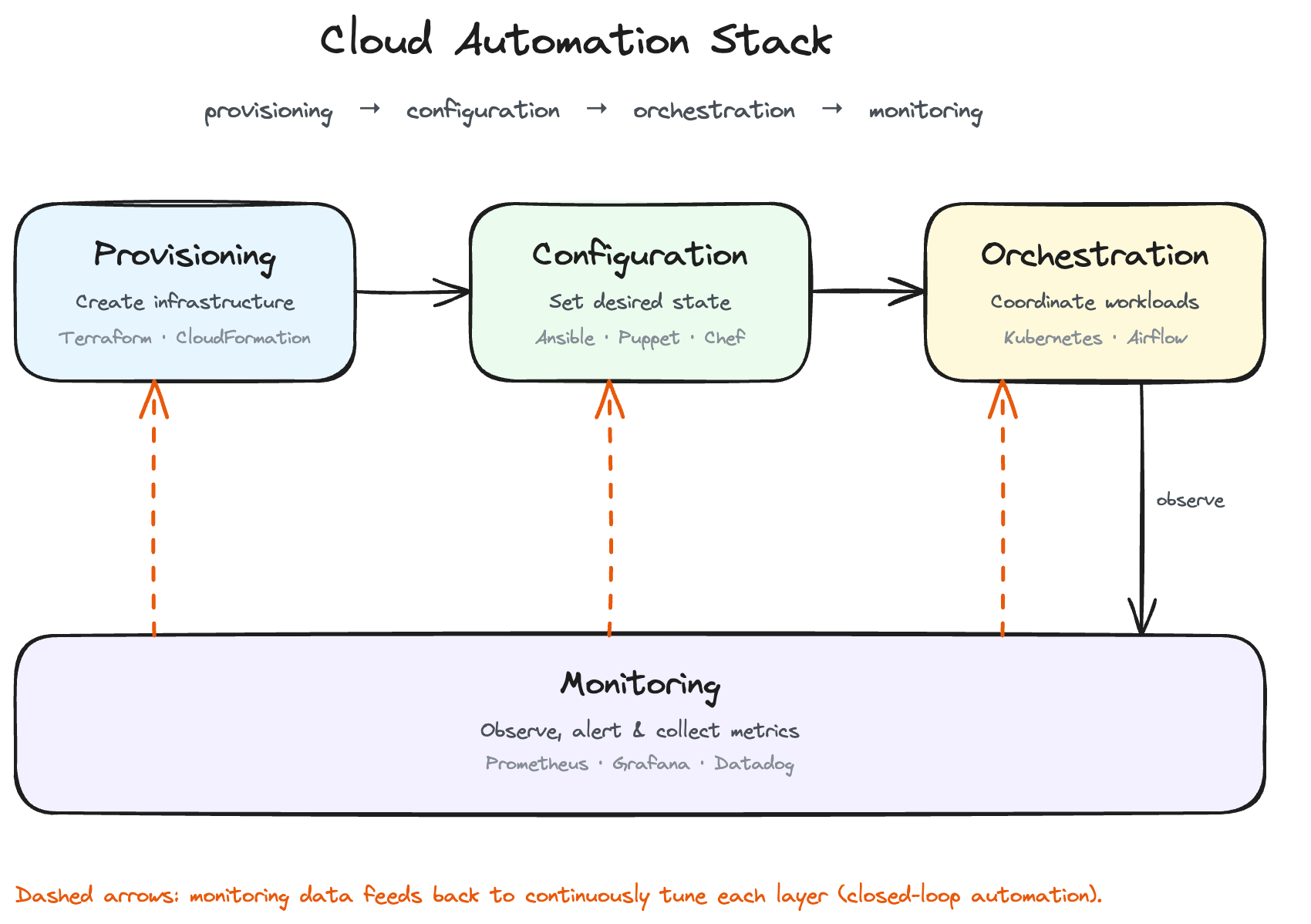
Overview of cloud infrastructure automation tools
Most cloud automation tooling falls into four categories, and picking the right one starts with knowing which category addresses the problem at hand:
Selection usually comes down to three questions:
- Does the team need multi-cloud support, or is everything on one provider?
- Does the workload need a full orchestration layer, or just scheduled scripts?
- Does the CI/CD pipeline already have integration points for one tool over another?
Native cloud-provider tools integrate tightly with their own platform but lock you into it, while third-party tools like Terraform trade some of that integration for working the same way across providers.
Not every need requires a dedicated platform. A lightweight Bash, Python, or PowerShell script, triggered by a cron job or a CI step, is still cloud automation, and it's often the right tool for a narrow task that doesn't justify a full platform.
Infrastructure provisioning tools and platforms
The three most common provisioning tools take different approaches to the same problem, defining infrastructure in a template so it can be built repeatably:
CloudFormation and ARM templates only speak their own provider's API, so a multi-cloud team either maintains two template languages or standardizes on a provider-agnostic tool like Terraform. Templates in any of these tools are modular, a network module, a database module, a compute module, reused across environments instead of rewritten each time.
Cloud orchestration platforms and orchestration tools
Automation and orchestration solve different problems. Automation handles one task: restart this service, resize this disk. Orchestration coordinates many automated tasks in order, with dependencies between them, so a multi-step process runs correctly start to finish without someone kicking off each step manually.
Kubernetes orchestrates containerized workloads, deciding which node runs which container. Apache Airflow orchestrates data pipelines, running a defined task sequence and re-running any step that fails. AWS Step Functions orchestrates serverless workflows, chaining Lambda functions with built-in retry and error handling. All three sequence dependent steps and handle failures, applied to different kinds of work.
Running an orchestrator like Kubernetes yourself means you have the job of patching it, scaling its control plane, and keeping it available. Managed Kubernetes platforms, including Rackspace Spot, take that job off a team's plate by including a fully managed control plane.
Automation tools for DevOps workflows
CI/CD tools automate the path from a code commit to a running deployment, testing, building, and deploying an application without someone running each step manually. Jenkins, GitLab CI/CD, and GitHub Actions all fill this role by triggering a defined pipeline on every code change.
The value compounds when the pipeline connects to the provisioning and configuration tools above. A merged pull request can trigger a pipeline that applies a Terraform plan, runs an Ansible playbook, and deploys the application, all without a person touching a single step.
Understand that this access has to be earned carefully. A pipeline that can run Terraform or push to Kubernetes can also do real damage if it's compromised, so its credentials matter as much as the automation itself. Current practice favors short-lived, scoped tokens issued through OIDC or Workload Identity Federation over long-lived stored secrets, and many teams add a GitOps tool like ArgoCD or FluxCD on top, pulling approved changes from Git rather than letting the pipeline push to production directly.
Monitoring and observability in cloud automation
Monitoring closes the loop on everything above it. Tools such as Prometheus, Grafana, or Datadog track resource health and availability continuously, and that data is what makes self-healing and auto-scaling possible, since neither can act on a problem it doesn't know exists.
When monitoring data crosses a defined threshold, CPU over 80% for five minutes, a failed health check, error rates spiking, it triggers an automated response instead of paging a human first, scaling out, restarting a container, or rolling back a deployment. Alerting still notifies a person when something needs judgment, but the response that matters for uptime happens on its own.
Implementing cloud automation: Processes, practices, and workflows
Knowing what each tool category does is only half the picture. Putting them into a real production workflow is where cloud automation either saves a team real effort or turns into a pile of scripts nobody understands.
Designing automated cloud workflows
An effective automated workflow starts with mapping the manual process it's replacing, step by step, since automating an undocumented process usually means automating the wrong thing. Most workflows are event-driven, triggered by a code commit, a scheduled time, a monitoring alert, or a queue message, rather than by a person starting them manually.
Cloud-native workflow services like AWS Step Functions, Azure Logic Apps, and Google Cloud Workflows exist for this event-driven sequencing, connecting a trigger to a defined series of steps without custom glue code. Documenting and version-controlling the workflow matters just as much, an undocumented workflow is as hard to debug at 2 a.m. as an undocumented manual process.
Auto scaling and dynamic resource allocation
Auto scaling automates how many resources you need right now, adding capacity as demand rises and removing it as demand falls, based on policies you define ahead of time (CPU above a threshold, queue depth, a scheduled time window). This is the mechanism that turns elasticity, one of the pillars above, into something that happens without a person watching a dashboard by hand.
Handled well, auto scaling covers both proactive spikes (a scheduled sale event) and reactive ones (unexpected traffic), and it's one of the most direct levers on cost, since capacity that isn't provisioned isn't billed.
Rackspace Spot, for example, auto-scales node pools automatically.
Automated deployment processes and patch management
Automated deployment applies the same event-driven pattern to shipping application changes. A change triggers a build, the build triggers a deploy, and the deploy follows a strategy, rolling update, blue-green, or canary, that avoids downtime. Patch management follows the same shape, applying OS and dependency patches on a schedule instead of waiting for someone to notice a CVE manually.
Scheduling both around low-traffic windows limits the blast radius of anything that goes wrong, and logging every automated deploy and patch gives you an audit trail, useful for debugging a bad rollout and for a compliance review alike.
Automated failover processes and reliability engineering
Failover automation detects a failed resource, a crashed instance, an unreachable zone, and redirects traffic or rebuilds it without a person paging in first, moving recovery time from minutes down to seconds. Self-healing infrastructure runs on the same pattern, a health check fails, and the system replaces the component automatically.
For anything spanning multiple regions or zones, orchestration coordinates the failover sequence, redirecting traffic, promoting a replica, updating DNS, in the right order rather than all at once. Chaos engineering, deliberately triggering failures in a controlled environment, is how teams confirm failover works before a real outage tests it for them.
Security workflows and compliance management automation
Security automation applies policy checks and remediation the same way deployment automation applies code changes, continuously, without waiting for a scheduled audit. A misconfigured storage bucket or an overly permissive access rule gets flagged, and in a mature setup, corrected the moment it's created rather than at the next manual review.
The most effective version of security automation embeds the check into provisioning itself, by using an IaC template or configuration policy that simply won't create a non-compliant resource. Enforcing rules like GDPR or HIPAA at creation time, rather than checking for violations after the fact, is where compliance automation is heading, which removes an entire category of "found during the audit" findings before they happen.
Strategic benefits, optimization, and best practices of cloud automation
With the mechanics and implementation covered, the remaining question is what all of this is worth, and how to apply it without over-automating the parts of an operation that still need a person's judgment.
Cost optimization through cloud automation
Automation cuts cloud spend by continuously doing what a person would only get around to occasionally:
- Shutting down non-production environments overnight and on weekends
- Rightsizing instances running well below their allocated capacity
- Managing reserved-instance commitments against actual usage instead of a one-time estimate
Auto scaling, covered above, adds to this directly, since capacity that scales down when demand drops stops being billed the moment it's removed.
You can also set a hard spend threshold. If you cross it, the system alerts your team or blocks the deployment outright before the overage actually happens.
Scalability and business agility through automation
Automated provisioning turns a multi-day environment setup into a process that runs in minutes. A new feature or a new region launch no longer waits days on infrastructure and ships as soon as the code is ready. Self-service automation extends the same benefit to individual developers, who can provision a test environment or a database from a template without filing a ticket and waiting on an infrastructure team.
Reducing human intervention and improving operational efficiency
Automating a repetitive task removes it from a team's workload permanently, and the gains compound, fewer manual deployment steps, faster incident response, lower error rates, since a script doesn't skip a step under pressure the way a tired engineer might at 3 a.m.
Automating everything isn't the goal, though. Teams that have gone through this shift land on the same split. Automate the repetitive, well-understood work:
- Restarting a known-safe service
- Applying a tested patch
- Scaling within known limits
And keep a person in the loop for anything high-risk or ambiguous:
- A production database migration
- A security incident with an unclear cause
- A change with no good rollback path
Automation that removes human judgment from exactly the decisions that need it isn't an efficiency win.
Best practices for cloud automation implementation
Teams that get real, lasting value from cloud automation tend to follow the same handful of practices:
- Start small and iterate. Automate one high-impact process first, prove it works, and expand from there
- Standardize templates for reuse. One written once and reused beats the same logic copy-pasted and modified five times
- Test automation as rigorously as application code. A bad script can misconfigure production just as fast as a good one configures it correctly
- Govern what's automated. Track what exists and who owns it, so nothing becomes an unmanaged risk after its owner leaves
- Review automation on a schedule. A workflow built for last year's scale can quietly become the wrong one for this year's
Future directions in cloud automation
The next shift in cloud automation is agentic, closed-loop systems that detect an anomaly, determine its root cause, and remediate it automatically, with a person providing oversight rather than performing the fix.
Gartner projects that 40% of enterprise applications will embed task-specific AI agents by the end of 2026, up from less than 5% in 2025. Cloud providers are already building agent orchestration directly into the infrastructure layer, and the same pattern is showing up in multi-cloud, hybrid, and edge automation.
Frequently asked questions
What is cloud automation?
Cloud automation is software and code that provisions, configures, and manages cloud resources with little to no manual intervention. It covers everything from a single script that resizes a disk automatically to a full pipeline that provisions, configures, deploys, and monitors an application end to end.
How does cloud automation work?
It works by using each cloud provider's API to perform the same actions a person would take in a console, but triggered by code, a schedule, or a monitoring event instead of a click. Provisioning tools create resources, configuration management keeps them in the desired state, orchestration sequences multi-step workflows, and monitoring feeds the data that triggers automated responses.
What's the difference between cloud automation and cloud orchestration?
Automation handles a single task, restarting a service, resizing a disk, applying a patch. Orchestration coordinates many of those tasks together, in a specific order, with dependencies between them, so a multi-step process completes correctly end to end. Every orchestrated workflow relies on automation for its individual steps, but not every automated task needs an orchestrator on top of it.
What are some examples of cloud automation?
Common examples include auto-scaling a fleet based on CPU usage, deploying a tested build through a CI/CD pipeline, patching operating systems on a schedule, failing over to a backup region when a health check fails, and flagging or correcting a misconfigured resource that violates a security policy.
What are the main cloud automation tools?
The main categories are provisioning tools (Terraform, AWS CloudFormation, Azure Resource Manager), configuration management tools (Ansible, Puppet, Chef, SaltStack), orchestration platforms (Kubernetes, Apache Airflow, AWS Step Functions), and monitoring tools (Prometheus, Grafana, Datadog). Most environments use tools from more than one category rather than a single all-in-one platform.
What is Infrastructure as Code (IaC)?
Infrastructure as code is the practice of defining cloud resources, servers, networks, storage, in a text file instead of creating them manually. That file is version-controlled, making every infrastructure change reviewable, every environment reproducible, and a bad change revertible by rolling back the commit.
What are the benefits of cloud automation?
The main benefits are speed (minutes instead of days), fewer errors (a script runs the same way every time, while a manual process doesn't), consistency across environments, and lower cost, since automation catches idle and over-provisioned resources a person would only get around to reviewing occasionally.