


Two teams share one Kubernetes cluster, and both have a Service named api. When another Pod sends a request to api, which of the two Services actually receives it?
The fix is to put each team in its own namespace. Names only have to be unique within a single namespace, not across the whole cluster, so once each team's api lives in its own namespace, they're two separate Services and neither one has to be renamed.
This guide covers what a namespace is, the default namespaces every cluster ships with, and the YAML, Terraform, and kubectl commands you need to work with them, plus resource quotas, cross-namespace DNS, and why namespaces alone aren't a hard security boundary.
What Is a Kubernetes Namespace?
A namespace is a logical partition inside a single cluster. It groups related resources, keeps names from colliding between teams or projects, and gives you a boundary to attach quotas and limits to.
Three things define what a namespace actually does:
- Name scoping: names only need to be unique within a namespace. Two teams can both run a Service called
api, one inteam-a, one inteam-b, without conflict - Shared cluster: multiple teams, projects, or environments run on the same physical cluster, each working inside its own namespace instead of competing for the same resources
- Resource limits: a namespace is the boundary a ResourceQuota or LimitRange attaches to, so you can cap how much CPU, memory, or how many objects one team can consume
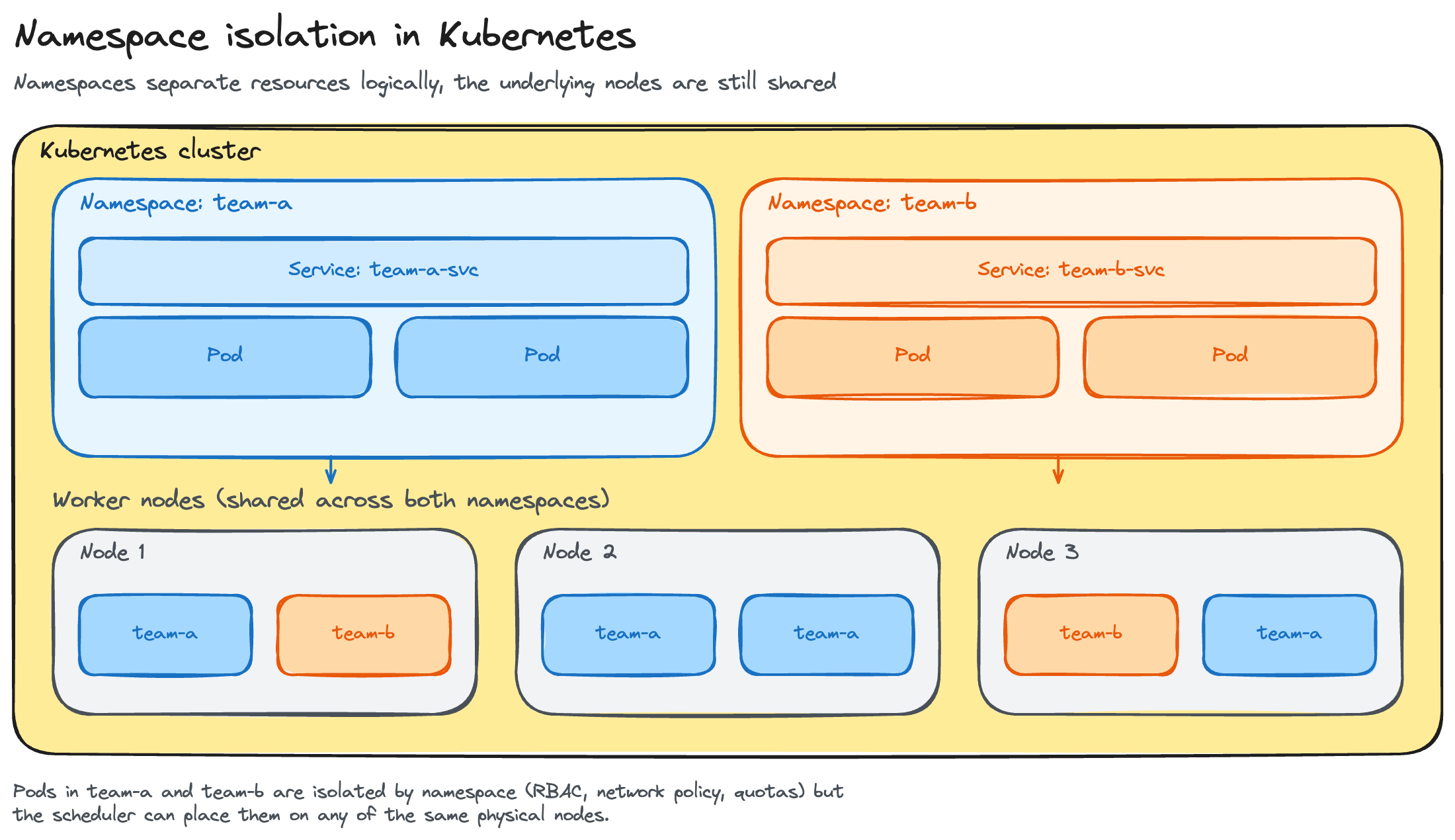
Namespaces don't partition the cluster's actual infrastructure. Every namespace draws from the same pool of nodes, the same network, and the same control plane, only the organizational and policy layer is separated.
Namespace vs. Pod vs. Cluster: Clearing Up the Confusion
These three terms describe different scopes, and conflating them is the most common beginner mistake:
- Cluster is the whole system, every control-plane and worker node, everything running on it
- Namespace is a logical division inside one cluster
- Pod is the smallest deployable unit, and it runs inside exactly one namespace
The containment runs cluster → namespace → pod. A namespace lives inside a single cluster and holds Pods; it isn't a pod, and it doesn't span multiple clusters.
The Default Namespaces
Every cluster ships with four namespaces already in place:
Avoid deploying application workloads into default, and don't touch objects in kube-system unless you know exactly what you're changing. It holds the components the cluster needs to function.
Namespaced vs. Cluster-Scoped Resources
Not everything in Kubernetes lives inside a namespace. Namespaced objects, Pods, Services, Deployments, ConfigMaps, Secrets, ResourceQuotas, belong to exactly one namespace. Cluster-scoped objects, Nodes, PersistentVolumes, StorageClasses, ClusterRoles, and Namespaces themselves, don't belong to any namespace at all.
Check which is which directly:
kubectl api-resources --namespaced=true
kubectl api-resources --namespaced=false
This distinction matters for RBAC scope, a Role only applies within its namespace, while a ClusterRole applies cluster-wide, and for anything that needs to exist once per cluster rather than once per team.
Working with Namespaces: Essential kubectl Commands
A handful of commands cover most day-to-day namespace work:
kubectl delete namespace removes every object inside it, Pods, Services, ConfigMaps, all of it, with no separate confirmation step. The last command sets your current context's default namespace, so you stop typing -n <name> on every command. Tools like kubectx and kubens exist specifically to switch that default faster.
Creating a Namespace with YAML (and Terraform)
The imperative command works for quick testing, but most teams manage namespaces the same way they manage everything else in production, as a YAML manifest under version control.
apiVersion: v1
kind: Namespace
metadata:
  name: team-a
  labels:
    team: team-a
    environment: production
Apply it with:
kubectl apply -f namespace.yamlYAML over the imperative create command buys you the same thing IaC buys everywhere else: the namespace's definition lives in Git, changes go through review, and kubectl apply is idempotent, re-running it doesn't fail just because the namespace already exists.
For teams already managing infrastructure with Terraform, the same kubernetes_namespace resource creates a namespace declaratively, once the provider is configured against a running cluster:
resource "kubernetes_namespace" "team_a" {
  metadata {
    name = "team-a"
    labels = {
      team        = "team-a"
      environment = "production"
    }
  }
}
Managing Resources: ResourceQuota and LimitRange
Namespaces don't limit resource usage by themselves. Two objects handle that:
- ResourceQuota caps a namespace's total resource consumption, total CPU, total memory, total object counts, so one team can't consume the whole cluster
- LimitRange sets defaults and min/max bounds per container, so a Pod that doesn't specify its own requests or limits still gets something sane instead of running unconstrained
Use both together. LimitRange keeps individual Pods from shipping with no resource requests at all; ResourceQuota keeps the namespace's total footprint under control even when every Pod is well-behaved individually.
apiVersion: v1
kind: ResourceQuota
metadata:
  name: team-a-quota
  namespace: team-a
spec:
  hard:
    requests.cpu: "10"
    limits.memory: 20Gi
    pods: "50"
apiVersion: v1
kind: LimitRange
metadata:
name: team-a-limits
namespace: team-a
spec:
limits:
- default:
cpu: 500m
memory: 512Mi
defaultRequest:
cpu: 250m
memory: 256Mi
max:
cpu: "2"
memory: 2Gi
type: ContainerThose quotas cap spend within a cluster, and running that cluster on Rackspace Spot's spot-priced managed Kubernetes instead of fixed on-demand rates lowers what filling each namespace's quota actually costs.
Cross-Namespace Communication and DNS
Inside a namespace, a Service is reachable by its short name; a Pod in team-a can reach a Service called api with just http://api. Cross a namespace boundary and that short name stops resolving, since DNS scoping is part of what a namespace does. Reach a Service in another namespace through its fully qualified name instead:
<service>.<namespace>.svc.cluster.localA Pod in team-b calling the api Service in team-a uses api.team-a.svc.cluster.local. This pattern comes up any time one team depends on a shared service, a shared auth service or a shared database proxy, that lives in its own namespace.
The DNS pattern doesn't restrict who can call what. By default, a Pod in any namespace can reach a Service in any other namespace, since namespaces alone don't isolate network traffic. Restricting that requires a NetworkPolicy.
Namespaces and Isolation: Soft Multi-Tenancy, Security, and Alternatives
Namespaces are soft multi-tenancy. They give you an organizational and policy boundary, RBAC scoped per namespace, NetworkPolicies, quotas, but not a hard security boundary. Pods in different namespaces still run on the same nodes and share the same kernel, so a container escape in one namespace isn't automatically contained by the namespace boundary alone.
For stronger isolation, teams typically layer one of a few things on top:
- NetworkPolicies and RBAC harden the namespace boundary itself, restricting both traffic and API access
- Separate clusters per team or environment give up namespace sharing entirely in exchange for a real isolation boundary
- Virtual clusters (tools like vCluster) sit between the two, giving each tenant something that looks like its own cluster while still running on shared physical infrastructure
The separate-cluster option is usually ruled out on cost. Running five clusters instead of five namespaces multiplies your control-plane and node overhead five times over. That math changes on a platform with a free control plane and spot-priced nodes. Rackspace Spot, for example, makes cluster-per-team or cluster-per-environment a realistic alternative to cramming every tenant into namespaces on one shared cluster.
Kubernetes Namespaces vs. Linux User Namespaces
These are two unrelated things that happen to share a name. The Namespace object covered in this guide is a Kubernetes API resource, a logical partition for organizing cluster resources. A Linux user namespace is a kernel feature that remaps the UIDs and GIDs inside a container to a different, unprivileged range on the host, so a process running as root inside a container has no root privileges on the node itself.
You enable it per Pod with hostUsers: false. User namespaces reached general availability in Kubernetes v1.36, which is why the term is showing up in search results and discussions right now, but they solve a container-escape security problem, not resource organization. A cluster can use both at once, Kubernetes namespaces to organize workloads, Linux user namespaces to harden the containers running inside them.
Kubernetes Namespace Best Practices
- One namespace per team, app, or environment. Avoid deploying workloads into
default - Use consistent, meaningful names and labels. They drive selectors, RBAC bindings, and cost reporting later
- Set LimitRange defaults and ResourceQuota ceilings on every namespace. Skipping this is how one team's runaway job takes down everyone else's
- Scope RBAC to the namespace level. Grant least-privilege access per team, and pair it with NetworkPolicies for traffic isolation
- Don't over-partition. Every extra namespace is more RBAC, more quotas, and more objects to track, and namespaces still aren't a hard security boundary by themselves
- Plan names as permanent. You can't rename a namespace, since every reference to it, RBAC bindings, NetworkPolicies, DNS names, would break. Redeploy into a correctly named namespace and migrate instead
Get started with Rackspace Spot and try out everything covered in this guide on a real cluster.
Frequently asked questions
What is a namespace in Kubernetes?
A namespace is a logical partition inside a single Kubernetes cluster. It scopes resource names so two teams can each have a Service called api without conflict, and it gives you a boundary to attach RBAC rules, quotas, and limits to.
What are the default namespaces in Kubernetes?
Every cluster ships with four: default, where resources land if you don't specify a namespace; kube-system, which holds core components like the scheduler and controllers; kube-public, readable by all users and used for cluster-wide metadata; and kube-node-lease, which holds node heartbeat data used for failure detection.
What's the difference between a namespace and a pod?
A namespace is a logical division inside a cluster. A Pod is the smallest deployable unit in Kubernetes, and it runs inside exactly one namespace. A namespace can hold many Pods; a Pod belongs to exactly one namespace.
What's the difference between a namespace and a cluster?
A cluster is the entire system, every control-plane and worker node. A namespace is a logical division within one cluster, not a separate cluster of its own. A single cluster typically holds many namespaces.
How do resources in different namespaces communicate?
A Service in one namespace is reachable from another namespace through its fully qualified DNS name, <service>.<namespace>.svc.cluster.local, instead of its short name. Namespaces don't block that traffic by default; restricting it requires a NetworkPolicy.
Can I rename a Kubernetes namespace?
No. Kubernetes doesn't support renaming a namespace, since every reference to it, RBAC bindings, NetworkPolicies, DNS names, would break. The standard approach is to create a new, correctly named namespace and redeploy into it.
Are namespaces a security boundary?
Only a soft one. Namespaces separate resources organizationally, RBAC, quotas, naming, but Pods in different namespaces still share the same nodes and kernel. For a hard security boundary, pair namespaces with NetworkPolicies and RBAC, or use separate or virtual clusters instead.