
Virtual Machines in Spot
Deploy virtual machines at spot market prices, no complex setup required.
What is a VM Cloudspace?
A VM Cloudspace is a dedicated environment for running virtual machines on spot infrastructure. Unlike Kubernetes Cloudspaces, VM Cloudspaces give you direct access to virtual machines without container orchestration overhead.
Feature | VM Cloudspace | Kubernetes Cloudspace |
|---|---|---|
Access | Direct SSH | kubectl / API |
Use Case | Traditional workloads, custom software | Containerized apps |
Scaling | VM Pools | Node Pools |
Pricing | Spot auction | Spot auction / On-Demand |
Key Concepts
VM Pools
VM Pools are groups of identical virtual machines. Each pool defines:
Server Class: The compute hardware specification (CPU, Memory)
Desired Count: Number of VMs you want
Bid Price: Your maximum hourly price per VM
OS Image: The operating system (e.g., Ubuntu 22.04)
SSH Keys
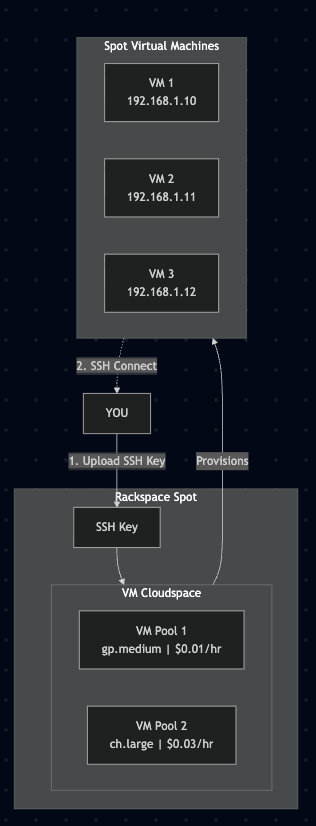
SSH keys are required for secure access to your VMs. You must upload a public SSH key before creating a VM Cloudspace.
Region
VM Cloudspaces are deployed in specific regions. Choose a region close to your users for optimal performance. This region will apply to any future VM Pools and cannot be changed after a VM Cloudspace is created.
Spot VM Visual Diagram
Quick Start
Step 1: Create a VM Cloudspace
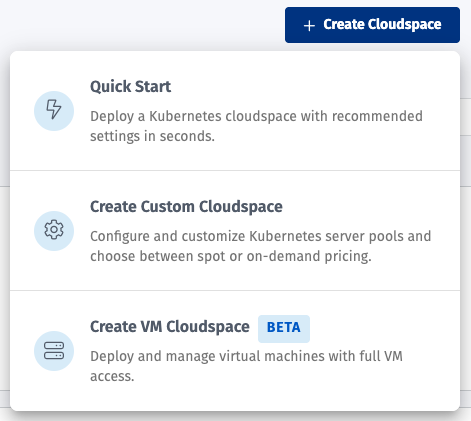
Click Create Cloudspace → Deploy VM Cloudspace
Select preferred region for deployment
Choose existing or add new SSH key. For help creating keys look in Manage SSH Keys
Configure at least one VM Pool
Select a server class
Set your bid price
Choose the number of VMs
Select an OS image (default: Ubuntu 24.04)
Step 2: Connect to Your VMs
Once your VMs are provisioned, you'll see IP addresses for each on the Overview page. Learn more about connecting via SSH: Manage SSH Keys
Pricing
VM Cloudspaces use the same spot infrastructure pricing, you bid for capacity and pay the market price (up to your bid). Learn more about how our pricing works: Open Market Auction
Component | Pricing |
|---|---|
Compute | Spot market rate (hourly) |
Storage | Included |
Network | Standard rates |
If market prices exceed your bid, VMs may be preempted. Set appropriate bids based on workload criticality. Learn more about Pre-emption
Supported Operating Systems
OS | Image Name | Default User |
|---|---|---|
Ubuntu 24.04 LTS |
|
|
Next Steps
Manage SSH Keys - Learn how to manage and connect to VMs via SSH
Manage and Scale VMs - Learn how to scale and monitor your VMs