


Introduction
Airflow can be deployed on spot instances to significantly reduce infrastructure costs.
Based on current Rackspace Spot pricing, two spot instances could cost around $1.44 per month, while a single on-demand instance with similar CPU and memory specifications comes to roughly $21 per month.
That difference largely comes from how the Rackspace Spot auction-based market works. Pricing is driven by competitive bids, which allows users to access unused capacity at much lower prices, in some cases as low as $0.001 per hour. You can find more context in this article on spot instance history and market dynamics.
This auction-based market maintains preemption rates below 1%, meaning interruptions tend to be infrequent. When you combine that with how Airflow is designed to handle retries and task isolation, you can build systems that take advantage of these cost savings with a low risk of interruptions.
This article focuses on how certain architectural decisions come into play when running Airflow on spot instances, and what actually happens during preemption across both the control plane and worker nodes.
What happens if a node disappears while your scheduler is running? What happens if a task is mid-execution on a worker node? And more importantly, how much of this does Airflow handle for you, and how much do you need to design for yourself?
The goal here is to explore these failure modes in practice and understand the boundaries of this setup. Where does an all-spot architecture for Airflow work, where does it break down, and why?
Airflow deployment setup
The first part of this series focused on the Deployment of Apache Airflow on Kubernetes Using Spot Instances.
For a quick recap, in the last article, the setup included:
- The Control plane: 2 replicas each of scheduler, API server, webserver, DAG processor, and triggerer, distributed across 2 spot nodes belonging to different server classes
- Worker nodes: 2 spot node instances, isolated from control plane via node selectors and taints
- Executor: KubernetesExecutor, each task runs in its own ephemeral pod
At this stage, the Airflow UI should already be running.
To access the UI, run the following command:
kubectl port-forward svc/airflow-apiserver 8080:8080 -n airflow;
After logging in to the Airflow UI, select DAGs from the left sidebar. You should see a DAG named credit_default_pipeline. The Airflow instance uses git-sync to pull DAG files from the repository, so it appears here automatically.
Make sure the gitSync configuration in airflow-values.yaml points to the correct repository and branch:
dags:
  persistence:
    enabled: false
  gitSync:
    enabled: true
    repo: https://github.com/your-org/airflow-dags.git
    branch: master
    subPath: "dags/"
    wait: 60
    maxFailures: 0
    depth: 1
Understanding the credit default pipeline DAG
Imagine you are working at an online marketplace or fintech platform that offers credit options. As part of your role, you are responsible for maintaining a machine learning model that evaluates the creditworthiness of users.
This model is trained on historical data collected over time, including features such as user income, credit score, loan amount, age, and repayment history.
For example, when a user purchases an item online and selects a pay later or credit option, your system performs an automated credit evaluation before approving the transaction. Behind the scenes, models like the one you maintain analyze these features to estimate the likelihood that a borrower will repay the loan associated with that credit option.
The DAG in this example represents a simplified version of that workflow. It periodically retrains the model using stored loan data and evaluates its performance, helping ensure that the credit risk model stays up to date as new data becomes available.
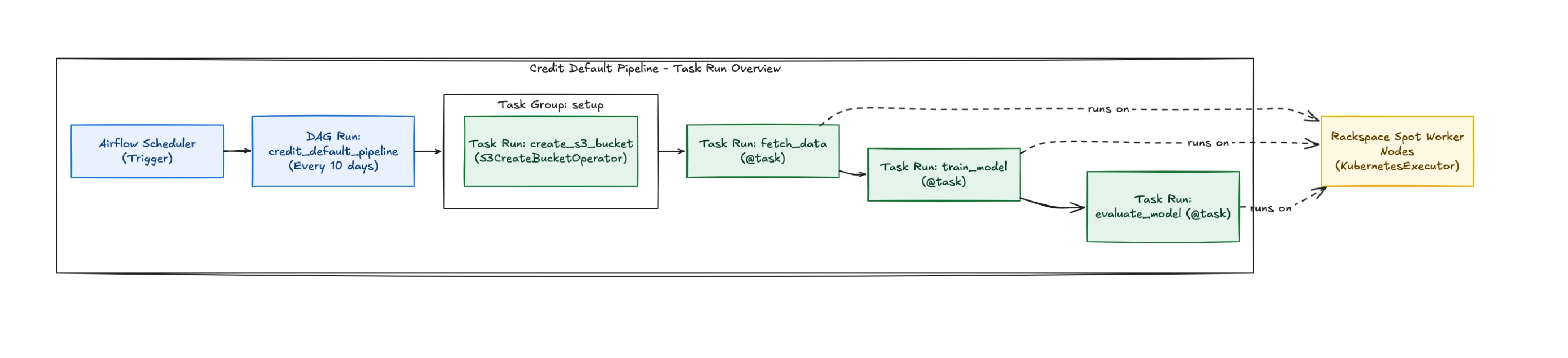
At a high level, this DAG orchestrates an end-to-end machine learning workflow that retrains a credit default prediction model every ten days using the latest loan data that’s stored in a PostgreSQL database.
The workflow is divided into four main steps:
- Create storage - Ensure that the S3 bucket used for artifact storage exists.
- Fetch data - Retrieve loan records from PostgreSQL and store the dataset in S3.
- Train model - Train a machine learning model using the dataset and save both the trained model and the test dataset back to S3.
- Evaluate model - Load the artifacts from S3, compute performance metrics such as accuracy, precision, recall, and F1 score, and write the results back to S3.
The full DAG code for the credit default pipeline is provided below:
"""
Credit Default Prediction Pipeline DAG

This DAG orchestrates a complete ML pipeline using S3 for intermediate storage:
1. Fetch loan data from PostgreSQL and save to S3
2. Train a Random Forest model, save model and test data to S3
3. Evaluate model performance from S3 artifacts

Runs every 10 days to retrain the model with fresh data.

EXECUTOR: KubernetesExecutor - Each task runs in its own pod on Rackspace spot instances
"""

from airflow.decorators import dag, task
from airflow.providers.amazon.aws.hooks.s3 import S3Hook
from airflow.providers.amazon.aws.operators.s3 import S3CreateBucketOperator
from airflow.providers.postgres.hooks.postgres import PostgresHook
from datetime import datetime, timedelta
from kubernetes.client import models as k8s
import os

# ------------------- #
# DAG-level variables #
# ------------------- #

DAG_ID = "credit_default_pipeline"

# S3 Configuration
_AWS_CONN_ID = os.getenv("AWS_CONN_ID", "aws_default")
_S3_BUCKET = os.getenv("S3_BUCKET", "airflow-ml-artifacts")

# Postgres Configuration
_POSTGRES_CONN_ID = os.getenv("POSTGRES_CONN_ID", "postgres_default")
_POSTGRES_DATABASE = os.getenv("POSTGRES_DATABASE", "credit_db")

# Task IDs for file path construction
_FETCH_DATA_TASK_ID = "fetch_data"
_TRAIN_MODEL_TASK_ID = "train_model"

# Default args for the DAG
default_args = {
    "owner": "airflow",
    "depends_on_past": False,
    "email_on_failure": False,
    "email_on_retry": False,
    "retries": 3,  # Increased retries for spot instance interruptions
    "retry_delay": timedelta(minutes=5),
    "execution_timeout": timedelta(hours=2),
}

# KubernetesExecutor pod configuration for running on spot instances
kubernetes_pod_config = {
    "pod_override": k8s.V1Pod(
        spec=k8s.V1PodSpec(
            node_selector={
                "workload": "airflow-workers"  # Schedule on worker nodes only
            },
            restart_policy="Never",
            termination_grace_period_seconds=120,  # Graceful termination for spot interruptions
            containers=[
                k8s.V1Container(
                    name="base",
                    resources=k8s.V1ResourceRequirements(
                        requests={"cpu": "500m", "memory": "1Gi"},
                        limits={"cpu": "1000m", "memory": "2Gi"},
                    ),
                )
            ],
        )
    )
}

# -------------- #
# DAG definition #
# -------------- #


@dag(
    dag_id=DAG_ID,
    start_date=datetime(2024, 1, 1),
    schedule=timedelta(days=10),
    catchup=False,
    default_args=default_args,
    description="Automated ML pipeline for credit default prediction on Rackspace spot instances",
    tags=["ml", "credit", "production", "spot-instances", "kubernetes", "s3"],
    doc_md=__doc__,
)
def credit_default_pipeline():
    """
    Credit default prediction ML pipeline with S3 intermediate storage.
    Each task runs in its own Kubernetes pod on Rackspace spot instances.
    """

    # ---------------- #
    # Setup Tasks      #
    # ---------------- #

    _create_bucket = S3CreateBucketOperator(
        task_id="create_s3_bucket",
        bucket_name=_S3_BUCKET,
        aws_conn_id=_AWS_CONN_ID,
    )

    # ---------------- #
    # Pipeline Tasks   #
    # ---------------- #

    @task(task_id=_FETCH_DATA_TASK_ID, executor_config=kubernetes_pod_config)
    def fetch_data(**context):
        """
        Fetch loan data from PostgreSQL and save to S3.

        Reads all loan records from the database and exports to CSV in S3.
        File location: s3://{bucket}/{dag_id}/fetch_data/{timestamp}.csv
        """
        import pandas as pd

        from datetime import datetime

        dag_id = context["dag"].dag_id
        task_id = context["task"].task_id
        logical_date = (
            context.get("data_interval_start")
            or context.get("logical_date")
            or datetime.now()
        )
        dag_run_timestamp = logical_date.strftime("%Y%m%dT%H%M%S")

        print(f"Fetching data from PostgreSQL database: {_POSTGRES_DATABASE}")

        # Fetch from Postgres using PostgresHook
        pg_hook = PostgresHook(postgres_conn_id=_POSTGRES_CONN_ID)

        query = """
        SELECT
            loan_amount,
            income,
            credit_score,
            age,
            loan_term,
            default_status
        FROM loans
        """

        df = pg_hook.get_pandas_df(sql=query)
        print(f"Fetched {len(df)} rows from database")

        # Convert DataFrame to CSV bytes
        csv_bytes = df.to_csv(index=False).encode("utf-8")

        # Write to S3
        s3_hook = S3Hook(aws_conn_id=_AWS_CONN_ID)
        s3_key = f"{dag_id}/{task_id}/{dag_run_timestamp}.csv"

        s3_hook.load_bytes(
            bytes_data=csv_bytes, key=s3_key, bucket_name=_S3_BUCKET, replace=True
        )

        print(f"Data saved to s3://{_S3_BUCKET}/{s3_key}")
        print(f"File size: {len(csv_bytes) / 1024:.2f} KB")

    @task(task_id=_TRAIN_MODEL_TASK_ID, executor_config=kubernetes_pod_config)
    def train_model(**context):
        """
        Train Random Forest model on data from S3, save model and test data to S3.

        Reads CSV from S3, trains model, and saves:
        - Trained model: s3://{bucket}/{dag_id}/train_model/{timestamp}.pkl
        - Test data: s3://{bucket}/{dag_id}/train_model/{timestamp}_test.csv
        """
        import pandas as pd
        import joblib
        import io
        from sklearn.model_selection import train_test_split
        from sklearn.ensemble import RandomForestClassifier

        from datetime import datetime

        dag_id = context["dag"].dag_id
        task_id = context["task"].task_id
        logical_date = (
            context.get("data_interval_start")
            or context.get("logical_date")
            or datetime.now()
        )
        dag_run_timestamp = logical_date.strftime("%Y%m%dT%H%M%S")
        upstream_task_id = _FETCH_DATA_TASK_ID

        # Read data from S3 (written by fetch_data task)
        s3_hook = S3Hook(aws_conn_id=_AWS_CONN_ID)
        data_key = f"{dag_id}/{upstream_task_id}/{dag_run_timestamp}.csv"

        print(f"Reading data from s3://{_S3_BUCKET}/{data_key}")
        csv_data = s3_hook.read_key(key=data_key, bucket_name=_S3_BUCKET)

        # Load into DataFrame
        df = pd.read_csv(io.StringIO(csv_data))
        print(f"Loaded {len(df)} rows for training")

        # Prepare features and target
        X = df.drop("default_status", axis=1)
        y = df["default_status"]

        # Train/test split
        X_train, X_test, y_train, y_test = train_test_split(
            X, y, test_size=0.2, random_state=42, stratify=y
        )

        print(f"Training set: {len(X_train)} samples")
        print(f"Test set: {len(X_test)} samples")

        # Train Random Forest model
        print("Training Random Forest classifier...")
        clf = RandomForestClassifier(
            n_estimators=100, max_depth=10, random_state=42, n_jobs=-1
        )
        clf.fit(X_train, y_train)
        print("Model training complete")

        # Save model to S3
        model_buffer = io.BytesIO()
        joblib.dump(clf, model_buffer)
        model_buffer.seek(0)

        model_key = f"{dag_id}/{task_id}/{dag_run_timestamp}.pkl"
        s3_hook.load_file_obj(
            file_obj=model_buffer, key=model_key, bucket_name=_S3_BUCKET, replace=True
        )
        print(f"Model saved to s3://{_S3_BUCKET}/{model_key}")

        # Save test data to S3
        test_df = pd.concat([X_test, y_test], axis=1)
        test_csv_bytes = test_df.to_csv(index=False).encode("utf-8")

        test_data_key = f"{dag_id}/{task_id}/{dag_run_timestamp}_test.csv"
        s3_hook.load_bytes(
            bytes_data=test_csv_bytes,
            key=test_data_key,
            bucket_name=_S3_BUCKET,
            replace=True,
        )
        print(f"Test data saved to s3://{_S3_BUCKET}/{test_data_key}")

    @task(executor_config=kubernetes_pod_config)
    def evaluate_model(**context):
        """
        Evaluate trained model from S3 and print performance metrics.

        Reads model and test data from S3, evaluates performance,
        and saves metrics to S3.
        """
        import pandas as pd
        import joblib
        import io
        from sklearn.metrics import (
            accuracy_score,
            precision_score,
            recall_score,
            f1_score,
        )

        from datetime import datetime

        dag_id = context["dag"].dag_id
        task_id = context["task"].task_id
        # Use data_interval_start which is the Airflow 3.x replacement for logical_date
        logical_date = (
            context.get("data_interval_start")
            or context.get("logical_date")
            or datetime.now()
        )
        dag_run_timestamp = logical_date.strftime("%Y%m%dT%H%M%S")
        upstream_task_id = _TRAIN_MODEL_TASK_ID

        s3_hook = S3Hook(aws_conn_id=_AWS_CONN_ID)

        # Read model from S3
        model_key = f"{dag_id}/{upstream_task_id}/{dag_run_timestamp}.pkl"
        print(f"Loading model from s3://{_S3_BUCKET}/{model_key}")

        model_obj = s3_hook.get_key(key=model_key, bucket_name=_S3_BUCKET)
        model_bytes = model_obj.get()["Body"].read()
        clf = joblib.load(io.BytesIO(model_bytes))
        print("Model loaded successfully")

        # Read test data from S3
        test_data_key = f"{dag_id}/{upstream_task_id}/{dag_run_timestamp}_test.csv"
        print(f"Loading test data from s3://{_S3_BUCKET}/{test_data_key}")

        test_csv = s3_hook.read_key(key=test_data_key, bucket_name=_S3_BUCKET)
        df_test = pd.read_csv(io.StringIO(test_csv))

        # Prepare test features and labels
        X_test = df_test.drop("default_status", axis=1)
        y_test = df_test["default_status"]

        print(f"Evaluating on {len(X_test)} test samples...")

        # Predict
        y_pred = clf.predict(X_test)

        # Calculate metrics
        accuracy = accuracy_score(y_test, y_pred)
        precision = precision_score(y_test, y_pred)
        recall = recall_score(y_test, y_pred)
        f1 = f1_score(y_test, y_pred)

        metrics = (
            f"Model Performance Metrics\n"
            f"========================\n"
            f"Accuracy:  {accuracy:.4f}\n"
            f"Precision: {precision:.4f}\n"
            f"Recall:    {recall:.4f}\n"
            f"F1 Score:  {f1:.4f}\n"
        )

        print(metrics)

        # Save metrics to S3
        metrics_key = f"{dag_id}/{task_id}/{dag_run_timestamp}_metrics.txt"
        s3_hook.load_string(
            string_data=metrics, key=metrics_key, bucket_name=_S3_BUCKET, replace=True
        )
        print(f"Metrics saved to s3://{_S3_BUCKET}/{metrics_key}")

    # ---------------- #
    # Task Dependencies #
    # ---------------- #

    _fetch = fetch_data()
    _train = train_model()
    _evaluate = evaluate_model()

    # Chain: create_bucket -> fetch -> train -> evaluate
    _create_bucket >> _fetch >> _train >> _evaluate


# Instantiate the DAG
credit_default_pipeline()
How tasks are executed: the role of the KubernetesExecutor
In this setup, Airflow is configured to use the KubernetesExecutor.
Instead of running tasks on long-lived worker processes, each task is executed in its own Kubernetes pod. When a task is triggered, Airflow dynamically creates a pod with the required resources, schedules it on an available node, and runs the task in isolation. Once the task completes, the pod is terminated.
# KubernetesExecutor pod configuration for running on spot instances
kubernetes_pod_config = {
    "pod_override": k8s.V1Pod(
        spec=k8s.V1PodSpec(
            node_selector={
                "workload": "airflow-workers"  # Schedule on worker nodes only
            },
            restart_policy="Never",
            termination_grace_period_seconds=120,  # Graceful termination for spot interruptions
            containers=[
                k8s.V1Container(
                    name="base",
                    resources=k8s.V1ResourceRequirements(
                        requests={"cpu": "500m", "memory": "1Gi"},
                        limits={"cpu": "1000m", "memory": "2Gi"},
                    ),
                )
            ],
        )
    )
}
Intermediate storage options in Airflow and why this pipeline uses S3
This pipeline creates an S3 bucket if one doesn't already exist because it relies on external storage for passing data between tasks.
When creating DAGs, you will need to transfer data between tasks, and there are different ways to do so.
This section gives an overview of the available intermediate storage mechanisms and explains why Amazon S3 was the optimal choice here.
1. Local Ephemeral Storage (Pod / Node Filesystem)
Local storage refers to the temporary filesystem available within a running task (e.g., inside a Kubernetes pod). It is typically used for:
- Writing intermediate files during computation
- Storing temporary outputs before further processing
- Handling logs or transient artifacts
While this type of storage is fast and convenient, it comes with the major limitation of not being durable.On spot instances, where nodes can be terminated at any time, any data stored locally is immediately lost when the pod is evicted.
For this reason, local storage is only used within the scope of a single task and never for passing data between tasks in the DAG.
2. Airflow XCom (Metadata Database Storage)
XCom is Airflow’s built-in mechanism for sharing data between tasks. It is designed for small pieces of information, such as:
- File paths
- Execution metadata
- Status indicators
XCom functions as a communication layer rather than a storage system. Instead of passing actual datasets between tasks, the preferred pattern is to push references (such as S3 object paths or database identifiers) that downstream tasks use to retrieve the data from an external source.
This approach avoids:
- Overloading the Airflow metadata database
- Hitting size limitations
- Tight coupling between compute and orchestration layers
3. Custom XCom Backend (S3-backed)
To extend XCom’s capabilities, a custom backend can be configured to store larger payloads in S3 instead of the Airflow database.
This allows:
- Handling larger intermediate data without size constraints
- Maintaining the simplicity of XCom APIs
- Offloading storage responsibility to a more scalable system
Even in this setup, XCom still acts as a reference layer, while the actual data resides in object storage.
4. Amazon S3 (Primary Intermediate Storage)
Amazon S3 serves as the central storage layer in the DAG and is the primary mechanism for passing data between tasks.
Its role includes:
- Persisting outputs from each task
- Acting as a shared storage accessible by all workers
- Serving as a checkpointing system for fault tolerance
Each task follows a consistent pattern:
- Process data locally
- Upload results to S3
- Pass a reference to downstream tasks
There are a couple of ways this reference can be shared:
- Using XCom, where the S3 path is explicitly passed between tasks as described in point 2
- Using deterministic naming, where downstream tasks know exactly where to look because the file path follows a consistent, predictable pattern.
In this DAG, the second approach is used.
Here’s a snippet from the code:
# Write to S3
s3_hook = S3Hook(aws_conn_id=_AWS_CONN_ID)
s3_key = f"{dag_id}/{task_id}/{dag_run_timestamp}.csv"

s3_hook.load_bytes(
    bytes_data=csv_bytes, key=s3_key, bucket_name=_S3_BUCKET, replace=True
)

print(f"Data saved to s3://{_S3_BUCKET}/{s3_key}")
The path is constructed from dag_id, task_id, and dag_run_timestamp and because this structure is consistent, downstream tasks already know exactly where to look instead of relying on XCom to pass the path.
In this code above the data will be saved to s3://airflow-ml-artifacts/{dag_id}/{task_id}/{dag_run_timestamp}.csv
On spot instances, where tasks may restart on different nodes, deterministic paths mean execution can resume without depending on the prior task state stored in Airflow.
Setting up and running the DAG
In this section, we create the database that will store the loan data used by the DAG and populate it with dummy data.
Setting up the PostgreSQL database
For development and testing purposes, we'll create our credit default data table in the same PostgreSQL instance that Airflow uses for its metadata database. This is a quick way to get started without provisioning a separate database.
1. Connect to the Airflow PostgreSQL pod
kubectl exec -it airflow-postgresql-0 -n airflow -- psql -U postgres

#the password is postgres
2. Create a database for the credit default data.
CREATE DATABASE credit_db;3. Connect to the new database
\c credit_db4. Create the loans table
CREATE TABLE loans (
    id SERIAL PRIMARY KEY,
    loan_amount DECIMAL(10, 2),
    income DECIMAL(10, 2),
    credit_score INTEGER,
    age INTEGER,
    loan_term INTEGER,
    default_status INTEGER,  -- 0 or 1
    created_at TIMESTAMP DEFAULT NOW()
);
5. Set up port forwarding to the PostgreSQL pod
kubectl port-forward -n airflow svc/airflow-postgresql 5432:5432
Preparing the dataset for the pipeline
Before triggering the DAG, the loans table will be populated with sample loan data.
1. A custom script was used to populate the loans table with dummy records.
python3 generate_data.py2. Confirm the data was created correctly by querying the database:
`SELECT * FROM loans LIMIT 100;`3. Checking the proportion of users who defaulted on their loans
SELECT
    default_status,
    COUNT(*) as count,
    ROUND(COUNT(*) * 100.0 / SUM(COUNT(*)) OVER(), 2) as percentage
FROM loans
GROUP BY default_status;
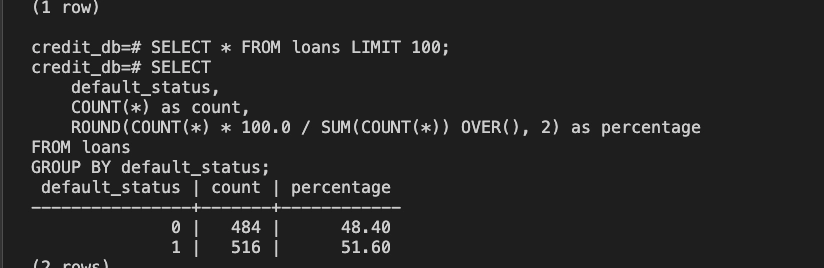
This roughly 48/51 split provides a balanced distribution of repayment and default cases, which is useful for training and evaluating the model in this pipeline, and for estimating whether a user is likely to repay a loan.
Running the DAG
Trigger a DAG run from the Airflow UI and confirm all four tasks complete successfully.
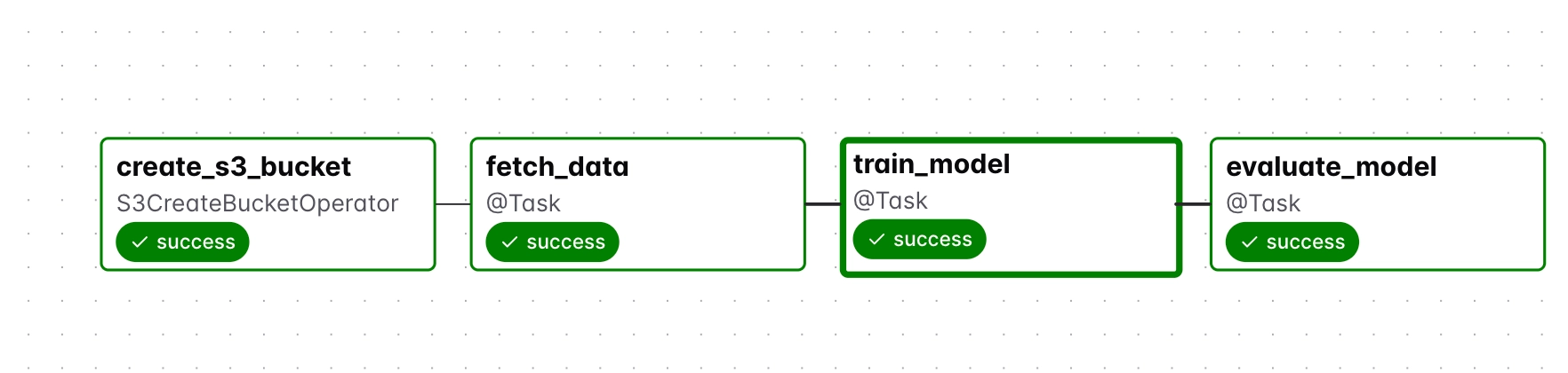
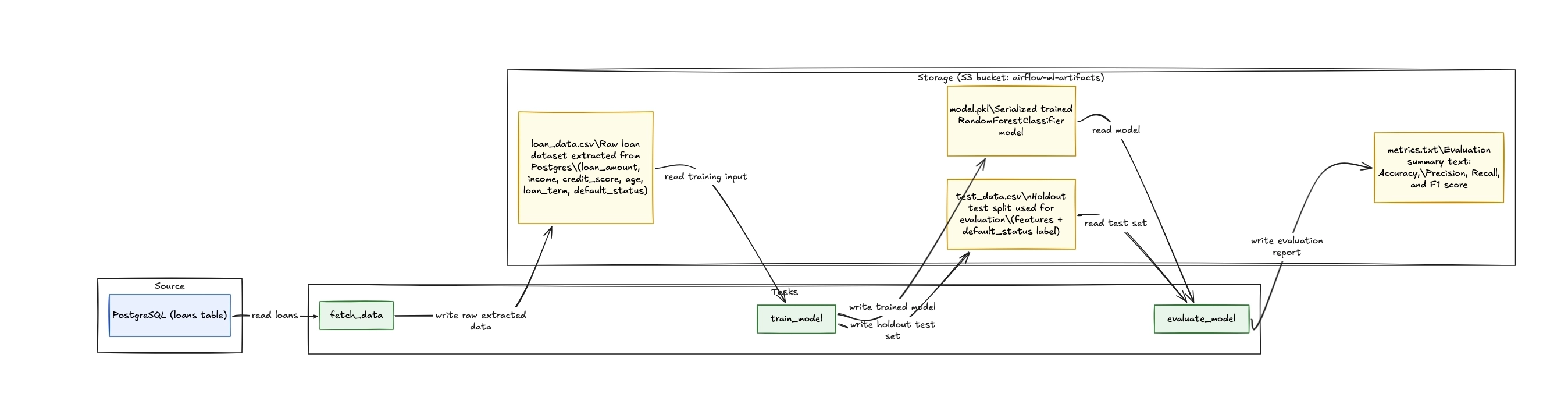
How tasks pass data through S3
The diagram below shows how each task reads from and writes to S3, tracing the data from the PostgreSQL source through to the final evaluation report.
Verifying the outputs in S3
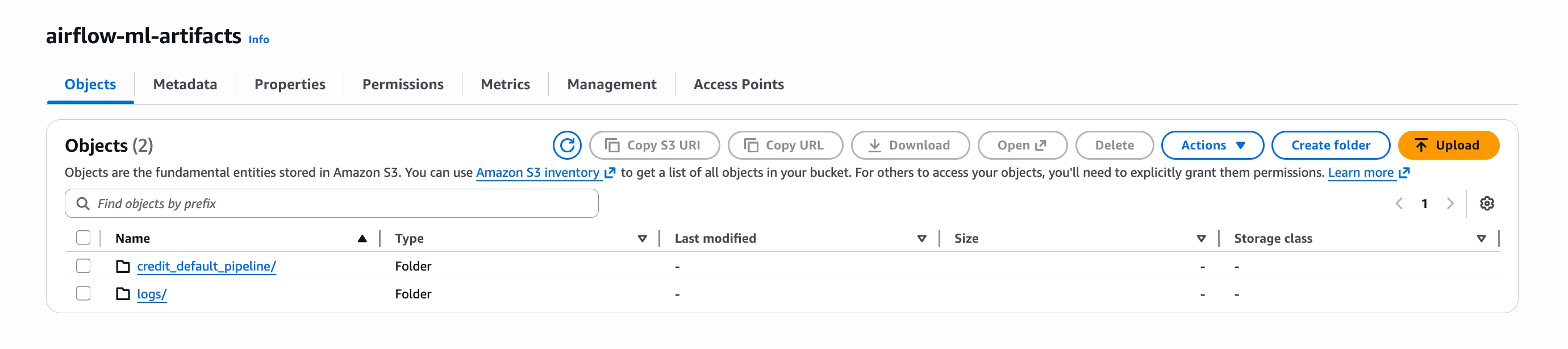
Here the same S3 bucket serves two purposes: persisting data between tasks and storing Airflow logs. The log configuration was set in kubernetes/airflow-values.yaml in the first article:
# Remote logging to S3 (required for KubernetesExecutor)
config:
  logging:
    remote_logging: "True"
    remote_base_log_folder: "s3://your-airflow-logs-bucket/logs"
    remote_log_conn_id: "aws_default"
  core:
    task_log_reader: "s3.task"
This is why the airflow-ml-artifacts bucket contains two folders: credit_default_pipeline/ for intermediate task data and logs/ for Airflow logs.
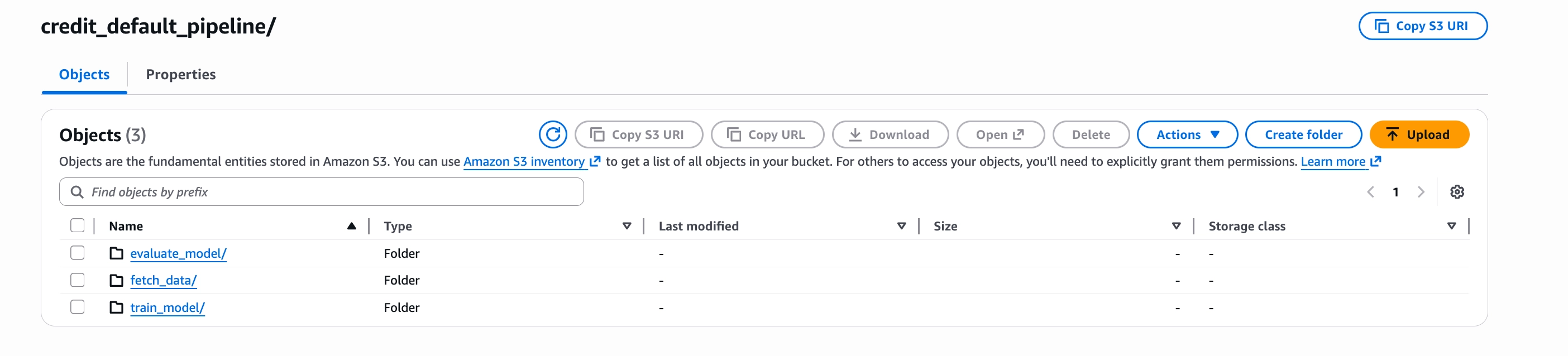
Task output directories
Each task has its own directory inside credit_default_pipeline/, where its output artifact is stored before the next task reads it.
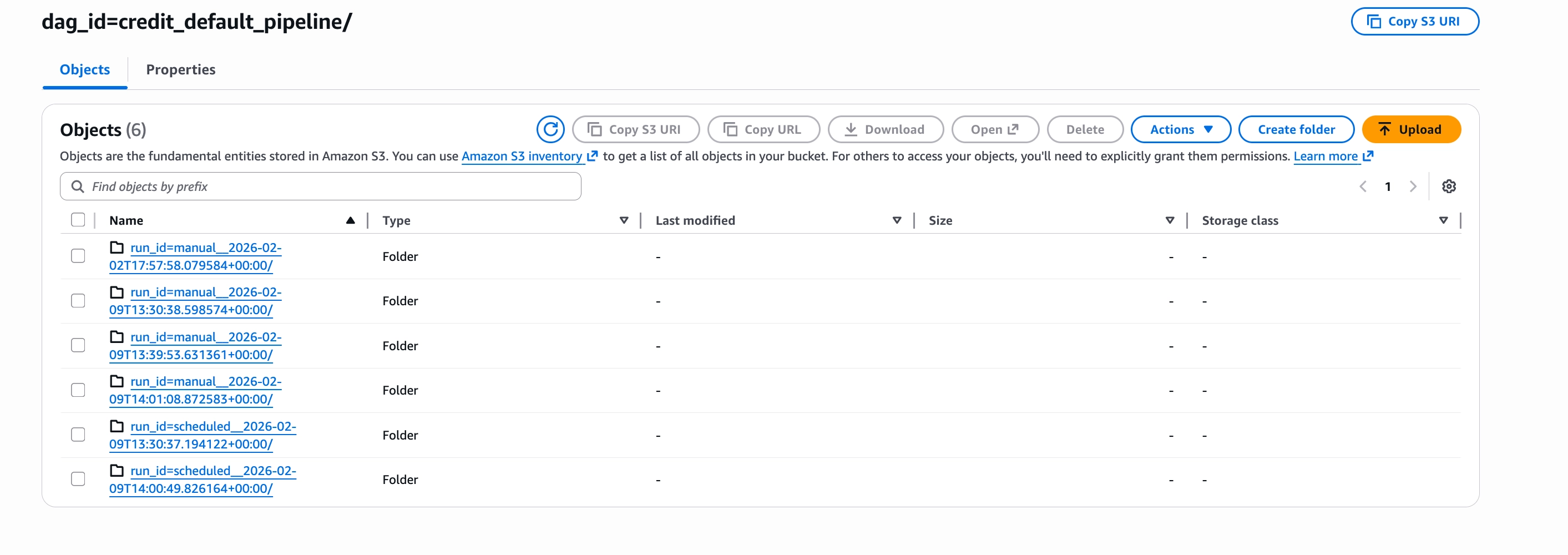
Log directories by DAG run
Logs are organised by run_id, so each DAG run produces an isolated log directory. This makes it straightforward to trace logs back to a specific run.
Verifying the final outputs of the pipeline
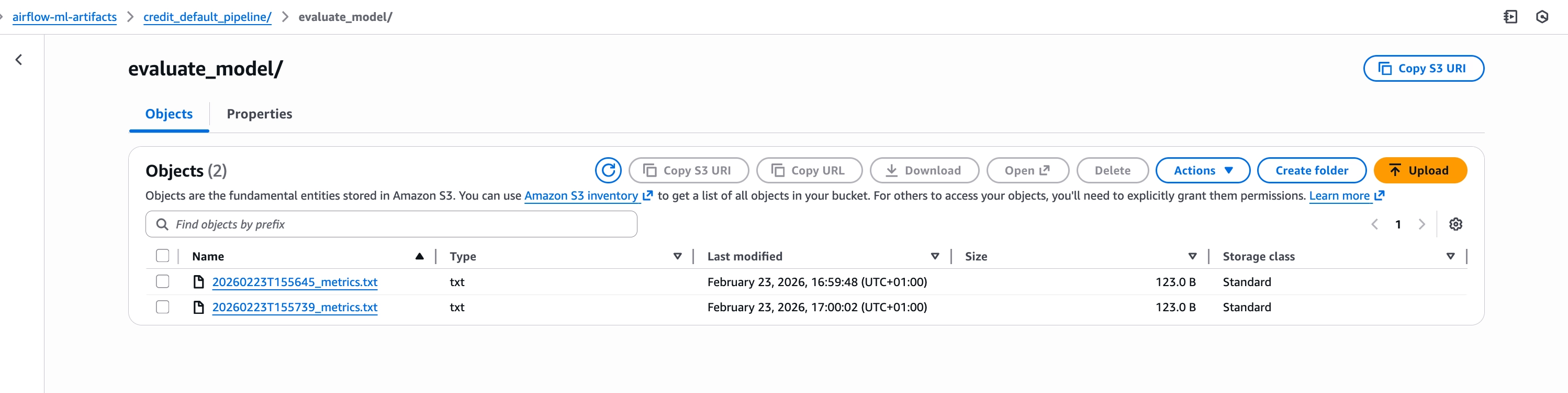
Navigate to the evaluate_model/ directory in S3 to confirm that metrics.txt was saved successfully.
This file contains the evaluation results of the trained model, including metrics such as accuracy, precision, recall, and F1 score. It is the final output of the pipeline and confirms that the model was trained and evaluated correctly.
Simulating node preemption
Here's what happens when a node is preempted:
- A termination notice is sent
- The node is cordoned, preventing new pods from being scheduled
- Existing pods are gracefully terminated
- The node is removed from the cluster
To simulate this behavior, the node will be manually deleted. While this does not fully replicate provider-driven preemption, it removes the node and abruptly terminates all running pods. They are then rescheduled on other nodes and this is sufficient for observing how the pipeline behaves under interruption.
What happens when a control plane node is preempted
Recall that this architecture runs two replicas of each Airflow control plane component, scheduler, API server, webserver, DAG processor, and triggerer, distributed across two different spot instance types. And so if one node gets preempted, Kubernetes reschedules the pods to the surviving node, and work continues with minimal disruption.
So now we want to see and know exactly how long rescheduling takes, whether the surviving node has sufficient capacity, or what happens to tasks that were executing when the control plane briefly flickered.
While the DAG was actively running, one node was deleted to simulate spot instance preemption.
How the pipeline behaves when a node is lost
After node deletion, all control plane pods consolidated onto the remaining ch.vs1.large-dfw node. The rescheduling process took 2-3 minutes, but fast enough that ongoing work continued with minimal impact.
The surviving node had sufficient capacity and no pods remained pending due to resource constraints.
More importantly, there was no significant disruption to the system. Because two replicas of each component were running, at least one scheduler, one API server, and one webserver remained available throughout the event. Kubernetes Service endpoints updated automatically, routing traffic to the surviving pods while the others were being rescheduled.
During the 1-2 minute window while the second scheduler replica was starting, the cluster operated at reduced capacity. Health check failures appeared in the logs as the new pod initialized. But from the perspective of running tasks, nothing broke.
Why tasks survived control plane failure
One of the reasons tasks pods survived the control plane failure is because they are running on their own worker nodes and using the KuberentesExecutor.
kubernetes_pod_config = {
    "pod_override": k8s.V1Pod(
        spec=k8s.V1PodSpec(
            node_selector={"workload": "airflow-workers"},
        )
    )
}
Once a task pod is initialized, it operates independently of the Airflow Scheduler. The KubernetesExecutor’s role is limited to pod creation and final outcome reporting; during execution, the pod communicates directly with PostgreSQL and S3 to process data. Because it doesn't poll for instructions or require a persistent connection to the API server, the task simply runs its Python logic to completion and exits, regardless of the control plane's status.
What happens when a worker node is preempted
In this section, the goal is to verify whether S3 checkpointing works as expected and to observe how task retries behave under interruption.
It’s important to note that Kubernetes does not automatically reschedule task pods created by the KubernetesExecutor because they do not have any controllers (deployments) backing them. Instead, task completion depends entirely on the retry logic configured in Airflow.
Here are the steps that were taken:
- Triggered a DAG run.
- Monitored for the
train_modelpod (the longest-running task at ~19 seconds). - Identified the worker node where the pod was running.
- Deleted that node while the task was active.
- Observed that Kubernetes did not reschedule the pod.
- Waited for Airflow to detect the failure and trigger a retry.
- Verified that the retry succeeded using the S3 checkpointed data.
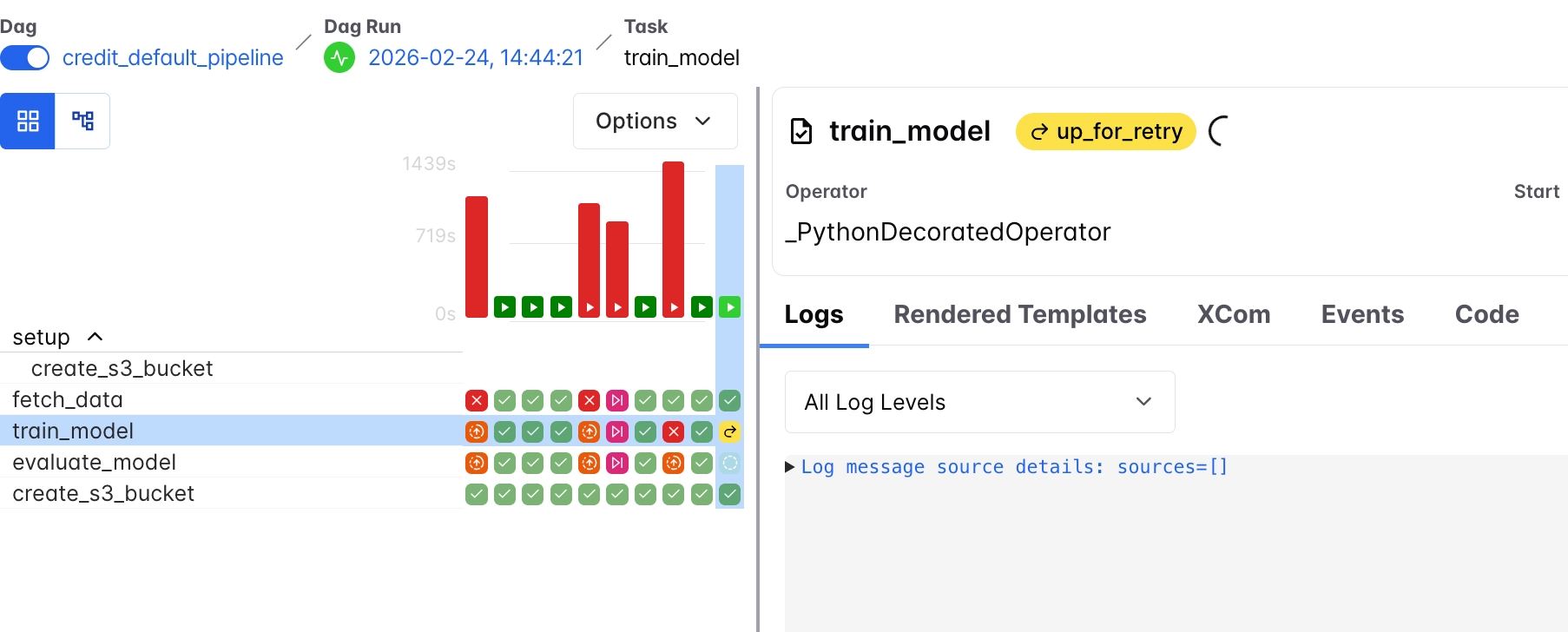
As mentioned earlier, the goal here is to understand whether a task can successfully retry on a different node using data stored in S3 from previous tasks.
Here is what happened after deleting the node during execution, from the diagram above, we see that:
train_modelentered theup_for_retrystateAirflow detects that the task has failed due to node termination and schedules it for retry based on the configured retry policy.- The original pod disappears completelySince the task is executed as a bare pod (via the KubernetesExecutor), Kubernetes does not recreate or reschedule it automatically. The pod is lost when the node is deleted.
fetch_dataremains successfulThe upstream task does not re-run because its output has already been stored in S3 and is available for reuse.evaluate_modelremains pending (None)This task is blocked and waits fortrain_modelto complete successfully before proceeding.
And then based on the retry mechanism we set in the DAG, it was observed that there was a 5 minute wait before each retry and the new pod was created on the remaining worker node after the second retry.
default_args = {
    "owner": "airflow",
    "depends_on_past": False,
    "email_on_failure": False,
    "email_on_retry": False,
    "retries": 3,  # Increased retries for spot instance interruptions
    "retry_delay": timedelta(minutes=5),
    "execution_timeout": timedelta(hours=2),  # Prevent hanging tasks
}
Also, because we used s3, the task was able to continue from where it stopped and get the last data it needed. And so train_model could read the data directly from s3 and continue the DAG execution from there. This is a simple example of checkpointing with S3.
Handling incomplete outputs in the pipeline
Some other considerations worth thinking about are:
- What happens when a task is interrupted while writing data to S3?
- Can partially written outputs be reused, or should they be discarded and the task re-run?
Why idempotency matters for interrupted tasks
If the fetch_data task is preempted while writing to S3, the result would be one of two things:
- A partially written file, or
- No file at all
The retry mechanism for this task uses replace=True when writing to S3, so a retried execution simply overwrites whatever was left behind, producing a clean, complete output on the next run.
This reflects the principle of idempotency, where every task is designed to run safely multiple times without affecting the final result.
Validating outputs after task interruption
When a task is interrupted while writing to S3, it may leave behind incomplete or corrupted outputs.
To prevent downstream tasks from consuming invalid data, an example could be using a success marker pattern.
Each task writes its output (e.g., data.csv) and only creates a corresponding marker file (e.g., data.csv.SUCCESS) after the write completes successfully.
Downstream tasks then check for this marker before proceeding, ensuring that only complete and valid data is used, even if previous attempts left behind partial results.
Where to run the Airflow metadata database (and why it matters)
While most control plane components can tolerate interruptions when properly configured, the metadata database is different.
The other Airflow control plane components are largely stateless and can recover from preemption through replication and Kubernetes rescheduling and so running these components on spot instances is feasible.
The metadata database, however, stores the entire state of the system:
- DAG runs
- Task states
- Execution history
- Logs and scheduling metadata
As a result, running the metadata database on spot instances is extremely risky and all stored state can be permanently lost after preemption.
With on-demand instances, it is possible to run the metadata database directly on the cluster with relatively low risk because it’s stable.
The table below summarizes how some Airflow components behave under preemption and the level of risk associated with running them on spot instances.
And so just to be safe, when using spot instances:
- Run other components (scheduler, webserver, workers) on spot
- Run the metadata database on durable infrastructure:
- Managed services (e.g. Rackspace DBaas)
- Or persistent volumes on on-demand nodes
The cost of running Airflow on spot vs on-demand instances
In this setup, high availability is achieved by running:
- 2 spot instances for the control plane
- 2 spot instances for worker nodes
This brings the total to 4 spot instances.
The alternative would be a simpler setup using on-demand infrastructure:
- 1 on-demand node for the control plane
- 1 on-demand node for worker nodes
Even with double the number of nodes for redundancy, the spot-based setup remains significantly cheaper.
It is also important to note that the instance types and sizes used in this setup were chosen specifically for the workload in this project. For relatively lightweight pipelines like this, small instances are sufficient, which keeps costs extremely low.
However, as workloads grow and require more CPU and memory, the cost of on-demand instances increases significantly, since pricing for one-demand instances scales directly with the resources provisioned.
Meanwhile, spot instances tend to remain substantially cheaper even at higher resource configurations.
Conclusion
While the control plane and worker nodes can safely run on spot instances when designed correctly, the metadata database is a critical exception. Because it stores the full state of the system, it’s advisable that it should run on durable infrastructure, as losing it would mean losing the entire Airflow history and execution state.
In this setup, a simple simulation was used to observe how the system behaves under preemption at both the control plane and worker levels. Control plane components remained available through replication and Kubernetes rescheduling, with only brief disruption, while worker tasks relied on Airflow’s retry mechanism to recover from interruption. By using S3 as an intermediate storage layer, tasks were able to restart without rerunning previous steps, demonstrating a simple form of checkpointing.
This also highlighted the risk of partial outputs being written to S3. To address this, validation strategies such as success markers can be introduced in DAG code to ensure that downstream tasks only consume complete and valid data.
While the control plane and worker nodes can safely run on spot instances when designed correctly, the metadata database is a critical exception. Because it stores the full state of the system, it is strongly recommended to run it on durable infrastructure, as losing it would mean losing the entire Airflow history and execution state.

